


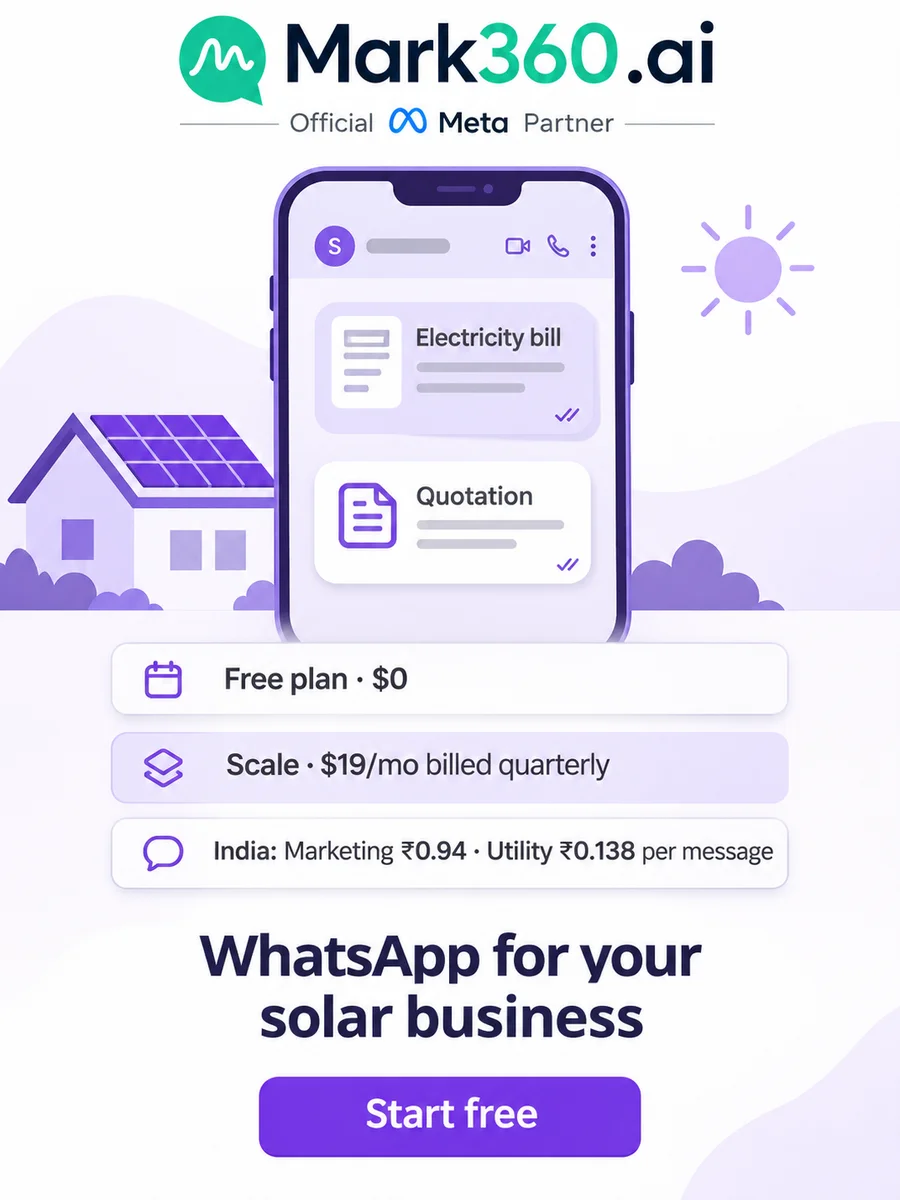
Direct answer: Solar installers and EPC companies use WhatsApp to qualify rooftop enquiries, collect electricity bill and roof photos, book site surveys and send quotes from one official WhatsApp Business API number. With WhatsApp for solar business on Mark360.ai, an AI agent asks monthly bill, roof type, city and ownership, a WhatsApp Form takes the photos, and a quotation PDF goes out from the chat. In India, utility messages cost ₹0.138 and marketing ₹0.94.
Key takeaways
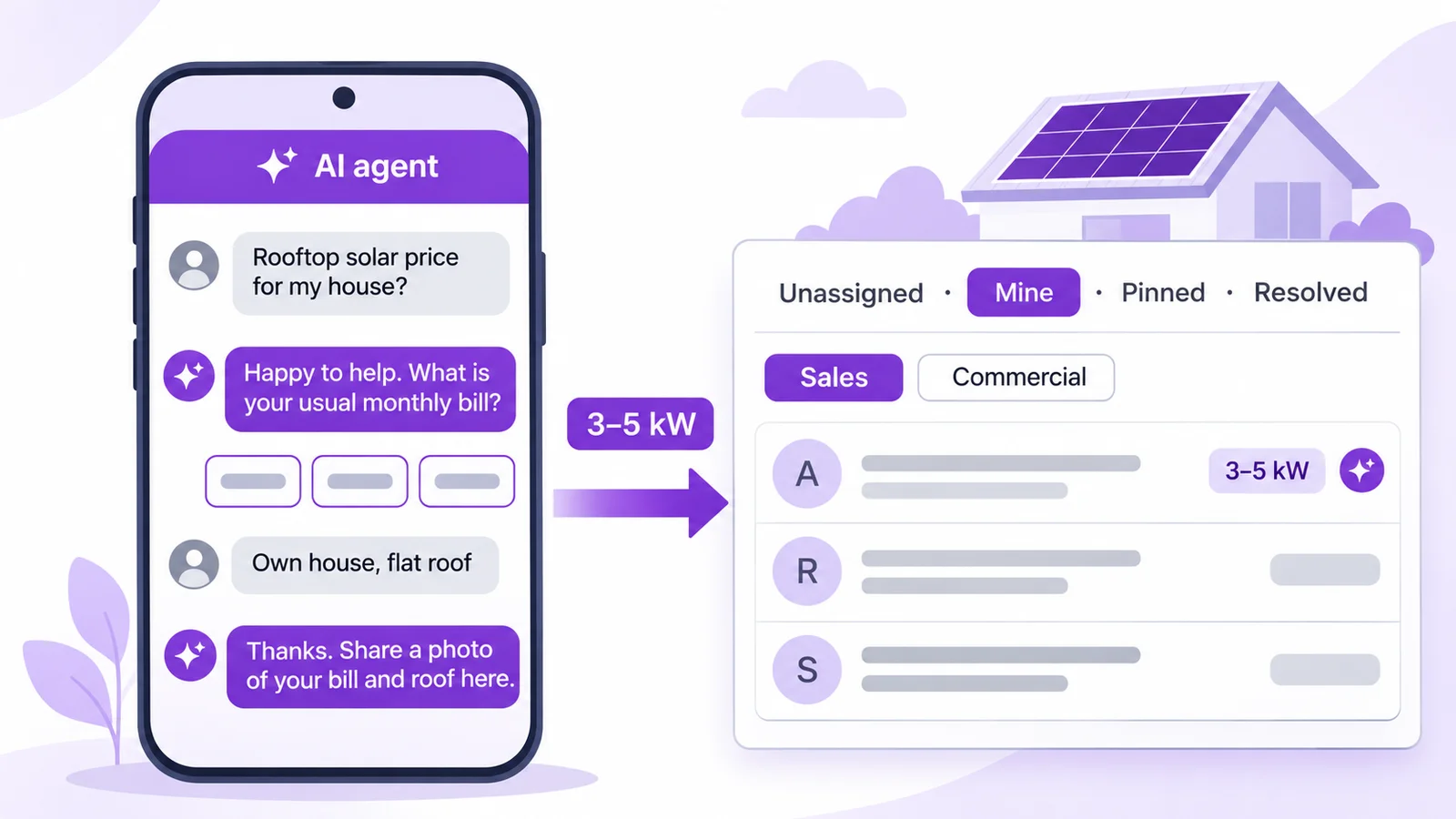
- An AI agent (Lead Qualification template) asks bill, roof type, city and ownership, tags the kW band and hands serious leads to sales in the team inbox.
- A WhatsApp Form collects a photo or PDF of the electricity bill and rooftop photos before an engineer travels for the site survey.
- The Appointment Booking agent puts the site-survey slot on the calendar, and a quotation PDF with line items (modules, inverter, structure, installation) goes out from the chat.
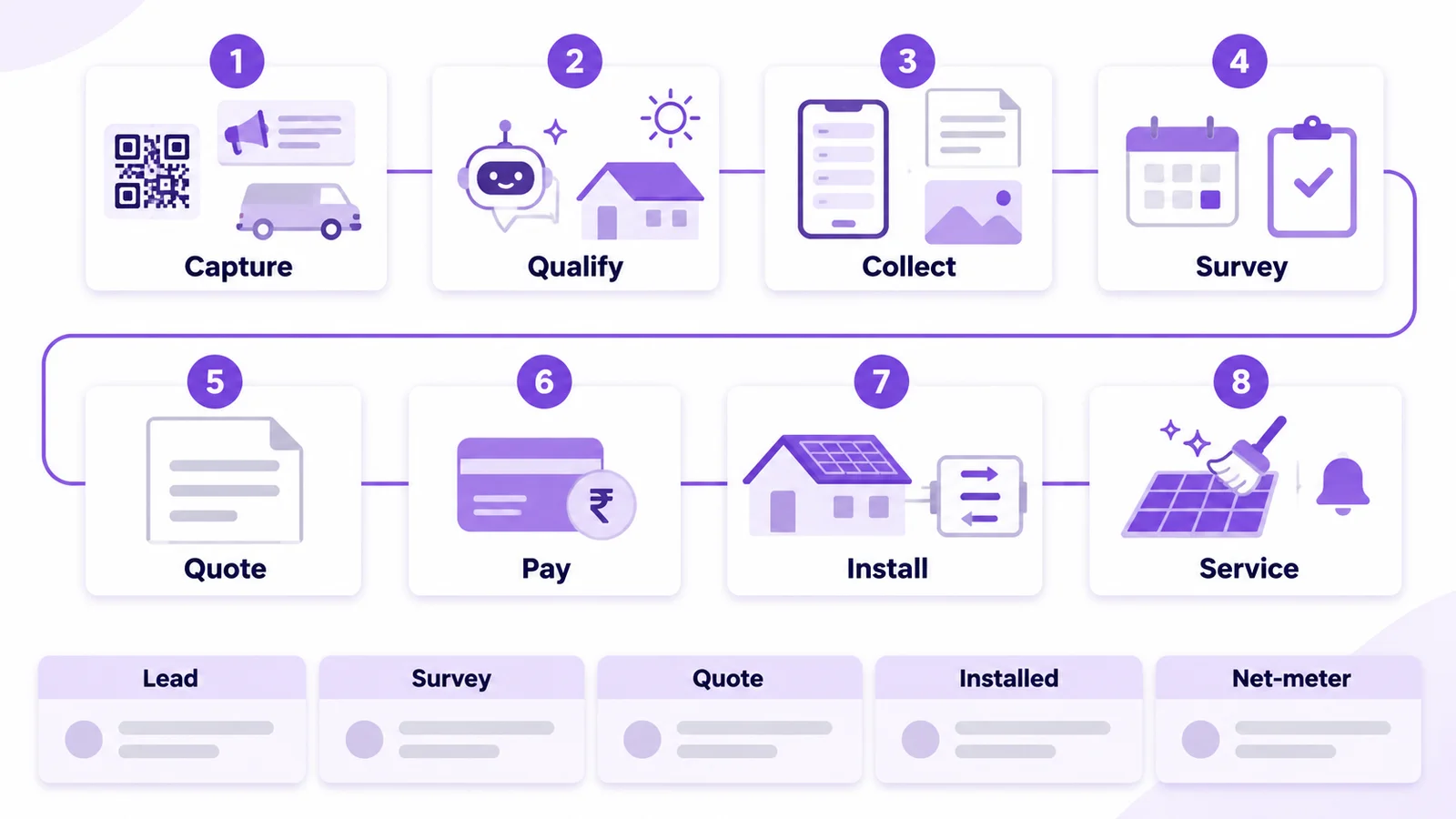
- A leads pipeline tracks every rooftop from Lead to Survey, Quote, Installed and Net-meter, with utility updates at each stage.
- Nurture drips and cleaning or AMC broadcasts go only to people who opted in, and the bot never promises a subsidy amount; it points to the official PM Surya Ghar portal.
This guide is for rooftop solar installers, solar EPC companies doing residential and commercial projects. See also our WhatsApp guide for interior designers and WhatsApp for real estate. For quotation-led service firms, see WhatsApp for professional services. Every scenario below is an example setup, not a customer story.
Top WhatsApp use cases for solar installers and EPC companies
| Use case | Mark360 feature | Template category | Example trigger |
|---|---|---|---|
| Qualify rooftop ad leads | AI agent: Lead Qualification | Service (free-form, inside 24h) | Click-to-WhatsApp ad chat |
| Bill and rooftop photo upload | WhatsApp Form (photo and document pickers) | Service or utility (template button) | Lead tagged residential or commercial |
| Site-survey booking and reminder | AI agent: Appointment Booking + Drip: Appointment Reminder | Utility | Survey slot booked on the calendar |
| System quote (for example 3 kW) | Quotation PDF from the chat | Service (inside 24h) or utility | Survey done |
| Booking advance | Razorpay payment link | Service or utility | Quote accepted |
| Installation and net-meter updates | Leads pipeline + utility templates | Utility | Stage moved by staff |
| Nurture leads who haven't booked | Drip: Welcome New Customer | Marketing (opted-in only) | Lead qualified, no survey booked |
| Panel cleaning and AMC reminders | Broadcast or drip to installed customers | Utility (AMC visit) or marketing (offer) | Pre-monsoon, or AMC visit due |
"Service" means a free-form reply inside the 24-hour window that opens when the customer messages you. Outside it you need a Meta-approved template.
Why WhatsApp for solar business works
A site survey costs an engineer a trip, and many rooftop enquiries aren't ready: the family rents, or they only want a price per kW.
- Speed decides who gets the survey. In a Harvard Business Review study (2011), companies that tried to contact a lead within an hour were nearly 7 times as likely to qualify it as those that waited longer. An AI agent replies in seconds, on Sunday evening too.
- The electricity bill does the sizing. A bill photo and two roof photos tell your engineer more than a phone call.
- The sale is long and the relationship is longer. Families compare quotes, so timed follow-ups matter; after installation, net-meter updates and AMC visits keep the chat useful.
Click-to-WhatsApp ads and AI lead qualification for solar installers
A WhatsApp AI agent on Mark360.ai answers from the knowledge base you upload, in English and Hindi, and hands off to a person. Start from the Lead Qualification template and add your solar questions.
Example: a rooftop solar installer in Jaipur runs a Click-to-WhatsApp ad built in Meta Ads Manager. The ad chat lands on the installer's number, and the agent asks five questions: home or business, average monthly electricity bill (as bands), roof type (concrete flat roof, metal sheet, tiles), city and pincode, and whether they own the building.
How to set up the solar qualification agent
- Upload your packages, warranty terms, process note and a plain-language subsidy page that links to the official portal.
- Create an agent from the Lead Qualification template and list your five questions in order.
- Add tag rules from your engineer's own sizing rule: for example bill bands mapped to tags 1–3 kW, 3–5 kW and 5 kW+, plus commercial and not eligible yet (tenants, unsuitable roofs).
- Set the hand-off: owners with a suitable roof, all commercial leads and anyone who asks for a person go to the Sales team in the shared team inbox with round-robin.
- Connect the agent to the ad entry point and a WhatsApp QR code for your van and hoardings.
Example chat (service replies inside the 24-hour window)
Lead:  Hi, rooftop solar price for my house?
Agent: Happy to help. What is your usual monthly electricity
       bill? [Below 2,000] [2,000-5,000] [Above 5,000]
Lead:  Around 3,500, own house, flat roof, Vaishali Nagar
Agent: Thanks. You can share a photo of your bill and roof
       here, and our engineer will call you today to plan
       a site survey.
The agent doesn't promise a subsidy amount or savings. If asked, it explains the process in general and links the official PM Surya Ghar national rooftop solar portal. More in our WhatsApp AI agent guide and Click-to-WhatsApp ads guide.
Plan note: the AI support agent is on Scale+ ($99/mo); the no-code chatbot builder starts on the Free plan.
WhatsApp Forms for electricity bill and rooftop photos
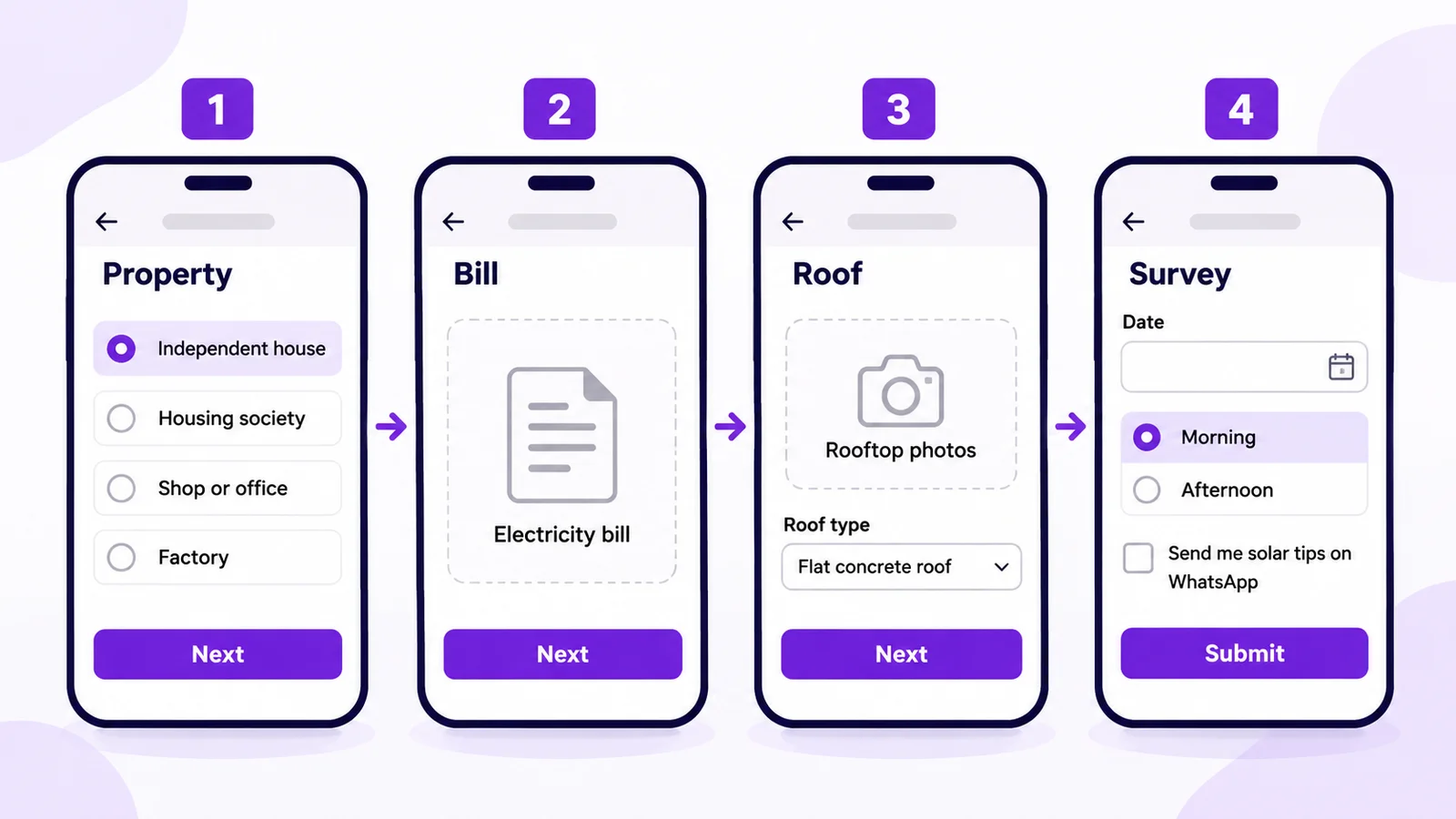
WhatsApp Forms (Flows) are multi-screen forms inside WhatsApp, with text, date, dropdown, choice, opt-in, photo and document pickers and If/Switch logic. Submissions are listed per Form, with export.
Example: a solar EPC company in Surat sends qualified leads a "Share bill and roof photos" button that opens a four-screen Form.
How to build the bill and rooftop Form
- Create a Form with four screens: "Property", "Bill", "Roof" and "Survey".
- Add a property choice (independent house, housing society, shop or office, factory) and a document picker for the latest electricity bill as a photo or PDF.
- Add a photo picker for two or three rooftop photos, plus a roof type dropdown.
- Add a preferred survey date, a morning/afternoon dropdown, name, address and an opt-in field ("Send me solar tips and offers on WhatsApp"), unticked by default.
- Use If/Switch logic: "Factory" or "Society" routes to the commercial team; "Rented" skips the survey screen and tags the lead for an owner-consent follow-up.
Your engineer checks the sanctioned load and units on the bill before the survey. The Scale plan includes 2 Forms.
AI appointment booking for solar site surveys
The Appointment Booking AI agent offers open slots and writes the site survey into the Mark360.ai appointment calendar. The Appointment Reminder drip then sends the confirmation and a reminder the evening before.
How to book and confirm surveys
- Create the agent from the Appointment Booking template and set survey hours, for example Monday to Saturday, 9 am to 5 pm.
- Start the Appointment Reminder preset when the booking is created.
Category: UTILITY   Name: solar_survey_reminder
Hi {{1}}, our engineer {{2}} will visit {{3}} tomorrow
between {{4}} for your rooftop site survey. Please keep
roof access open and your latest electricity bill handy.
[Button: Confirm]   [Button: Reschedule]
Or adapt our 24-hour reminder template or the what to bring template.
Solar quotation PDFs from the chat
Mark360.ai has a quotation form (client name, phone and line items) and a visual PDF template designer.
Example: after the survey, the engineer suggests a 3 kW on-grid system. Sales opens the quotation form and adds line items such as solar modules (3 kW DC), on-grid inverter, module mounting structure, DC and AC cabling with earthing, installation and commissioning and net-metering application support.
How to send a solar quote
- Design the PDF template once with company details and warranty terms.
- Open Quotations, create a quote with the client's name and phone, and add the line items.
- Preview the PDF, then send it in the open chat (inside the 24-hour window) or with an approved template.
- On acceptance, "Send payment request" sends the booking advance; the Razorpay link is tracked as paid, pending or failed.
Category: UTILITY   Name: solar_quote_ready
Hi {{1}}, your quotation {{2}} for a {{3}} rooftop system
is ready, based on the site survey on {{4}}.
[Button: View quote]   [Button: Talk to engineer]
It is utility because the client asked for it; a "book before the price rise" line would make it marketing.
Leads pipeline for solar: Lead → Survey → Quote → Installed → Net-meter
The Leads CRM gives you pipelines with custom stages, a card layout and permissions, and contacts can become leads automatically. Example stages: Lead → Survey → Quote → Installed → Net-meter (plus Lost). Staff move cards, and a utility template updates the customer at Installed and Net-meter.
Subsidy and net-metering paperwork differs by state and DISCOM, so keep the checklist in your knowledge base and ask for documents through a Form's document picker. Firms that run Zoho CRM can create WhatsApp leads there, and Google Sheets syncs customer data to contacts. See also our WhatsApp CRM guide.
Drip sequences for solar leads: actual timing
Drip sequences send approved templates in steps, triggered when a contact is created or updated, with start and stop conditions, sending days, a time window and an enter-once option.
Example: Welcome New Customer preset for qualified leads who opted in but haven't booked a survey. Sending days Monday to Saturday, window 10 am–7 pm:
- Day 0 (an hour after qualification): "How the rooftop subsidy works": general steps and the official portal link, no amounts.
- Day 2: the installation process: survey, design, installation, inspection and net-meter.
- Day 5: a survey booking button.
- Stop when: tag "survey booked", stage moves to Survey, or the contact opts out.
Category: MARKETING   Name: solar_nurture_process
Hi {{1}}, here is how a rooftop solar installation works
with us, from site survey to net-meter, in 5 steps.
[Button: Book a site survey]   [Button: Stop updates]
See our drips guide. After net-metering, the Review Collection preset asks for a review.
Opted-in broadcasts: pre-monsoon cleaning and AMC reminders
Broadcasts send an approved template to dynamic groups built from tags and custom fields, now or scheduled, and only to opted-in contacts.
Example: before the monsoon, an installer offers a panel cleaning and inspection visit to the dynamic group "tag installed + opted in", as a marketing template. For customers with an active AMC, save the next visit date in a custom field and send a utility reminder about the visit they already bought; the Payment Reminder preset can follow up AMC renewals.
Category: MARKETING   Name: solar_premonsoon_cleaning
Hi {{1}}, before the rains, book a panel cleaning and
inspection visit for your {{2}} system this month.
[Button: Book cleaning]   [Button: Stop updates]
See our broadcast guide.
Instagram comment-to-DM for solar reels
Instagram automation on Mark360.ai can answer a reel comment such as SOLAR with a rooftop checklist in the DM, then an opt-in block asks for a WhatsApp number and starts the nurture (Instagram lead capture).
Follow-to-unlock: a follow-to-unlock DM may unlock content such as the checklist. Never put prizes or discount codes behind a follow. It is safer than follower sites, but it is not risk-free.
A complete solar WhatsApp journey (sample automation flow)
- Capture: a Click-to-WhatsApp ad, a reel comment, a QR code on your van or the website chat widget.
- Qualify: the AI agent asks bill, roof, city and ownership, and tags the kW band.
- Collect: the Form takes the bill and rooftop photos.
- Survey: calendar booking and a reminder the evening before.
- Quote: a line-item quotation PDF in the chat.
- Pay: a Razorpay link for the booking advance.
- Install: stage updates through Installed and Net-meter.
- Service: review request, cleaning and AMC reminders.
Workflow nodes: entry when the bill Form is submitted → condition (owner and suitable roof?) → WhatsApp message (survey booking) and tag "survey pending", else tag "nurture" → wait-for-event (quote accepted) → Razorpay payment link → delay (1 day) → WhatsApp message (reminder) if unpaid. Stop: the link is paid, the lead is marked Lost, or the contact opts out.
Set up solar WhatsApp automation free. Connect your number on Mark360.ai, switch on the Lead Qualification agent and build your bill and rooftop Form. No credit card. Start free at app.mark360.ai
How much does WhatsApp cost for a solar business?
On Mark360.ai in India, a utility message is ₹0.138 and a marketing message ₹0.94. Since 1 October 2026 each number gets 1,000 free service messages a month. Plans: Free $0, Scale $19/mo billed quarterly, Scale+ $99/mo, Enterprise custom (pricing).
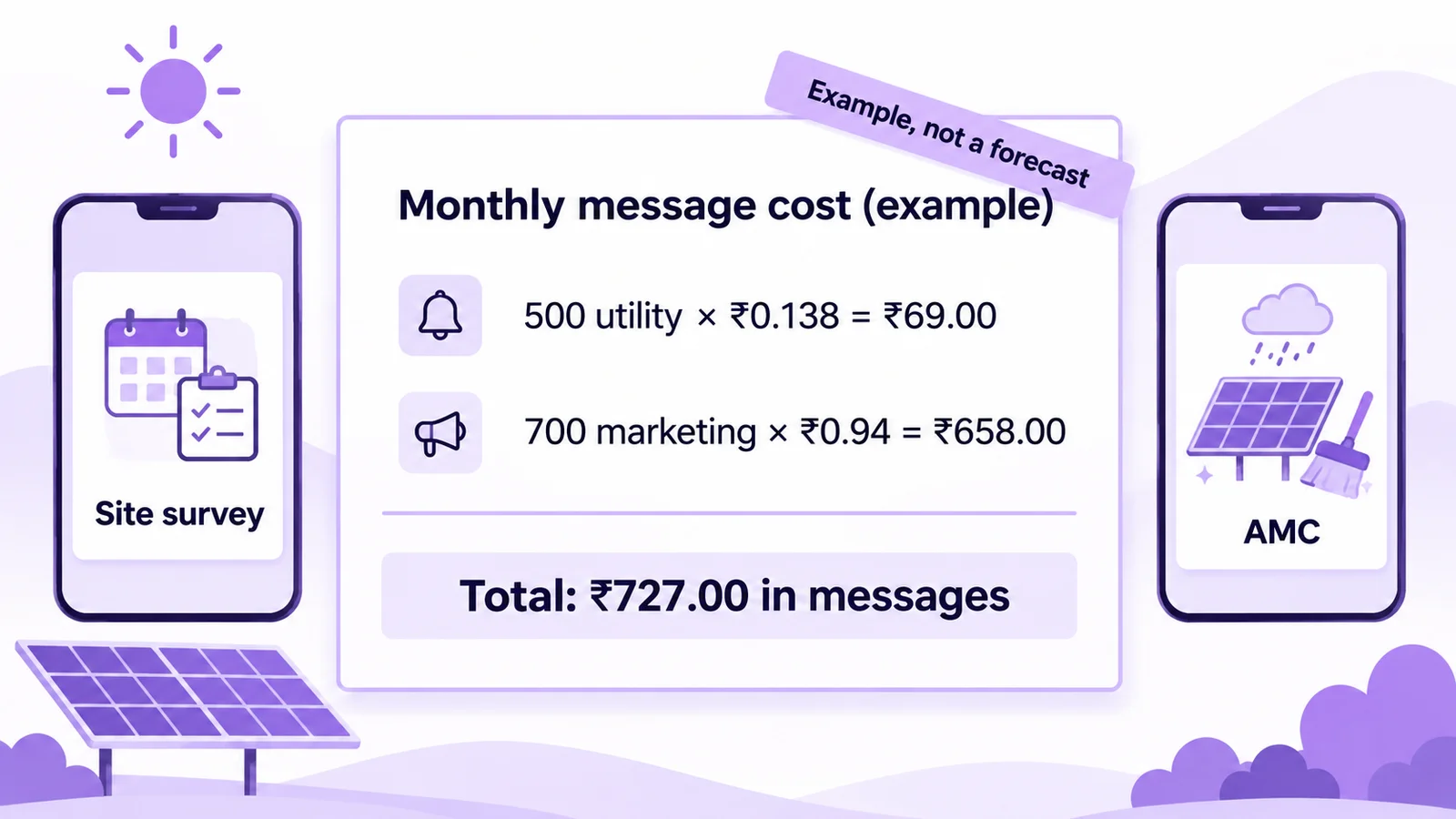
Example arithmetic, not a forecast: 500 utility messages (survey reminders, quote alerts, stage updates) × ₹0.138 = ₹69.00, plus 700 marketing messages (nurture steps and one pre-monsoon cleaning broadcast) × ₹0.94 = ₹658.00, makes ₹727.00 in messages a month, plus your plan. Try the pricing calculator or read WhatsApp API pricing in India.
If a lead comes from a Click-to-WhatsApp ad on the mobile app and you reply within the service window, Meta's pricing rules open a free entry point window of up to 7 days.
Compliance checklist for solar WhatsApp
- Opt-in first: collect it in the Form, the Instagram opt-in block or the widget, as WhatsApp's Business Messaging Policy requires, before any nurture or broadcast.
- Match the category: survey reminders, quote alerts and installation updates are utility; subsidy explainers, cleaning offers and launches are marketing (templates guide).
- No subsidy or savings promises in the bot or templates; link the official portal and let your engineer explain eligibility.
- Honour opt-outs with a STOP keyword and a "Stop updates" button.
- Protect your quality rating (why numbers get banned).
Summary: WhatsApp for solar business in one paragraph
A WhatsApp setup for solar installers is one official WhatsApp Business API number. An AI agent asks bill, roof, city and ownership and hands serious leads to sales, a Form collects the bill and rooftop photos, the calendar books the site survey, a quotation PDF and a Razorpay advance link close the order, the leads pipeline tracks Lead to Net-meter, and drips and broadcasts reach only opted-in customers.
Why Mark360.ai for solar installers and EPC companies
Mark360.ai is an Official Meta Business Partner on the WhatsApp Cloud API, founded in 2024 in Surat. One workspace covers AI agents, Forms, the calendar, quotation PDFs, the leads pipeline, drips and a WhatsApp and Instagram inbox, with no setup fee. Comparing tools? See Mark360 vs Wati or vs AiSensy.
Set up solar WhatsApp automation free. Connect your number on Mark360.ai, switch on the Lead Qualification agent and build your bill and rooftop Form. No credit card. Start free at app.mark360.ai