


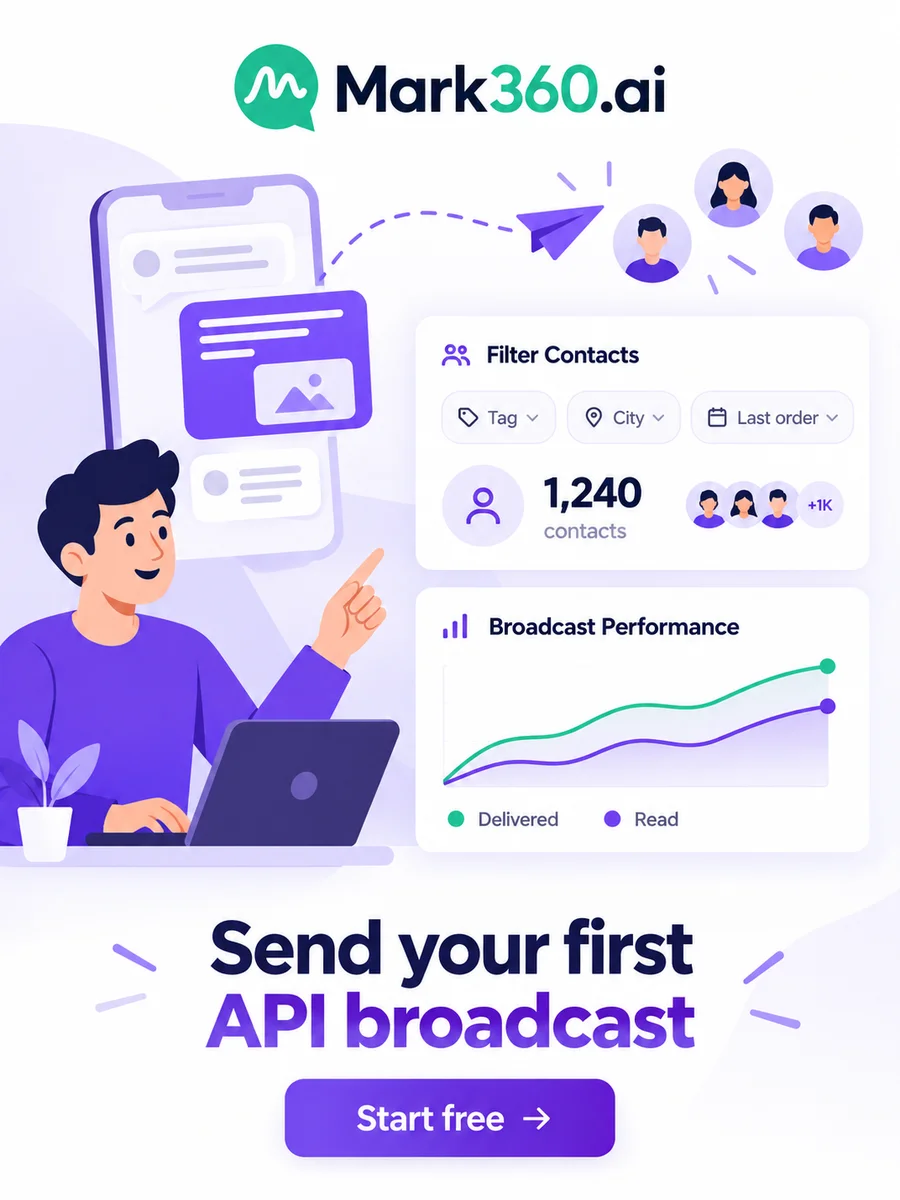
Direct answer: A WhatsApp broadcast is one message sent to many people at once, and each person gets it as a private one-to-one chat. You can send one from a broadcast list in the WhatsApp Business app (up to 256 contacts who saved your number). At scale, you send a Meta-approved template through the WhatsApp Business API to opted-in contacts.
Key takeaways
- Business app broadcast lists hold up to 256 contacts and only reach people who saved your number.
- API broadcasts send Meta-approved templates to opted-in contacts, with variables, buttons and analytics.
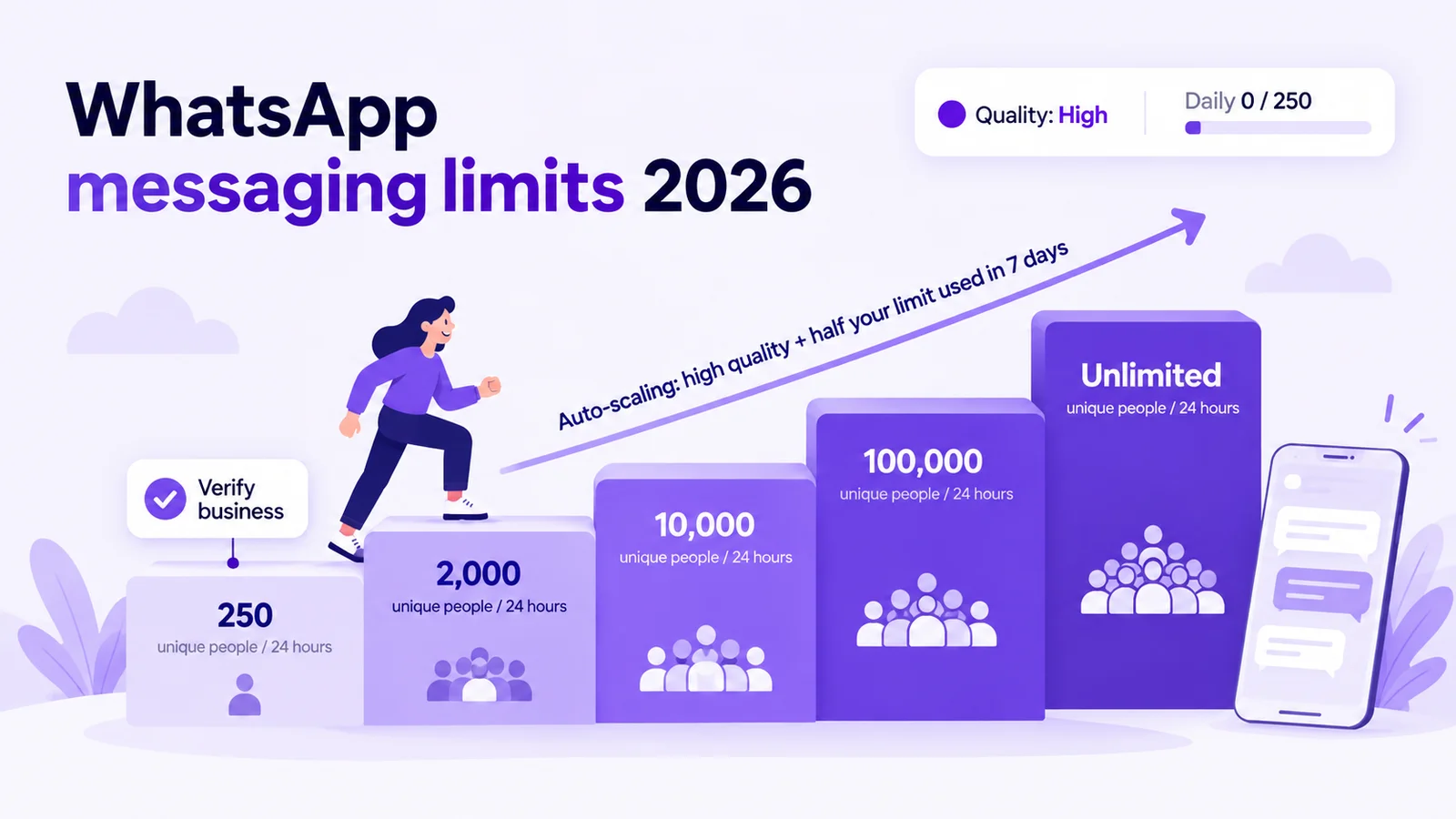
- API limits start at 250 unique people per 24 hours and rise to 2,000, 10,000, 100,000 and unlimited.
- Promotions are Marketing templates; order and booking updates can be Utility; mixed content counts as Marketing.
- On Mark360 in India a marketing message is ₹0.94 and a utility message is ₹0.138 (final prices, October 2026).
Checked in October 2026 against Meta's messaging limits, template categorization and pricing docs. Mark360 prices are from mark360.ai. Rules and rates change, so check before you launch.
What is a WhatsApp broadcast?
A broadcast sends the same message to a list of people. Unlike a group, recipients can't see each other and replies come back privately. Unlike a WhatsApp Channel (a public feed), it lands in each customer's chats.
This guide covers steps, limits, template rules, costs and reusable copy. Still choosing a compliant setup or vendor? Start with official bulk WhatsApp messaging in India.
WhatsApp Business app broadcast lists vs WhatsApp API broadcasts
| WhatsApp Business app broadcast list | WhatsApp API broadcast | |
|---|---|---|
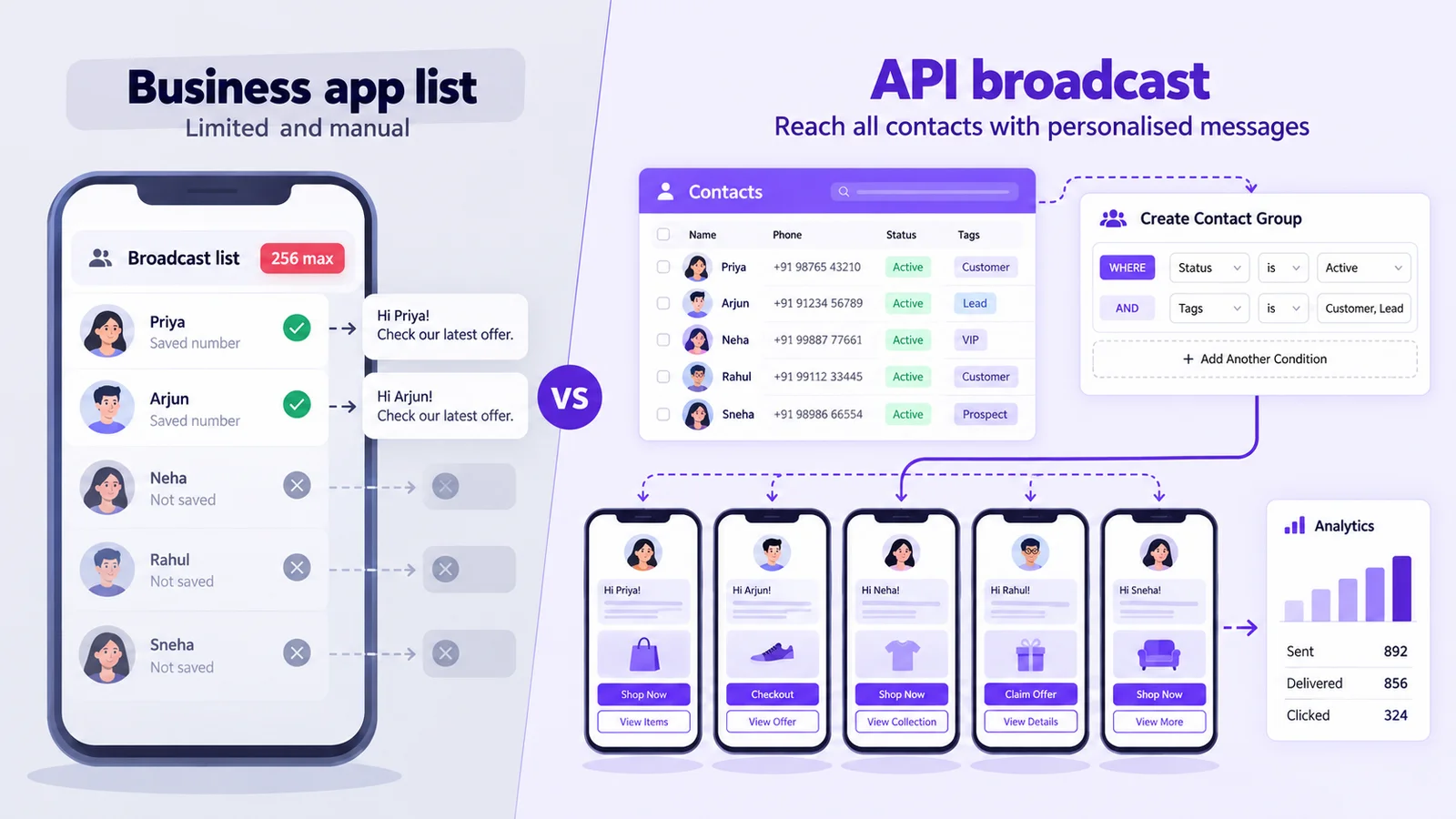
| Who receives it | Only contacts who saved your number in their phone | Any contact who opted in to hear from you |
| Audience size | Up to 256 contacts per list | Your messaging limit: 250 to unlimited unique people per 24 hours |
| Message format | Free-form text and media | Meta-approved template with variables, media header and buttons |
| Personalisation | None | Name, order, date or any custom field per contact |
| Scheduling and segments | Manual, from one phone | Scheduled sends to segments built from tags or fields |
| Analytics | Ticks per chat | Delivered, read and failed counts, plus cost per message |
| Cost | Free | Charged per delivered template, by category and country |
Some countries also get the Business app's paid business broadcasts tool (free messages first, then paid, reviewed by Meta). It still has no API segments, variables or shared inbox.
How to send a WhatsApp broadcast
In the WhatsApp Business app (small lists)
- In Chats, open the menu and choose Business Broadcast, or open a Label and tap Message customers.
- Select up to 256 contacts, write the message, add media and send.
- Ask customers to save your number: per the WhatsApp Help Center, others never receive it.
On the WhatsApp Business API (with Mark360)
- Connect your number to the official API through Meta's Embedded Signup.
- Import opted-in contacts from Excel (name, mobile, tags, opt-out) or sync from Shopify or Google Sheets.
- Build a segment: a dynamic group filtered by tag, status or custom field, with a live count.
- Create the template: Marketing or Utility, header, body with variables, footer and buttons (quick reply, call, copy code, URL). Submit it to Meta, or start from the template library.
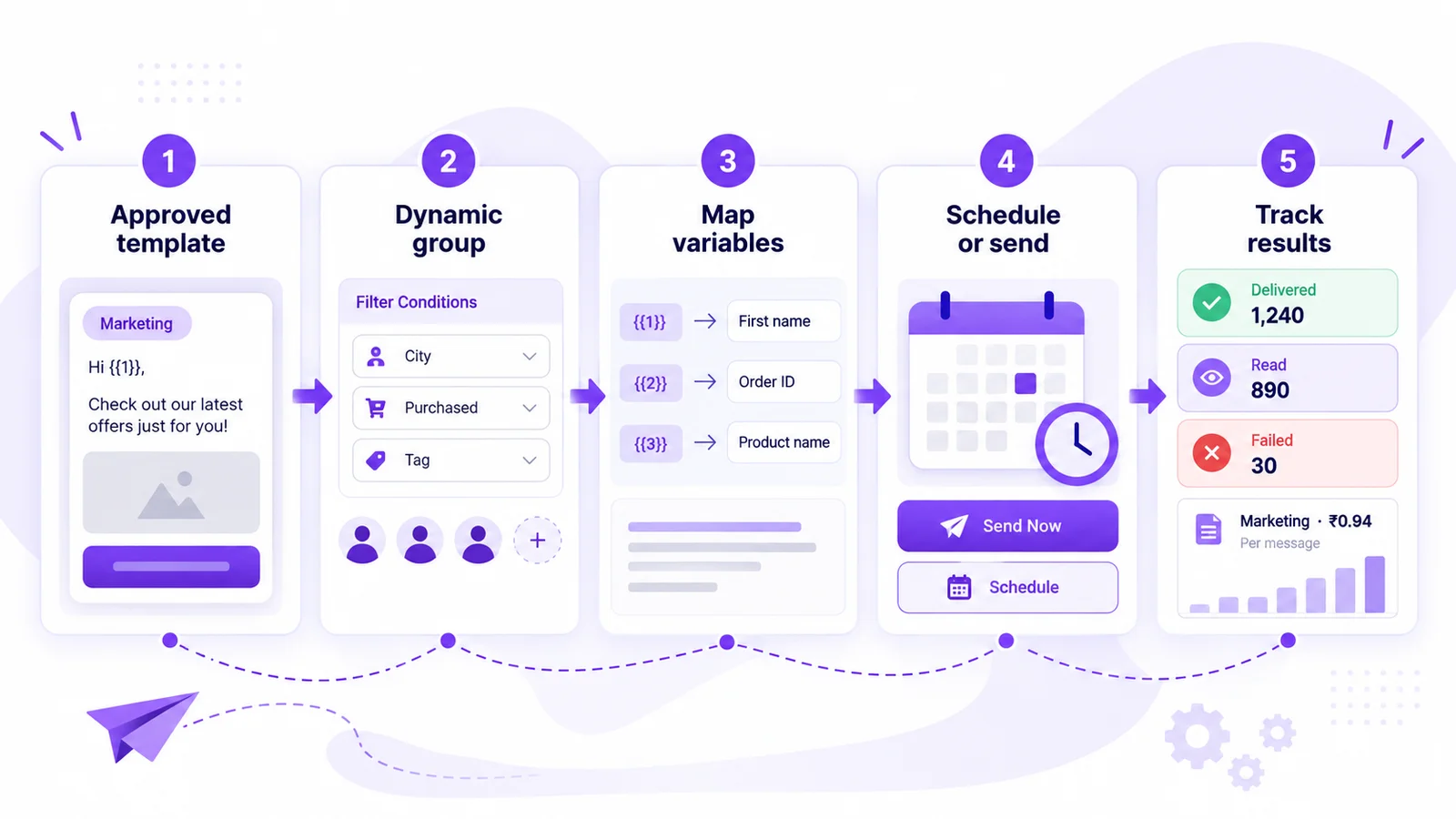
- Run the campaign wizard: approved template, group, variables mapped to fields, then send now or schedule.
- Track results: delivery, read and failure rates, plus each message's category and unit price. Replies land in the team inbox for an AI agent or your team.
Developers: an API token with send_templates permission triggers sends from your system; webhooks report template sends. See Mark360 WhatsApp broadcast.
WhatsApp broadcast limits in 2026
Per Meta's messaging limits docs (updated May 2026), the limit is how many unique people you can message outside a customer service window in a moving 24 hours. It applies to the whole business portfolio, shared by all its numbers.
| Messaging limit | How you reach it |
|---|---|
| 250 | Default for a new business portfolio |
| 2,000 | Verify your business (or have your partner verify it), or deliver 2,000 high-quality template messages to unique people in 30 days |
| 10,000 | Automatic scaling: high message quality and at least half your limit used in the last 7 days. Meta raises you one level within 6 hours |
| 100,000 | |
| Unlimited |
It counts people, not messages, and replies inside an open 24-hour window don't count. An 8,000-contact list on a 2,000 limit goes out over several days. Mark360 shows your daily limit and quality rating in the top bar.
Other limits that affect broadcasts
- Per-user marketing limits: per Meta's marketing templates docs, WhatsApp may deliver fewer marketing messages to people who rarely read them.
- Stopped marketing: customers can turn off your offers in WhatsApp; sends to them fail with error 131050.
- Template quality: rated High, Medium, Low or pending (Meta docs). Negative feedback or low reads can pause a template.
Template rules for broadcast messages
Every API broadcast is a template, and its category sets the review and the price. Per Meta's template categorization guidelines:
| Category | Use it for | Broadcast example |
|---|---|---|
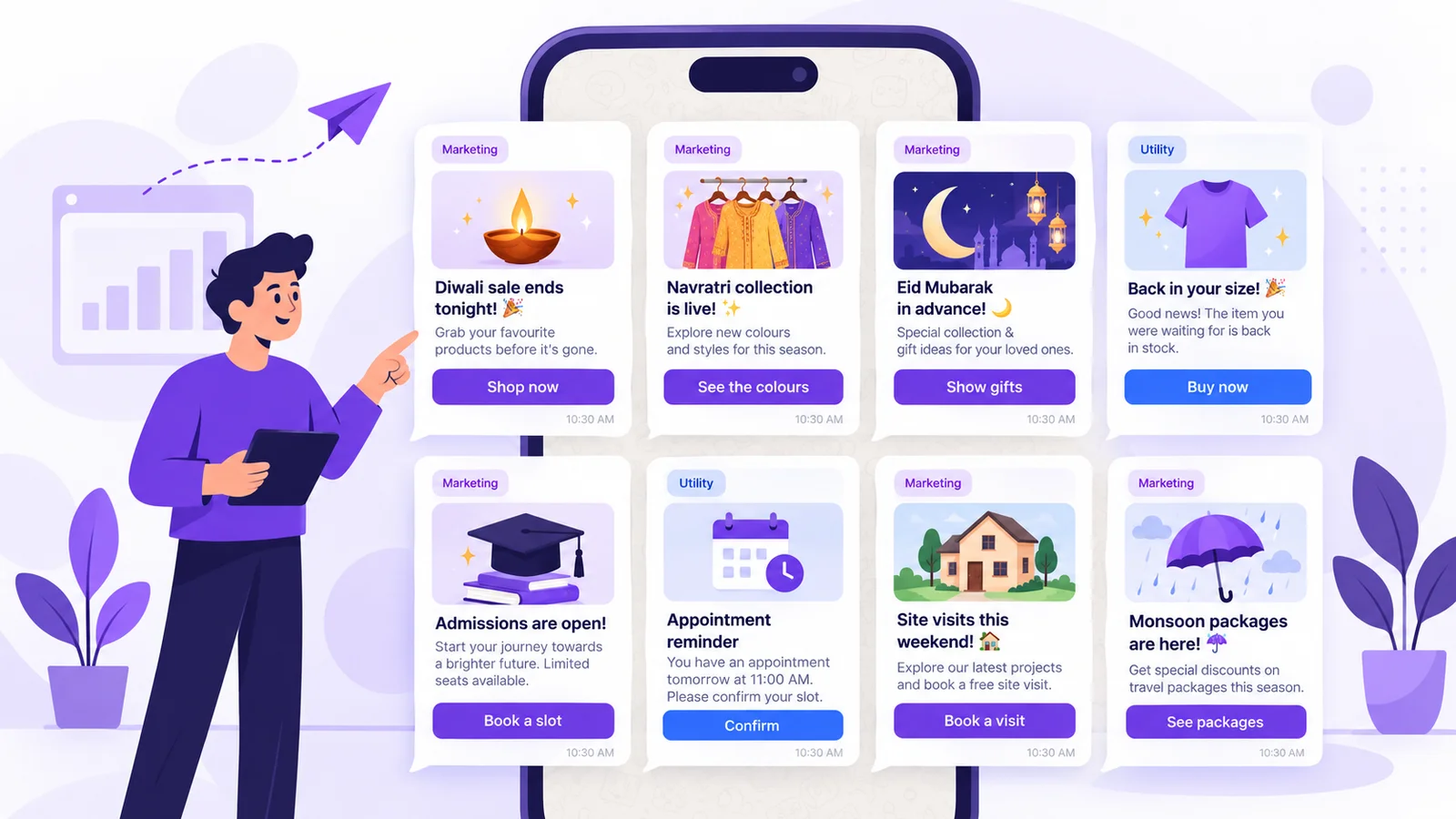
| Marketing | Offers, launches, festivals, events, re-engagement, cart reminders | Diwali sale, back in stock, webinar invite |
| Utility | Non-promotional updates specific to the person's order, account or booking, or critical to them | Order shipped, fee due, appointment reminder |
| Authentication | One-time passcodes | Not for broadcasts |
- Mixed content is Marketing: an order update with a coupon, or a vague “Congratulations!”, is billed as Marketing.
- Meta can recategorize a template, and you pay the category applied at send time.
- Variables: give a sample for each, never start or end the body with one, and don't pack too many into a short message (all common rejections in Meta's template review docs).
- Body up to 1,024 characters, footer up to 60 (“Reply STOP to opt out” fits).
- Name the occasion and end date. Separate Diwali, Navratri and Eid templates beat one generic “festival offer”. See our festival and sale templates.
- Review can take up to 24 hours, so submit festival templates early.
What does a WhatsApp broadcast cost?
Business app broadcast lists are free. On the API, Meta charges per delivered template message by category and recipient country, and can change rates each quarter, so check the official Meta pricing page. Mark360's India prices are final, with no setup fee:
| Delivered messages (India) | Marketing at ₹0.94 | Utility at ₹0.138 |
|---|---|---|
| 1,000 | ₹940 | ₹138 |
| 10,000 | ₹9,400 | ₹1,380 |
| 50,000 | ₹47,000 | ₹6,900 |
Plans are separate: Free is $0/month, Scale $19/month billed quarterly (5 campaigns a month), Scale+ $99/month, Enterprise custom with unlimited campaigns. Model volume in the WhatsApp API pricing calculator or see WhatsApp Business API pricing in India. For replies, see service message pricing from October 1, 2026.
25 WhatsApp broadcast message samples
Adapt and submit these as templates. {{1}}, {{2}} are variables filled from contact fields. Add your brand and an opt-out footer.
Festival broadcasts (Marketing)
- Diwali edit preview: “Hi {{1}}, our Diwali edit goes live on {{2}}. Tap below for a first look.” Button: Quick reply “Show me”
- Diwali last evening: “Hi {{1}}, the Diwali sale ends tonight. Use code {{2}} for {{3}}% off before midnight.” Button: Copy code + “Shop now”
- Dhanteras jewellery: “This Dhanteras, book coins and jewellery online and collect them at {{1}} on {{2}}. Tap below to reserve.” Button: “Book now”
- Navratri collection: “Hi {{1}}, our Navratri collection is live till {{2}}. See all nine colours below.” Button: “See the colours”
- Raksha Bandhan: “Order Rakhi hampers by {{1}} for delivery before Raksha Bandhan. Gift wrap is free.” Button: “Pick a hamper”
- Eid gifting: “Eid Mubarak in advance, {{1}}! Order gifts by {{2}} for delivery before Eid.” Button: “Show gifts” / “Not now”
- Christmas and New Year: “Our year-end sale is on: {{1}}% off sitewide until {{2}}. Happy holidays from the team.” Button: “Shop the sale”
- Holi: “Holi is on {{1}}! Order herbal colours and sweets by {{2}} for delivery this week.” Button: “Order now”
D2C and ecommerce
- Back in stock (Marketing): “Good news, {{1}}: {{2}} is back in your size. Stock is limited.” Button: “Buy now”
- New arrivals (Marketing): “New this week at {{1}}: {{2}}. Members shop first, so tap below.” Button: “See what's new”
- Price drop (Marketing): “Hi {{1}}, the {{2}} you viewed is now ₹{{3}}. Tap below to grab it.” Button: “View product”
- Order shipped (Utility): “Your order {{1}} has shipped and should reach you by {{2}}. Track it below.” Button: “Track order”
- COD confirmation (Utility): “Please confirm your cash-on-delivery order {{1}} for ₹{{2}}. Reply below.” Button: “Confirm” / “Cancel”
Education and coaching
- Admissions open (Marketing): “Admissions for {{1}} are open at {{2}}. Book a free counselling slot below.” Button: “Book a slot”
- Webinar invite (Marketing): “Join our free webinar “{{1}}” on {{2}}. Seats are limited.” Button: “Register me”
- Fee due reminder (Utility): “Hi {{1}}, the term fee of ₹{{2}} is due on {{3}}. You can pay online below.” Button: “Pay fee”
Healthcare and clinics
- Health camp (Marketing): “Our {{1}} check-up camp runs at {{2}} this week. Book your slot below.” Button: “Book a slot”
- Appointment reminder (Utility): “Reminder: your appointment with {{1}} is on {{2}}. Please confirm below.” Button: “Confirm” / “Reschedule”
Real estate
- Site visit weekend (Marketing): “Hi {{1}}, site visits at {{2}} are open this weekend with free pick-up. Book below.” Button: “Book a visit”
- New launch (Marketing): “Our new project {{1}} launches on {{2}}. Want the floor plans and launch prices?” Button: “Send price list”
Travel and hotels
- Monsoon getaway (Marketing): “Hi {{1}}, our monsoon packages to {{2}} start at ₹{{3}}. See the dates below.” Button: “See packages”
- Booking confirmed (Utility): “Your booking {{1}} is confirmed for check-in on {{2}}. Details are below.” Button: “View booking”
Restaurants, salons and gyms
- Weekend dine-in (Marketing): “This weekend at {{1}}: {{2}}. Show this message at the table.” Button: Call “Reserve a table”
- Salon festive slots (Marketing): “Hi {{1}}, festive slots are open until {{2}}. Book early for your pick of times.” Button: “Book now”
- Gym renewal (Marketing): “Hi {{1}}, your membership ends on {{2}}. Renew early and get a bonus month.” Button: “Renew”
WhatsApp broadcast best practices
- Segment first by city, last purchase or interest, then add follow-ups with campaigns, segmentation and drips.
- Test on 50 to 100 contacts to check variables and links.
- Space out marketing sends to protect template quality.
- Honour opt-outs: on Mark360, an opt-out keyword removes the contact from campaigns.
- Staff the replies with an AI agent for FAQs and a person for buyers.
Skip unofficial “bulk WhatsApp sender” apps: they break WhatsApp's terms and risk the number. See why WhatsApp Business numbers get banned.
Send your first API broadcast with Mark360
Mark360 is an Official Meta Business Partner based in Surat, India. Connect your number, build a dynamic segment, schedule an approved template and see delivery, reads and cost per message in one place. Trusted by 100+ businesses.
Send your first WhatsApp broadcast, or see how bulk WhatsApp on the official API works.
FAQs
What is a WhatsApp broadcast message?
One message sent to many contacts at once, delivered to each person as a private chat. Recipients can't see each other, and replies come back to you individually.
How many contacts can I add to a WhatsApp broadcast list?
Up to 256 per list in the WhatsApp Business app, and only contacts who saved your number receive it. On the API, a new business portfolio can message 250 unique people per 24 hours, rising to 2,000, 10,000, 100,000 and unlimited.
How do I increase my WhatsApp broadcast limit?
Verify your business, or deliver 2,000 high-quality template messages to unique people in 30 days, to reach 2,000. After that Meta raises the limit automatically when quality stays high and you use at least half of it over 7 days.
Do WhatsApp API broadcasts need template approval?
Yes. Anything sent outside a 24-hour customer service window must use a Meta-approved template. Business app broadcast lists don't use templates.
How much does a WhatsApp broadcast cost in India?
Business app lists are free. On the API you pay per delivered template: on Mark360 in India ₹0.94 per marketing and ₹0.138 per utility message (October 2026), so 10,000 marketing messages cost ₹9,400.
Why didn't everyone receive my broadcast?
In the Business app, people who haven't saved your number miss it. On the API, sends fail if the person stopped your marketing messages, hit WhatsApp's per-user marketing limit, or you passed your messaging limit.
Is a WhatsApp broadcast the same as a Channel?
No. A broadcast lands in each person's chat, can be personalised, and replies are private. A Channel is a public one-way feed people follow.