

You’ve probably already seen where ecommerce teams lose time on WhatsApp: checking order messages manually, calling COD customers, answering “Where is my order?”, and chasing abandoned carts.
WhatsApp automation for ecommerce turns those repetitive conversations into automated workflows triggered by customer actions, Shopify events, and WhatsApp messages. With the right setup, you can automate sales follow-ups, COD verification, order communication, customer support, and parts of the buying journey without adding another person to your support team.
What is WhatsApp automation for ecommerce?
WhatsApp automation for ecommerce means using the WhatsApp Business Platform to automatically send messages or respond to customers based on events such as an order being placed, a cart being abandoned, or a customer asking for support.
For a Shopify store, the typical setup connects Shopify, an automation platform, WhatsApp Business Platform, and your automation or AI logic. Shopify events and customer data can trigger specific WhatsApp workflows.
For example, a customer can add products to a Shopify cart, leave without purchasing, receive an automated WhatsApp reminder, and return to checkout through a direct link. If the customer replies, an AI agent or human support workflow can continue the conversation.
Quick answer: what is WhatsApp ecommerce automation?
WhatsApp automation for an online store means using the official WhatsApp Business API to send triggered messages (cart reminders, COD confirmation, order and delivery updates) and to answer inbound questions with a chatbot or AI agent, with a human handoff. WhatsApp ecommerce automation works best when it is connected to your store (for example Shopify), uses approved templates for business-initiated messages, and only messages customers who have opted in.
Go deeper: WhatsApp abandoned cart recovery for Shopify, COD confirmation to reduce RTO and Shopify WhatsApp automation KPIs.
What can you automate on WhatsApp for an ecommerce store?
The highest-value workflows are usually abandoned-cart recovery, COD confirmation, order notifications, customer support, and post-purchase follow-ups.
1. Abandoned cart recovery
An abandoned-cart workflow can remind customers who added products but did not complete checkout. Shopify provides abandoned-checkout data and recovery URLs that can be used in recovery workflows.
A practical sequence is: cart abandoned → WhatsApp reminder → checkout link → customer replies → AI or human follow-up.
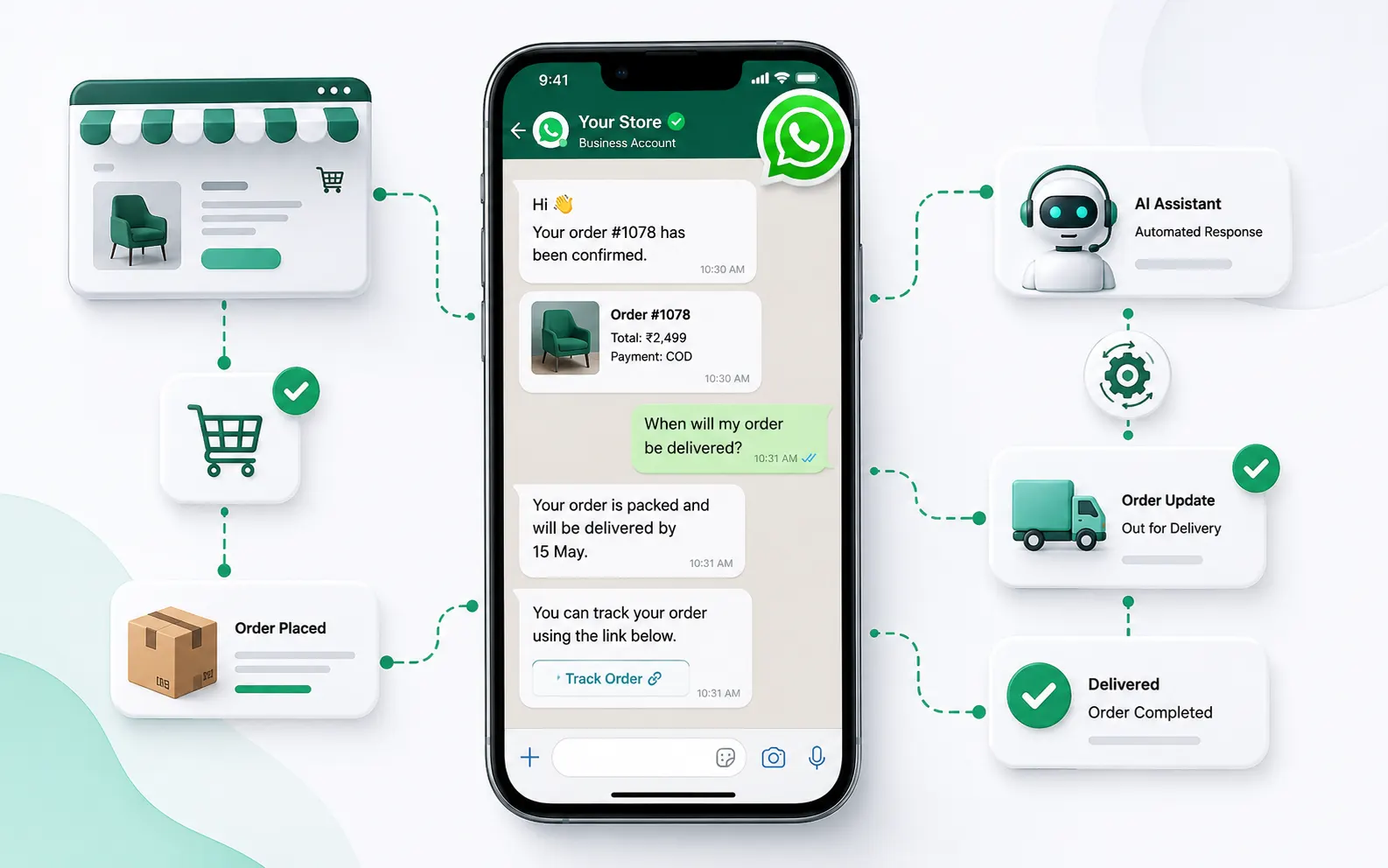
- Trigger a recovery workflow from abandoned-checkout data
- Show relevant product and cart information
- Send a direct recovery link
- Route replies to an AI agent or support team
Don't send the same message to every customer. Your workflow can use information such as products in the cart, cart value, customer history, and campaign eligibility.
2. COD order confirmation
Cash-on-delivery orders create a different operational problem. You want to confirm that the customer actually intends to receive the package before shipping it.
Instead of calling every COD customer, send a WhatsApp confirmation with clear choices such as Confirm Order and Cancel Order.
The workflow can then connect the response to your ecommerce process: confirmation can continue fulfilment, while cancellation can flag the order for review or stop the relevant workflow.
3. Order and shipping updates
Customers shouldn't have to contact support for basic order information. You can automate relevant communication around order confirmation, packing, shipping, delivery, and other supported order-status events.
The key is to automate status communication while keeping exception handling available for humans or AI support.
4. Customer support
WhatsApp becomes much more useful when customers can reply to automated messages. Instead of an agent manually reading a message, searching Shopify, and composing a response, an AI agent can identify the customer's intent, retrieve relevant information, and respond or escalate.
- Where is my order?
- Can I change my delivery address?
- What's your return policy?
- Can I exchange this size?
- Is this product available?
- How do I cancel my order?
- I received the wrong product.
An AI agent should have access to the information it needs and should operate within clearly defined permissions. Sensitive actions such as refunds, cancellations, and address changes may require human review depending on your workflow.
5. Post-purchase messages
The conversation doesn't necessarily end when an order is delivered. Depending on your product and customer journey, you can automate usage guidance, feedback requests, support follow-ups, and repeat-purchase reminders.
For consumable products, replenishment reminders can be useful around the expected reorder period. Promotional messaging still needs to follow applicable WhatsApp requirements and customer preferences.
How does WhatsApp automation work with Shopify?
A Shopify WhatsApp automation system usually has four parts: Shopify, an integration layer, WhatsApp Business Platform, and your automation or AI logic.
Shopify
Shopify contains the ecommerce events and customer or order information that workflows may need. Shopify webhooks can notify an application when supported shop events occur, allowing the integration to react instead of repeatedly polling for changes.
Integration layer
The integration connects Shopify events with WhatsApp workflows. Depending on the platform, this can use Shopify APIs, webhooks, native integrations, or middleware.
WhatsApp Business Platform
This is the messaging layer. Business-initiated communication and message templates are subject to WhatsApp's applicable policies and requirements. Customer opt-in and messaging-window rules should be considered when designing outbound workflows.
Automation and AI layer
This is where you define what happens after an event.
For example: COD order created → check payment method → send confirmation → wait for response → update order or route for review.
Or: customer asks “Where's my order?” → identify the order → retrieve current status → respond.
WhatsApp automation vs WhatsApp chatbot: what's the difference?
A chatbot mainly focuses on conversations. WhatsApp automation connects customer or ecommerce events to specific actions.
A chatbot might answer, “What are your return rules?” An ecommerce automation can handle a sequence such as order delivered → wait → request feedback → identify a problem → escalate to support.
You can use both together. In practice, the strongest setup is usually automation for predictable workflows plus AI for conversations that need context.
What does an AI agent add to WhatsApp ecommerce automation?
AI agents are useful when the next response can't be determined by a simple button or fixed rule.
A traditional workflow might say: if customer clicks Confirm → update order.
An AI agent can interpret a more natural request such as, “Yes, send it, but please deliver it after Friday because I'm travelling.” The agent can identify the intent, check what actions are allowed, retrieve relevant information, and either complete the permitted action or hand it to a human.
Don't give an AI agent unrestricted control over your store. Define explicit permissions and escalation rules for sensitive actions.
Our recommendation: use deterministic rules for deterministic actions. Use AI where language and context make fixed rules impractical.
What do you need to start?
You don't need a complicated setup to launch your first workflow.
- WhatsApp Business Platform setup
- Business identity and number configuration
- Customer opt-in where required
- Approved message templates for applicable outbound messages
- Shopify store and relevant integration access
- Clear workflow rules
- Human escalation for cases automation cannot resolve
Start with one workflow. For many ecommerce stores, COD confirmation or abandoned-cart recovery is a practical starting point, depending on where the biggest operational or revenue problem exists.
How should you measure WhatsApp automation?
Don't evaluate automation by message volume alone. Connect every workflow to a business outcome.
| Workflow | Metric to track |
|---|---|
| Abandoned cart | Recovery rate and recovered revenue |
| COD confirmation | Confirmation rate and RTO-related outcomes |
| Order updates | Support contacts per order |
| AI support | Resolution rate and escalation rate |
| Post-purchase | Repeat purchase rate |
| Campaigns | Delivery, read, click, and conversion metrics |
Common mistakes with WhatsApp ecommerce automation
Automating everything at once
Start with one painful workflow. A complicated automation system is harder to test and debug when Shopify events, WhatsApp messages, customer replies, and AI actions all interact.
Sending too many messages
Automation makes sending messages easy. That's exactly why you need clear rules. Every message should have a reason and a measurable purpose.
Building an AI agent without store access
An AI agent can't reliably answer order-specific questions without access to the underlying data. Connect it to the information it needs and restrict what it can change.
Ignoring WhatsApp messaging requirements
WhatsApp distinguishes between different business messaging scenarios and has requirements around templates, customer communication, and applicable service windows. Your workflow design should account for the current WhatsApp Business policies before launch.
Measuring messages instead of business outcomes
A high read rate does not tell you whether the automation recovered carts, reduced support workload, reduced failed deliveries, or generated repeat purchases. Track the business metric attached to each workflow.
A practical WhatsApp automation stack for Shopify
A straightforward architecture looks like this:
Shopify → webhook or API event → Mark360 automation → WhatsApp Business Platform → customer → AI agent or human support
For example, when a COD order is created, Shopify can provide the event, Mark360 can check the payment method, WhatsApp can send the relevant confirmation message, and the customer's response can feed into the next step of the workflow.
If the customer replies with a question, the AI agent can take over instead of forcing the conversation into a rigid menu.
Where should you start?
Don't start by building 20 WhatsApp workflows. Pick the process that currently consumes the most repetitive work or loses the most money.
If COD is creating operational headaches, automate confirmation first. If abandoned carts are the bigger issue, start there. If your support team spends hours answering “Where is my order?”, connect WhatsApp to Shopify and relevant order data, then let an AI agent handle repetitive queries.
Once the first workflow produces measurable results, add the next one.
For Shopify merchants, WhatsApp automation works best when it's connected to the actual ecommerce system—not when WhatsApp is treated as another isolated marketing channel.
Related reading: Shopify WhatsApp integration, WhatsApp abandoned cart recovery, and WhatsApp AI agent for business.