What is a WhatsApp AI agent for business and how do you set one up?
Quick answer
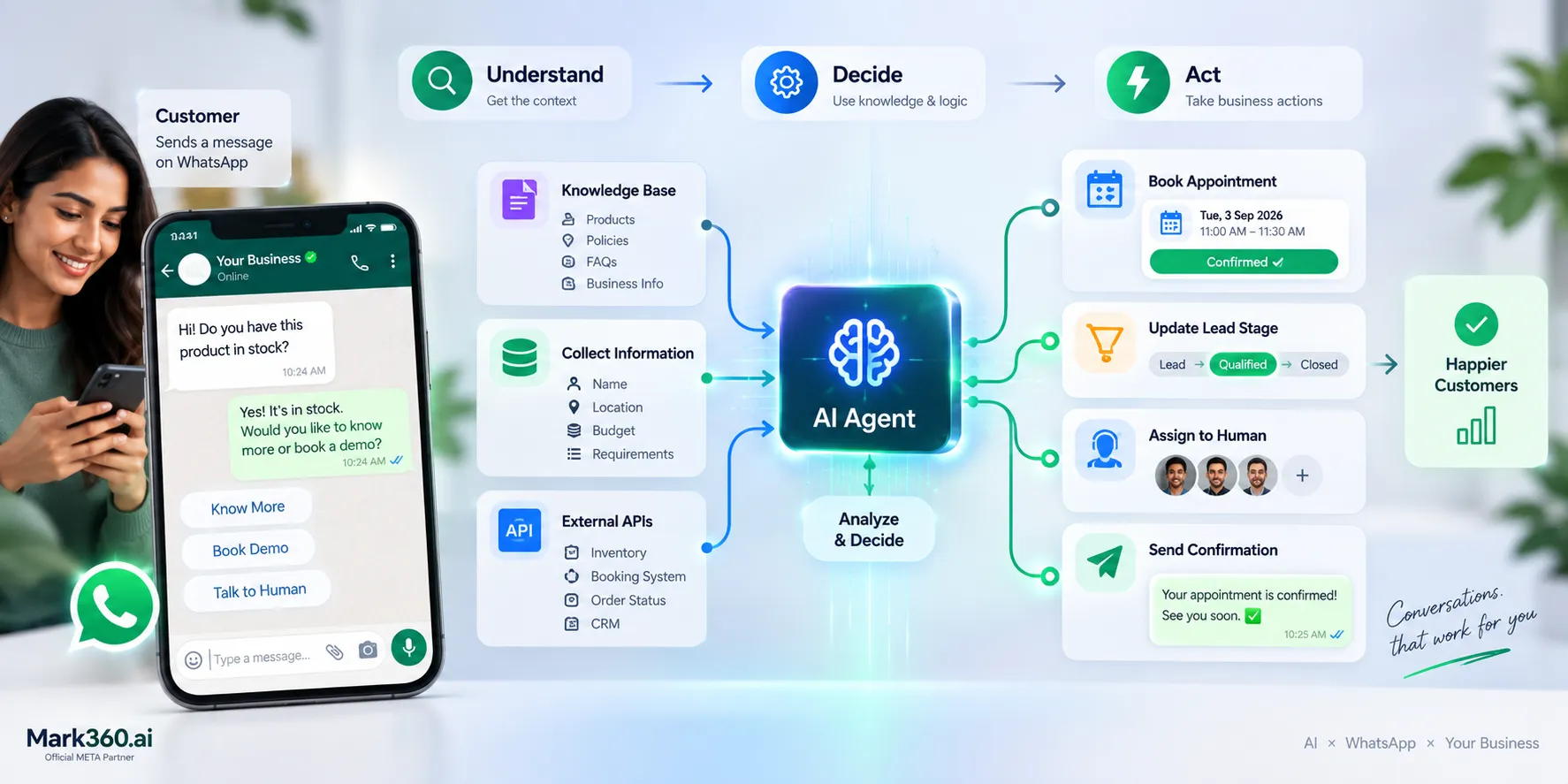
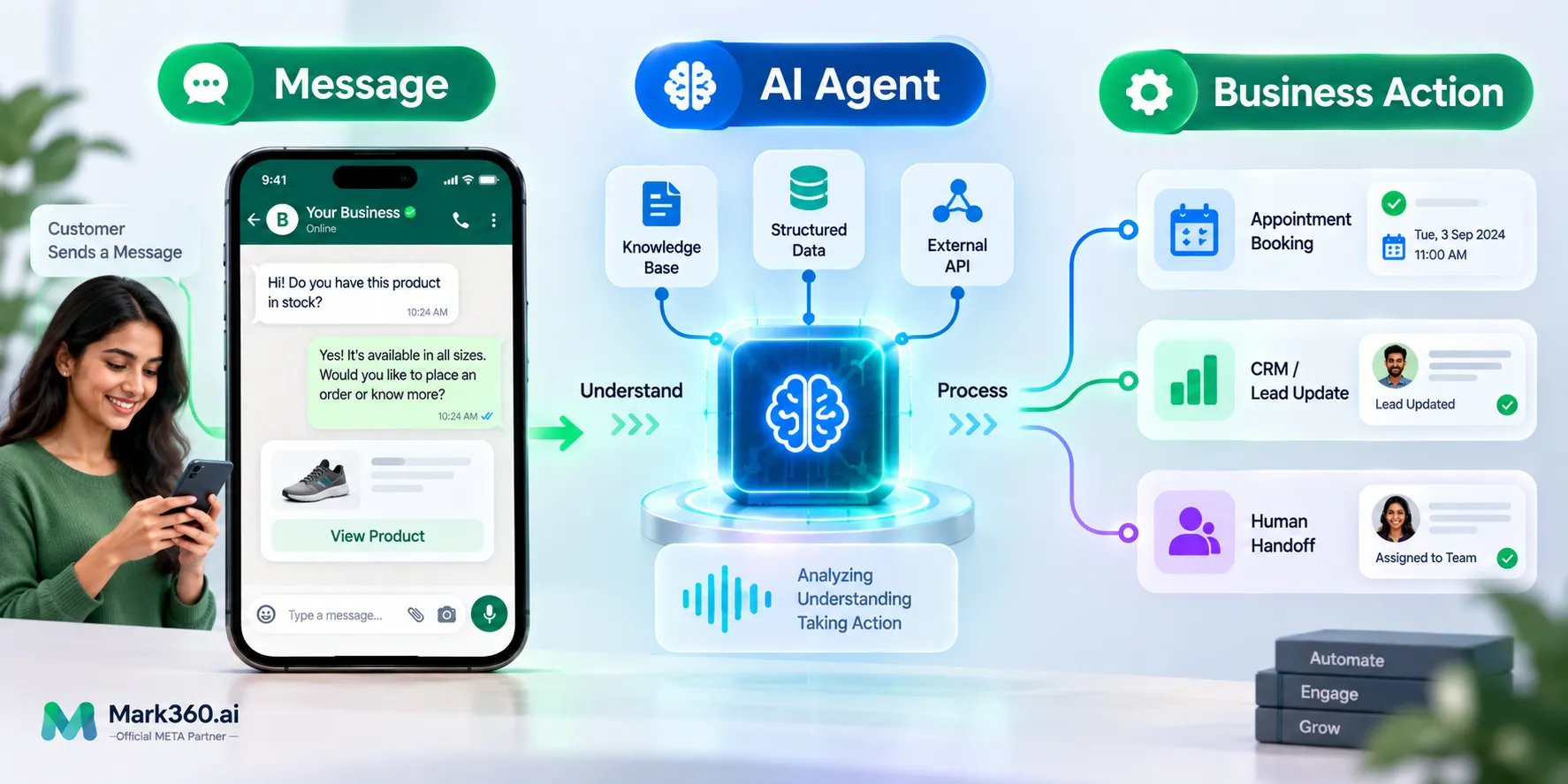
A WhatsApp AI agent is an AI system connected to a business WhatsApp account that can understand customer messages, retrieve approved business information, collect structured data, perform configured actions, update records, and hand conversations to a human when needed.
Key takeaways
Start with one measurable WhatsApp workflow
Use a knowledge base for approved business information
Use APIs for live business data
Collect required fields through natural conversation
Build human escalation into the workflow
Topics
WhatsApp Business Platform · ProductWhatsApp AI Agent · TopicWhatsApp AI Chatbot · TopicLead Qualification · TopicAppointment Booking · Topic
A customer sends your business a WhatsApp message asking for a price. Then another asks if a product is available. A third wants to book an appointment. Your team can answer all three, but the real problem starts when the same conversations repeat all day.
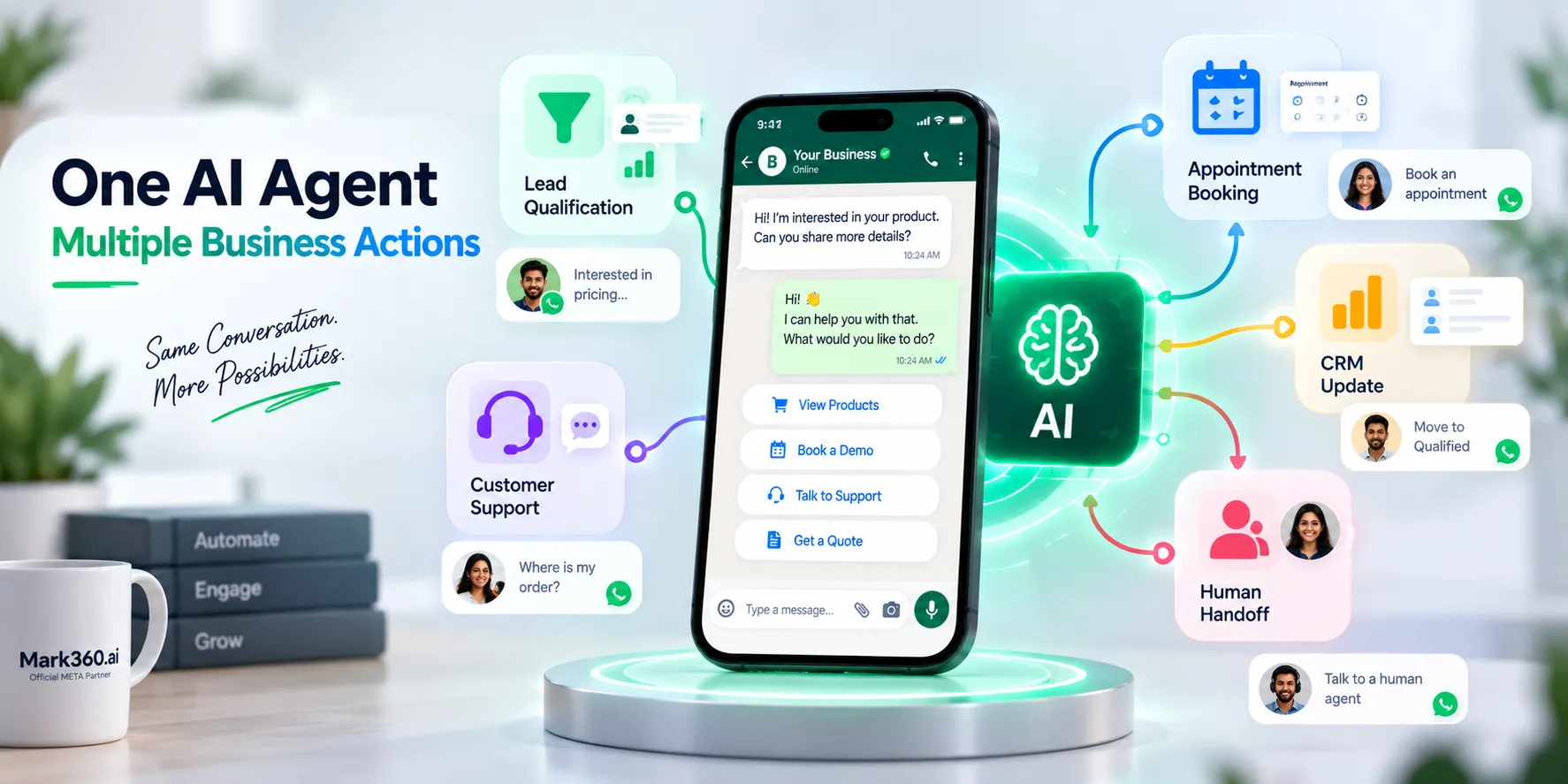
A WhatsApp AI agent for business can handle these conversations, collect the information you need, retrieve answers from your knowledge base, take configured actions, update lead records, and hand the conversation to a human when necessary. This guide explains what a WhatsApp AI agent does, which features matter, how to build one, and how to set up a practical agent with Mark360.
What is a WhatsApp AI agent?
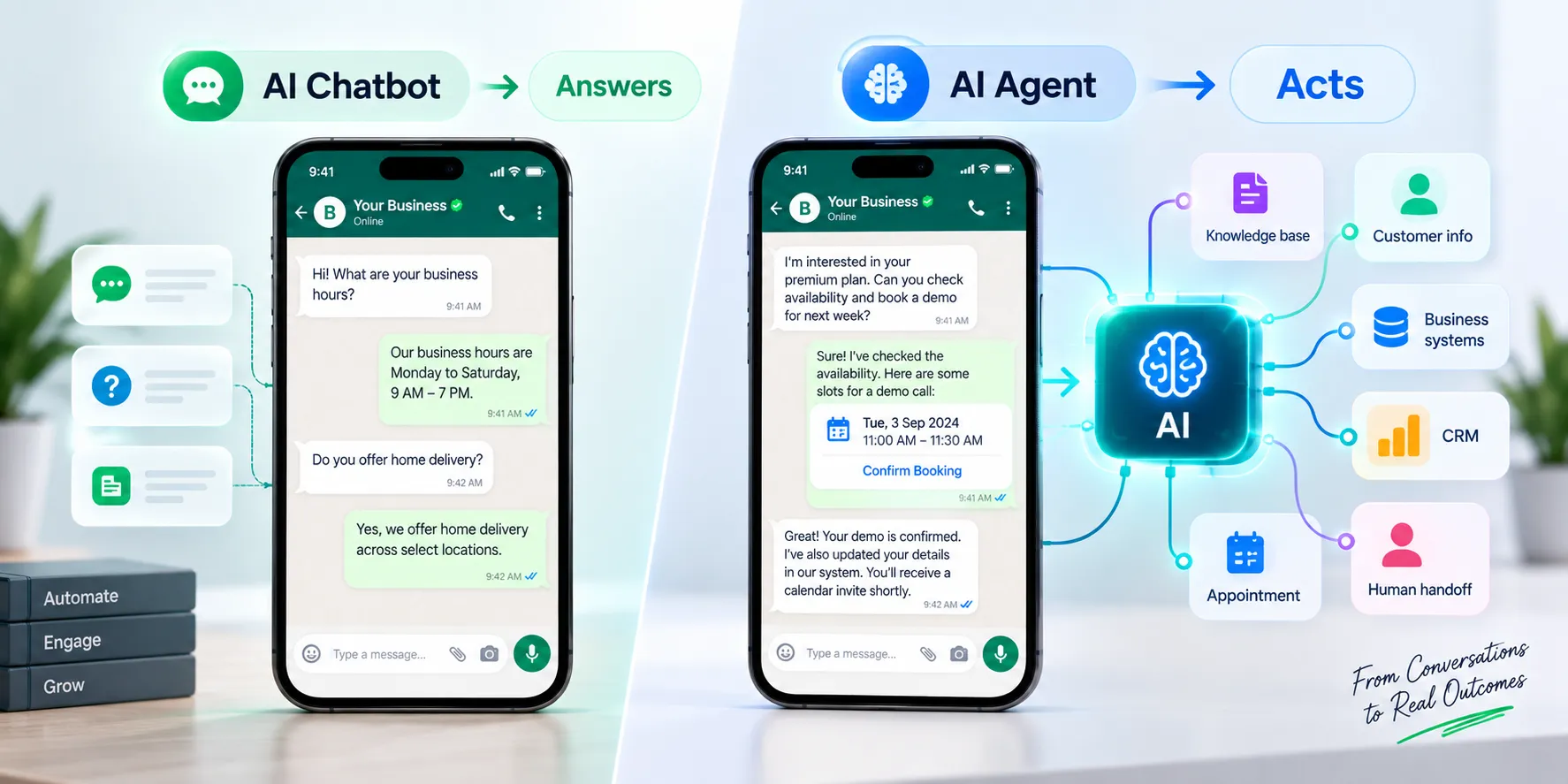
A WhatsApp AI agent is an AI-powered system connected to a business WhatsApp account that can understand customer messages and perform defined business actions. Unlike a basic chatbot that mainly provides replies, an AI agent can use business knowledge, collect structured information, call external systems, update customer records, book appointments, and assign conversations to a human.
The difference matters because most business conversations don't end with an answer. A customer may ask about a service, provide a budget, request an appointment, and expect the business to take the next step. An agent can manage that complete workflow instead of stopping after the first response. WhatsApp AI chatbot vs WhatsApp AI agent
A WhatsApp AI chatbot is generally designed to answer questions or guide customers through predefined conversations. A WhatsApp AI agent is designed to complete a task using knowledge, rules, data, and connected tools.
Capability
WhatsApp AI chatbot
WhatsApp AI agent
Answer common questions
Yes
Yes
Use business knowledge
Sometimes
Yes
Collect structured information
Basic
Yes
Call external APIs
Limited
Yes
Qualify leads
With a configured flow
Yes
Book appointments
With integration
Yes, with a booking capability or integration
Update lead stages
Limited
Yes, when permission is configured
Hand off to humans
Basic
Designed into the workflow
A simple test is useful: if the conversation only needs an answer, a chatbot may be enough. If the conversation needs the system to collect information and do something with it, you're looking at an AI agent.
What can a WhatsApp AI agent do for business?
A WhatsApp AI agent can automate customer conversations that normally require repetitive work from sales, support, operations, or front-desk teams. The strongest use cases have a clear input, a defined business action, and an obvious success condition.
WhatsApp AI lead generation
A WhatsApp AI agent can turn inbound conversations into qualified leads. Instead of sending a prospect to a long form, the agent can ask questions conversationally, capture the answers, and determine what should happen next.
For example, a real estate workflow could collect preferred location, property type, budget, and purchase timeline. A B2B sales workflow could ask about company size, use case, expected volume, and buying timeline. The information can then be saved against the contact and passed to the sales team.
Lead qualification AI agent
A lead qualification AI agent is more useful when your sales team has clear qualification criteria. The agent should know which fields are required, what qualifies a lead, and when a conversation should be handed to sales.
Mark360 includes an Update Lead Stage capability that can move contacts through pipeline stages such as Lead, Qualified, or Closed. This lets the conversation become part of the sales process instead of remaining isolated inside WhatsApp.
WhatsApp appointment booking AI
A WhatsApp appointment booking AI workflow can collect the service a customer wants, ask for a preferred date or time, check availability through the connected booking system, and confirm the appointment.
Mark360's Book Appointment capability is designed for checking availability and managing appointments on behalf of customers. This is especially useful for clinics, consultants, education providers, salons, service businesses, and other appointment-led operations.
AI chatbot customer service
An AI chatbot for customer service can handle repetitive questions about products, services, policies, delivery, business hours, locations, and other approved information. The key is to connect the agent to a controlled knowledge base instead of expecting the AI model to know your latest business information.
For live information such as current inventory, order status, appointment availability, or account data, the better approach is to connect the agent to the relevant system through an API.
AI agent for WhatsApp automation
An AI agent for WhatsApp automation adds intelligence to traditional trigger-based automation. A fixed workflow might always send the same next message. An AI agent can interpret what the customer said and decide whether it should ask another question, retrieve information, call a tool, update a record, or escalate the conversation.
WhatsApp AI agent features you should look for
When comparing a WhatsApp AI agent builder, don't focus only on how natural the demo conversation sounds. Look at the actions the agent can perform after it understands the customer's request.
1. Knowledge Base Access
The agent should be able to retrieve information from your own business content. That can include FAQs, product documentation, service information, policies, pricing guidance, and other approved material.
Mark360's Knowledge Base Access capability lets you select the knowledge bases an agent can use during conversations. This creates a defined source for business answers.
2. Structured Data Collection
Structured data collection lets an AI agent gather specific fields during a natural conversation. You can define information such as name, location, budget, product interest, preferred appointment date, or company size.
Mark360's Structured Data Collection behavior is useful when the conversation needs to produce structured information for sales or operations. The customer can answer conversationally while your system receives defined fields.
3. External API Calls
An AI agent should not guess information that changes in real time. External API calls allow the agent to send collected parameters to another system and use the returned information in the conversation.
This is useful for inventory checks, order information, appointment availability, serviceability, customer records, pricing systems, or other business applications that expose an API.
4. WhatsApp interactive buttons
Customers don't always need an open-ended AI response. Sometimes three clear options are faster. Mark360's Send Button Options behavior can present up to three interactive choices for decisions such as Book Appointment, Talk to Sales, or Track Order.
5. WhatsApp list menus
For larger sets of choices, a list menu can be easier to navigate than a long text response. Mark360's Send List Menu behavior can present multiple sections and items for menus, services, categories, or catalog-style selections.
6. Media responses
Some customer questions are better answered with a document, image, video, or brochure. Mark360's Send Media behavior lets you configure media that the agent can send when a defined workflow requires it.
7. Conversation assignment
An AI agent needs a reliable human handoff. Mark360's Assign Conversation capability can route a conversation to configured agents or teams when automation should stop.
The handoff should include enough context for the human to continue without asking the customer to repeat everything.
8. Contact information and lead updates
An agent becomes much more useful when it can work with customer records. Mark360 provides Contact Information Access for reading or updating contact tags and notes, while Update Lead Stage can move contacts through configured pipeline stages.
9. Session summaries
A long AI conversation can contain useful sales or support information. Mark360's Session Summary capability can save a conversation summary as a contact note, giving the next human agent a concise record of what happened.
How to build a WhatsApp AI agent
To build a WhatsApp AI agent, start with one business outcome, connect the WhatsApp Business Platform, provide controlled business knowledge, define the information the agent must collect, connect the actions it needs, and configure human escalation.
Step 1: Choose one workflow
Start with one job. Good first workflows include lead qualification, appointment booking, customer support, product enquiries, or enquiry routing.
Don't begin with an instruction such as “answer every customer question.” Define what the agent is responsible for and what it should not handle.
Step 2: Connect WhatsApp
For API-based business automation, the WhatsApp Business Platform provides the messaging infrastructure that connects customer conversations with business systems. Your implementation needs the appropriate WhatsApp business setup, authentication, messaging configuration, and webhook handling for incoming events.
Meta's current WhatsApp Business documentation also distinguishes the WhatsApp Business App from the WhatsApp Business Platform, including Cloud API functionality and related business terms.
Step 3: Give the agent business knowledge
Add the information the agent is allowed to use. Keep stable reference information in the knowledge base and keep live operational information in the system that owns that data.
For example, a return policy belongs in your business knowledge. Whether a particular order has shipped should come from your order system.
Step 4: Define required information
Write down the fields required to complete the workflow. A lead qualification agent might need budget, location, requirement, and timeline. An appointment agent might need service, preferred date, preferred time, and contact information.
This is where structured data collection prevents an AI conversation from becoming an unstructured transcript.
Step 5: Connect actions
Decide what the agent is allowed to do. It might call an API, book an appointment, update a lead stage, add a contact note, send a document, or assign the conversation to a human.
Give each action a narrow purpose. If an agent only needs to check availability, it doesn't automatically need permission to change other customer data.
Step 6: Define escalation rules
Set clear conditions for human handoff. These can include a customer explicitly requesting a person, a complaint, missing information, an unsupported request, a high-value lead, or a failed API action.
WhatsApp's Business Messaging Policy requires businesses using automation during the customer service window to provide a timely, clear, and direct escalation path.
Step 7: Test real conversations
Test more than clean questions. Customers send incomplete messages, spelling mistakes, mixed languages, follow-up questions, screenshots, and messages that change direction halfway through a conversation.
Test what happens when information is missing, an API fails, an appointment slot disappears, the customer asks for a human, or the knowledge base doesn't contain an answer.
How to set up a WhatsApp AI agent in Mark360
To set up a WhatsApp AI agent in Mark360, configure the agent's identity and instructions first, then enable the capabilities and behavior types required by the workflow.
Set the agent name and description. Give the agent a clear role and define what it is responsible for.
Write the role and instructions. Define the agent's identity, tone, business responsibilities, boundaries, qualification rules, and escalation conditions.
Enable Knowledge Base Access. Select the knowledge base the agent is allowed to use.
Enable appointment booking when required. Use Book Appointment if the workflow needs availability checks, booking, rescheduling, or cancellation.
Enable Contact Information Access. Allow the agent to read or update contact tags and notes when the workflow requires it.
Enable Update Lead Stage. Use this for qualification workflows where the agent should move contacts through your sales pipeline.
Configure Assign Conversation. Decide which agents or teams can receive conversations when human intervention is required.
Configure Session Summary. Save useful conversation context as a contact note when the next team member needs it.
Add behavior blocks. Choose Structured Data Collection, External API Call, Send Media, Send Button Options, Send List Menu, or End Conversation based on the workflow.
Run test conversations. Verify that the agent collects the right information, calls the correct actions, gives accurate answers, and escalates correctly.
WhatsApp AI agent use cases by industry
The same AI agent framework can support different industries, but the questions, business rules, data requirements, and escalation criteria should be specific to the workflow.
WhatsApp chatbot for healthcare
A WhatsApp chatbot for healthcare can handle administrative conversations such as appointment requests, clinic information, service questions, reminders, and routing. Healthcare workflows need additional care around privacy, regulated information, and medical advice. Don't design a general-purpose AI agent to diagnose conditions or make clinical decisions without the appropriate controls, review, and compliance framework.
WhatsApp chatbot for real estate
A WhatsApp chatbot for real estate can qualify property enquiries by location, budget, property type, financing status, and buying timeline. After qualification, the agent can share relevant information and route the prospect to a salesperson or schedule a site visit.
WhatsApp chatbot for education
A WhatsApp chatbot for education can answer questions about courses, admissions, eligibility, fees, campuses, application steps, and schedules. It can also collect student requirements and pass qualified prospects to an admissions counsellor.
WhatsApp chatbot for restaurants
A WhatsApp chatbot for restaurants can answer menu questions, share location information, collect reservation details, handle common enquiries, and route large-party or catering requests. If connected to a live reservation system, it can work with actual availability instead of collecting a callback request.
WhatsApp AI chatbot Malaysia
A WhatsApp AI chatbot in Malaysia needs to account for the languages and conversational patterns used by its customers. English, Bahasa Malaysia, and multilingual or mixed-language messages can appear in the same customer journey. Test the agent with the languages your support team actually handles instead of assuming every customer will follow a single-language script.
AI chatbot WhatsApp Indonesia
An AI chatbot for WhatsApp in Indonesia can support sales enquiries, customer service, lead qualification, appointment workflows, and other conversational processes. The important part is connecting the conversation to the business systems that contain the real information rather than relying on the AI to invent operational details.
How a WhatsApp AI agent works with automation
Traditional WhatsApp automation is usually trigger-based: an event happens, a predefined condition is evaluated, and a message or action runs. An AI agent adds a conversational decision layer between the customer's message and the next action.
Message received: the customer sends a WhatsApp message.
Conversation context loaded: the agent considers the current conversation and permitted contact information.
Intent understood: the agent identifies what the customer is trying to accomplish.
Knowledge retrieved: the agent uses approved business information when required.
Information collected: the agent asks for missing fields needed to complete the task.
Action selected: the agent answers, calls an API, books an appointment, updates a record, sends media, or assigns the conversation.
Customer receives the result: the agent replies with the relevant information or next step.
Conversation recorded: configured notes, tags, lead stages, or summaries can be updated.
This is the core of an AI agent for WhatsApp automation: conversation is connected to business action.
WhatsApp AI agent compliance and the 24-hour window
Building an AI agent doesn't remove WhatsApp's business messaging requirements. Your automation still needs to follow the current WhatsApp Business policies and applicable laws.
Customer opt-in matters
WhatsApp's Business Messaging Policy states that businesses are responsible for obtaining the required opt-in permission for communications and must respect requests to block, stop, or opt out of communication.
Understand the 24-hour customer service window
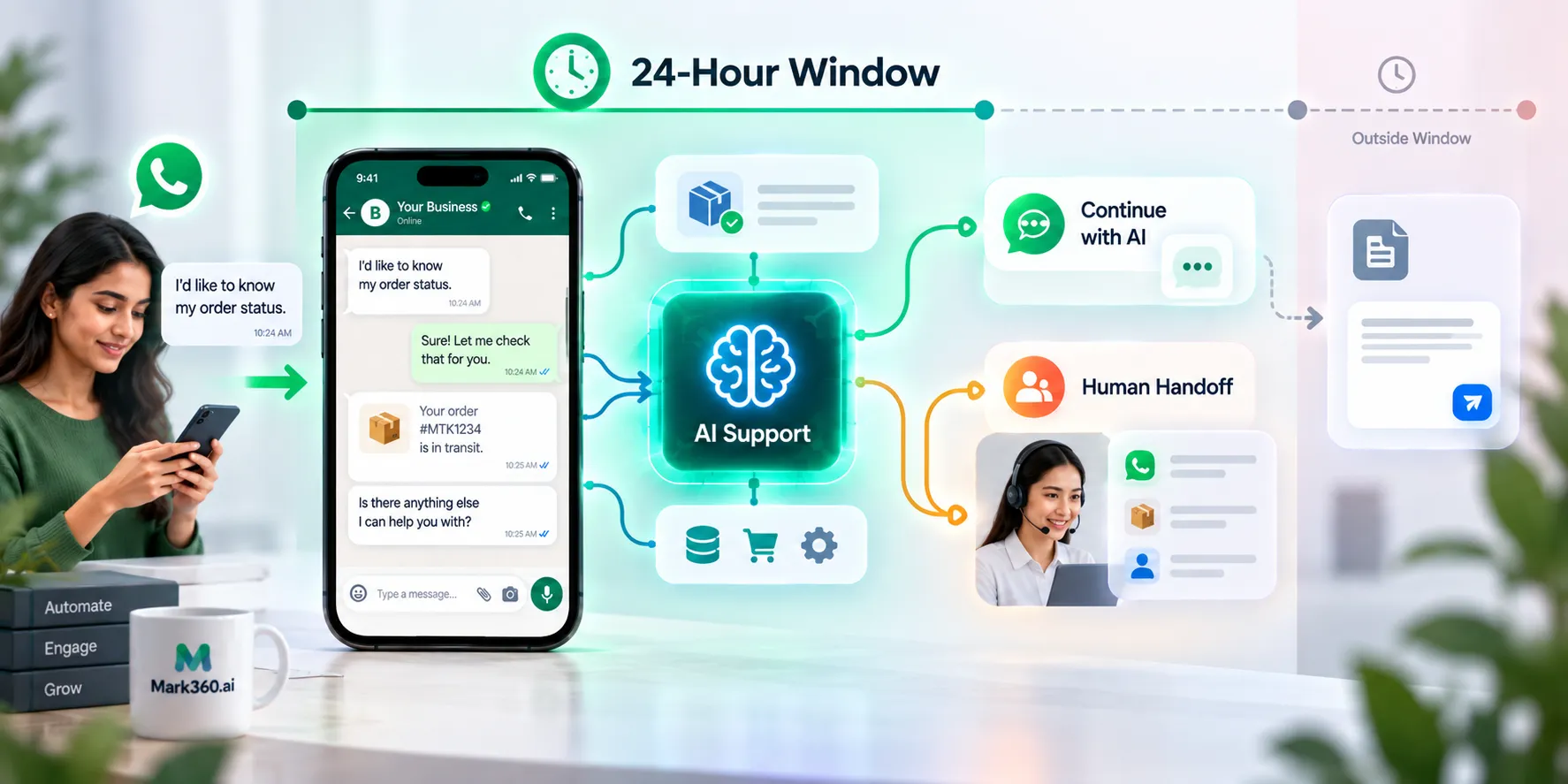
On the WhatsApp Business Platform, businesses can respond to a user's message without a message template during the 24-hour period after the user's last message. Outside that customer service window, business-initiated messages require an approved message template.
Keep human escalation available
WhatsApp's policy allows automation during the customer service window but requires a timely, clear, and direct escalation path. That can include human agent transfer and other support channels.
Don't let the AI become your source of truth
If a customer asks for live order status, appointment availability, current stock, or another changing value, retrieve it from the relevant business system. AI should interpret and communicate the result; it shouldn't fabricate it.
How to measure a WhatsApp AI agent
The best metric depends on the workflow. Don't judge an agent only by how many messages it handled or how often it avoided a human handoff.
Lead qualification rate: how many inbound conversations reach your defined qualification criteria.
Appointment completion rate: how many booking conversations result in confirmed appointments.
Resolution rate: how many support conversations are completed without unnecessary human intervention.
Handoff rate: how often the agent transfers conversations and why.
Action success rate: how often connected APIs or booking actions complete successfully.
Lead conversion: how qualified WhatsApp conversations contribute to opportunities or revenue.
One practical rule: don't chase a 100% automation rate. If a qualified buyer gets handed to the right salesperson with all the relevant information already captured, the agent has done its job.
Common mistakes when building a WhatsApp AI agent
Trying to automate everything
Start with one workflow. Once it works reliably, add another. A narrow agent is easier to test, measure, and improve.
Using the AI model as a database
Don't rely on generated answers for information that changes. Use your knowledge base for approved reference content and APIs for live operational data.
Writing instructions without defining actions
Telling an AI agent to “book an appointment” isn't the same as giving it access to an appointment system. The action needs a defined tool, required information, permissions, and a failure path.
Skipping structured data
If your sales team needs budget, location, timeline, and product interest, define those fields. Otherwise, valuable information can remain buried inside a long conversation.
Ignoring human handoff
Some conversations should stop being automated. Define those conditions before launch and make sure the human receives enough context to take over.
Testing only perfect messages
Real customers don't communicate like test scripts. Test incomplete questions, typos, multilingual messages, changing requirements, repeated questions, tool failures, and requests for human support.
Is a WhatsApp AI agent worth it for your business?
A WhatsApp AI agent makes sense when your team handles repetitive conversations that follow a recognisable workflow and require more than a simple canned response. Lead qualification, appointment booking, customer support, product enquiries, and enquiry routing are strong starting points.
If your requirement is only to send a fixed reminder after an event, traditional WhatsApp automation may be enough. If the customer needs to ask questions, provide information, and trigger an action, an AI agent is a better fit.
Start with one WhatsApp workflow
The best WhatsApp AI agent isn't the one with the longest prompt or the most features switched on. It's the one that reliably completes a useful business workflow.
Start with one problem: qualify inbound leads, book appointments, answer support questions, or route enquiries. Give the agent the knowledge it needs, connect the actions it is allowed to perform, and define exactly when a human should take over.
Mark360 brings those pieces into one agent configuration: Knowledge Base Access, Structured Data Collection, External API Calls, appointment booking, contact and lead updates, interactive WhatsApp messages, conversation assignment, media responses, and session summaries.
Explore Mark360 AI Agents and build a WhatsApp workflow around a real business outcome.
I help eCommerce and D2C brands turn WhatsApp into a serious growth channel — not just a chat app.
For most online stores, the problem isn’t reach. It’s response time.
Customers ask a question, wait too long, and end up buying from someone else.
Every delayed message = a lost sale.
That’s what pushed me to co-found Mark360.ai — a platform that helps brands automate sales, support, and retention through WhatsApp (without losing the human touch).
Our focus isn’t just automation — it’s conversation-led revenue.
Over the past 1.5 years, I’ve seen how a single automated reply can:
• 𝗕𝗿𝗶𝗻𝗴 𝗯𝗮𝗰𝗸 𝗮𝗯𝗮𝗻𝗱𝗼𝗻𝗲𝗱 𝗰𝗮𝗿𝘁𝘀
• 𝗖𝗼𝗻𝗳𝗶𝗿𝗺 𝗖𝗢𝗗 𝗼𝗿𝗱𝗲𝗿𝘀 𝗶𝗻𝘀𝘁𝗮𝗻𝘁𝗹𝘆
• 𝗗𝗿𝗶𝘃𝗲 𝗿𝗲𝗽𝗲𝗮𝘁 𝗽𝘂𝗿𝗰𝗵𝗮𝘀𝗲𝘀
• 𝗕𝗼𝗼𝘀𝘁 𝗰𝘂𝘀𝘁𝗼𝗺𝗲𝗿 𝘀𝗮𝘁𝗶𝘀𝗳𝗮𝗰𝘁𝗶𝗼𝗻
Learn how abandoned cart recovery can recover lost ecommerce revenue, why 25% should be treated as an upper-end target, and how Shopify and WhatsApp automation improve results.
Learn how COD confirmation reduces RTO, what the real RTO percentages look like in India, and how WhatsApp automation can prevent bad COD orders before dispatch.