



Click to WhatsApp Ads Guide for India (2026): Setup, Costs & Conversion Playbook
Click to WhatsApp Ads (CTWA) are Meta ads on Facebook and Instagram that open a WhatsApp chat instead of a landing page or lead form. For Indian brands, that path usually means more real conversations, faster qualification, and fewer abandoned forms — if you set up the campaign correctly and answer within seconds.

Quick answer: What are Click to WhatsApp Ads?
Click to WhatsApp Ads are paid Facebook/Instagram ads with a messaging CTA that starts a WhatsApp conversation with your business number. Use an Engagement or Leads objective, set the conversion location to WhatsApp, write a useful conversation opener, and connect an inbox (WhatsApp Business App for low volume, or WhatsApp Business API via a BSP for automation and AI agents).
| Decision | Recommendation for India |
|---|---|
| Campaign objective | Engagement or Leads — not Traffic |
| Destination | WhatsApp only (uncheck Messenger/IG if you want one inbox) |
| Number type | Business App for tests; API for scale + bots/AI |
| Primary KPI | Messaging conversations started & cost per conversation |
| Post-click stack | Opener → auto-qualify → human handoff → CRM |
Five key takeaways
- CTWA skips forms: the click opens WhatsApp, so reply speed decides conversion.
- Never use Traffic as the objective when you want conversations.
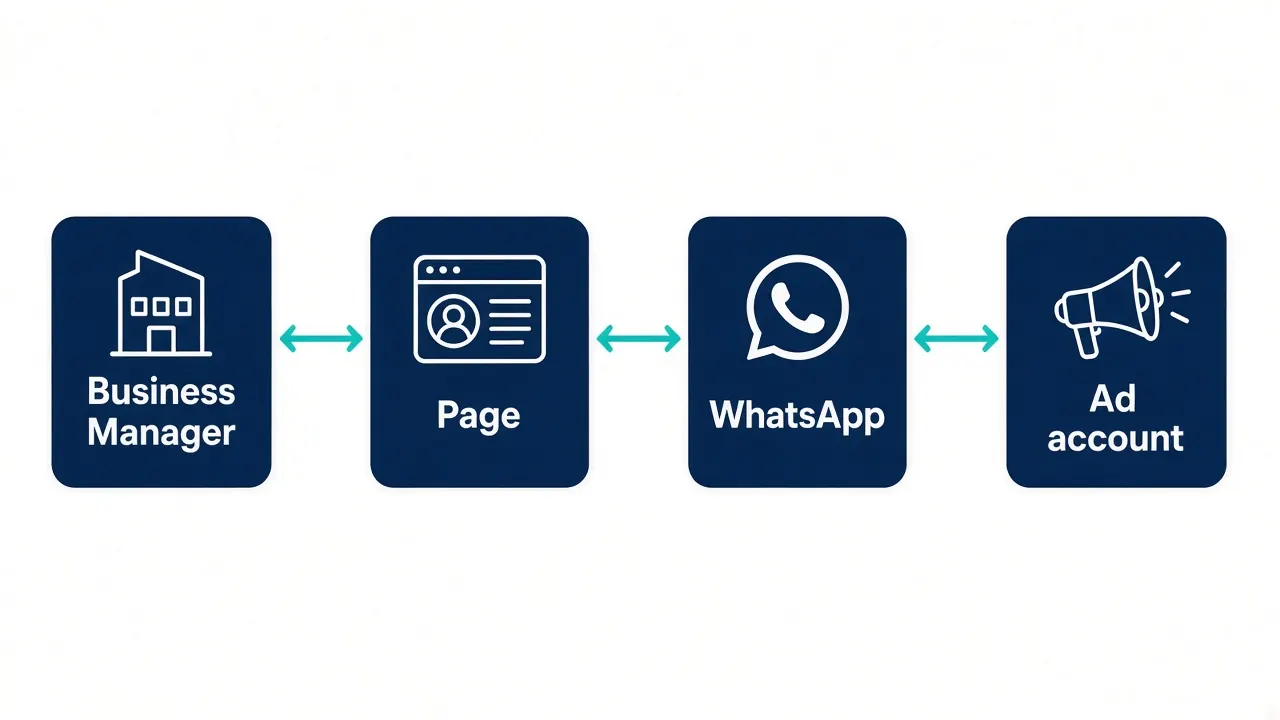
- Link and verify WhatsApp on the same Facebook Page / Business Manager before Ads Manager setup.
- The conversation opener and first automated reply matter as much as the creative.
- Scale on WhatsApp Business API + AI agents once volume exceeds what a human inbox can answer.

Why Click to WhatsApp Ads work for Indian brands
WhatsApp is already where Indian customers ask prices, confirm COD, book demos, and complain about deliveries. CTWA meets that habit: the ad creates intent on Meta, and the chat continues where trust is highest. Compared with classic lead forms, you remove one form-fill step and capture a reachable mobile identity as soon as the chat starts.
CTWA is especially useful for education, real estate, healthcare clinics, local services, D2C, and B2B demo booking — any offer that benefits from a short clarifying conversation before payment or a site visit.
Prerequisites before you open Meta Ads Manager
- A WhatsApp Business account (Business App or API number) — personal numbers are not supported.
- A Facebook Page for the brand (CTWA runs through a Page, not a personal profile).
- WhatsApp linked and OTP-verified under Page settings → WhatsApp.
- Page, WhatsApp account, and ad account under the same Meta Business Manager.
- Admin access and a valid payment method on the ad account.
Most “WhatsApp destination missing” errors are account-linking problems, not Ads Manager bugs. Fix the link first.
How to create Click to WhatsApp Ads in Meta Ads Manager (2026)
1) Choose Engagement or Leads (not Traffic)
Create a campaign and select Engagement (optimises for messaging conversations) or Leads (when Meta offers conversation/lead optimisation for messaging). Avoid Traffic: it optimises for cheap taps, not people likely to send a message, so cost-per-click looks good while cost-per-conversation gets worse.
2) Set conversion location to WhatsApp
At ad set level, choose Messaging apps / Messaging destinations, then WhatsApp. Uncheck Messenger and Instagram Direct if you want every chat in one WhatsApp inbox.
3) Budget, schedule, and audience
For India tests, many teams start around ₹300–₹500 per day so the algorithm can exit learning. Run at least 5–7 days before judging. Prefer broader interest targeting early; use website or customer list retargeting once you have data. Automatic placements across Facebook and Instagram are fine for first launches.
4) Creative and CTA
Use clear offer copy, a single primary CTA (Send Message / Chat on WhatsApp), and creative that looks native to Feed or Stories. Promise a conversation outcome (“Get a quote on WhatsApp”, “Check availability”) rather than a vague “Learn more”.

Conversation opener: the step most CTWA guides underweight
The pre-filled message that appears when WhatsApp opens decides whether the user hits send and whether your team has context. Replace Meta’s generic default with a short, natural opener:
- Service: “Hi, I saw your ad for [service]. Can you share pricing for [city]?”
- Product: “Hi, I’m interested in [product]. Which variant do you recommend?”
- Offer: “Hi, I saw the [offer]. Is it still available today?”
Add quick-reply buttons where available (Get a quote / Talk to sales / Track order) so mobile users can tap instead of type.

WhatsApp Business App vs WhatsApp Business API for CTWA
| Need | Business App | Business API (BSP) |
|---|---|---|
| Low weekly volume / testing | Good fit | Optional |
| Auto-reply, bots, AI agents | Limited | Required for scale |
| Team inbox + CRM sync | Basic | Strong with BSP tools |
| Template follow-ups outside the service window | Constrained | Supported with approved templates |
| CTWA attribution / CAPI | Manual | Easier via BSP integrations |
You can run CTWA on the Business App. Once conversations exceed what one person can answer in a few minutes, move to the WhatsApp Business API so every ad click gets an immediate, on-brand reply.

Post-click playbook: turn chats into leads and sales
- Instant welcome — Confirm the offer and ask one qualifying question within seconds.
- Qualify — City, budget band, product interest, timeline, or COD vs prepaid.
- Route — AI agent or bot handles FAQs; human takes high-intent chats.
- Capture — Save name, phone, campaign/ad IDs, and transcript to CRM.
- Follow up — Inside the customer-care window, reply freely. For later marketing templates, follow WhatsApp category rules and current rates.
- Optimise — Send qualified conversion events back to Meta where your stack supports Conversions API for business messaging.
Mark360, as an Official Meta Business Partner, helps Indian teams connect CTWA inbound chats to WhatsApp AI agents, shared workflows, and Shopify-friendly journeys — so the ad spend is not wasted on unread messages.

Costs to model for India CTWA campaigns
Budget for three layers:
- Meta media spend — your daily/lifetime ad budget (test from ~₹300–₹500/day).
- WhatsApp messaging — user-initiated service conversations from the ad are different from marketing template blasts. Always verify live category rules on Meta’s WhatsApp Business Platform pricing docs.
- Platform / BSP — inbox, automation, AI agents, and seats from your provider.
When you estimate outbound template follow-ups on Mark360 in India, use these Mark360 customer-facing totals (not labeled as Meta’s official card rates): Marketing ₹0.94 and Utility ₹0.138 per delivered template message. Authentication and Service categories should be verified on current pricing pages.

Metrics that prove CTWA is working
- Messaging conversations started
- Cost per messaging conversation started
- Reply rate / time to first response
- Qualified lead rate from chat
- Purchase / booking rate and ROAS (with offline or CAPI events when available)
Customise Ads Manager columns under Messaging before you scale. A cheap CPC with a slow first reply is a losing campaign.
Common CTWA mistakes (and fixes)
- Traffic objective → switch to Engagement/Leads.
- Unlinked WhatsApp / wrong Business Manager → fix Page link and number selection.
- Generic opener → rewrite for context + quick replies.
- No automation at volume → move to API + AI agent / flows.
- No messaging columns → track conversations, not vanity clicks.

How Mark360 helps after the click
Setup gets the conversation started. Conversion depends on what happens next. Mark360 combines WhatsApp Business API access, AI agents, and automation so Indian teams can greet CTWA leads instantly, qualify intent, escalate to humans, and keep Shopify or CRM systems updated — with transparent customer-facing India message totals.
Explore Mark360 WhatsApp API · Pricing · Pricing calculator

Related reading: Click-to-WhatsApp ads for Shopify, Meta Click to WhatsApp and Instagram ads funnel, and WhatsApp Business API pricing in India.