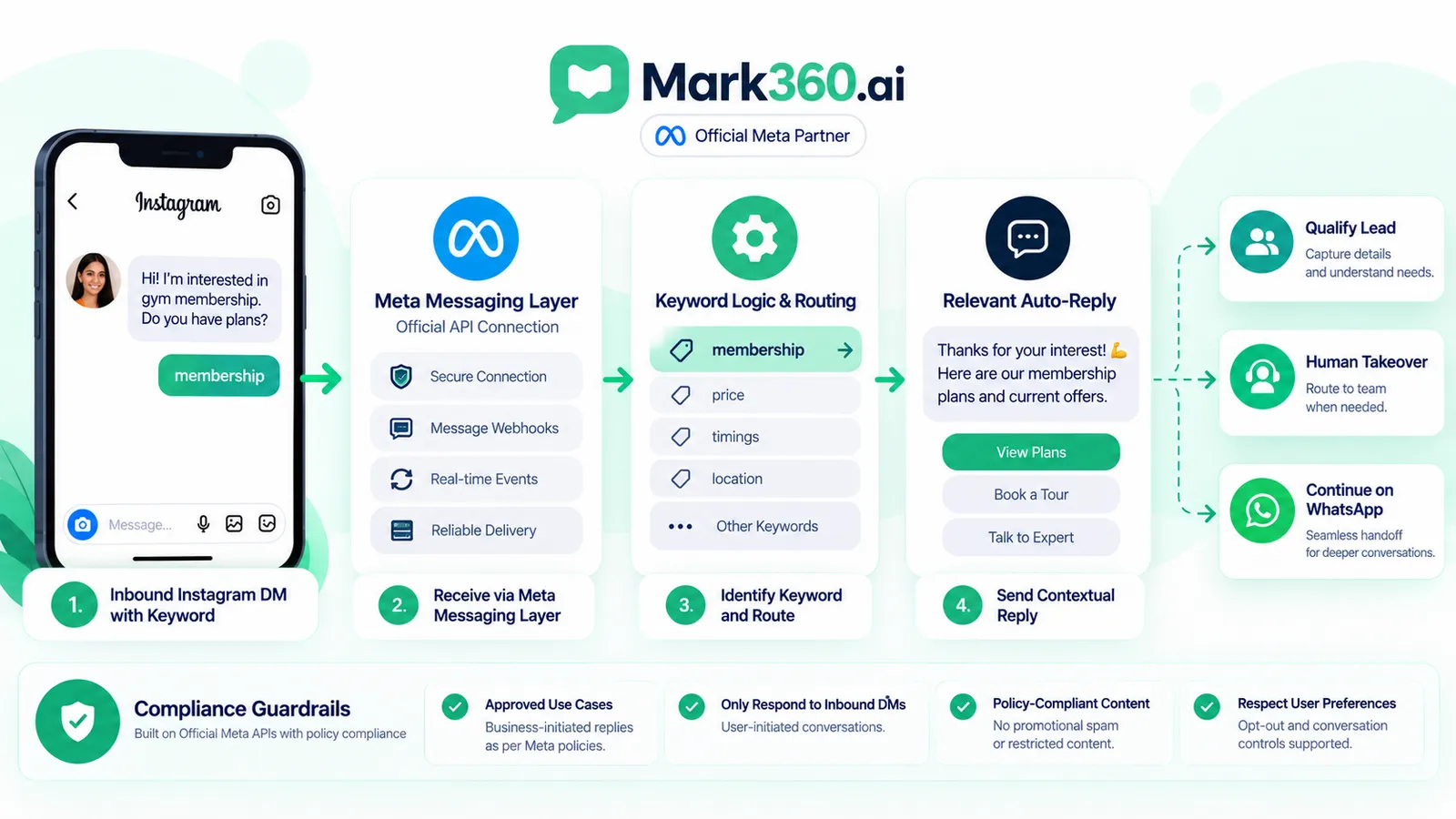
Instagram auto reply is most useful when it responds to a conversation the customer has already started. Instead of automatically messaging new followers or cold audiences, an inbound keyword workflow waits for a person to send a relevant Instagram DM such as “PRICE”, “SIZE”, “BOOK” or “LINK”, matches that message against a rule, and returns the next useful response.
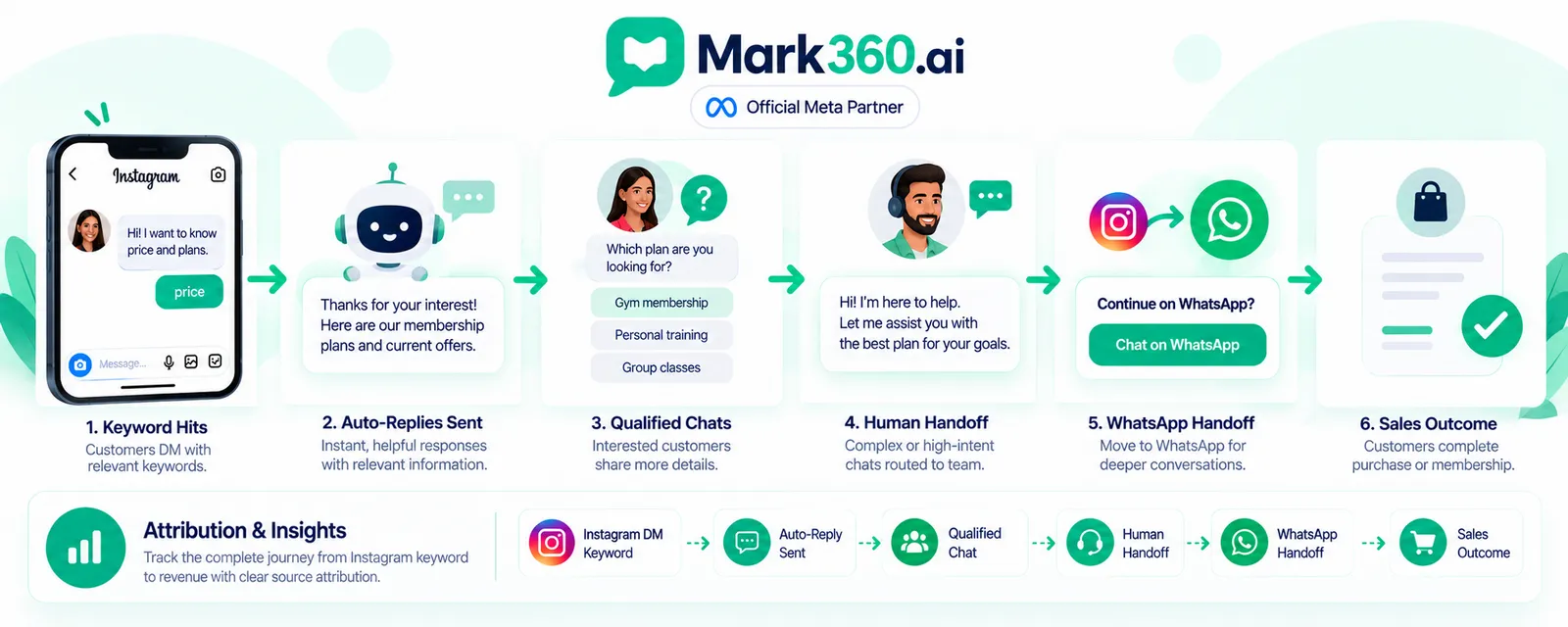
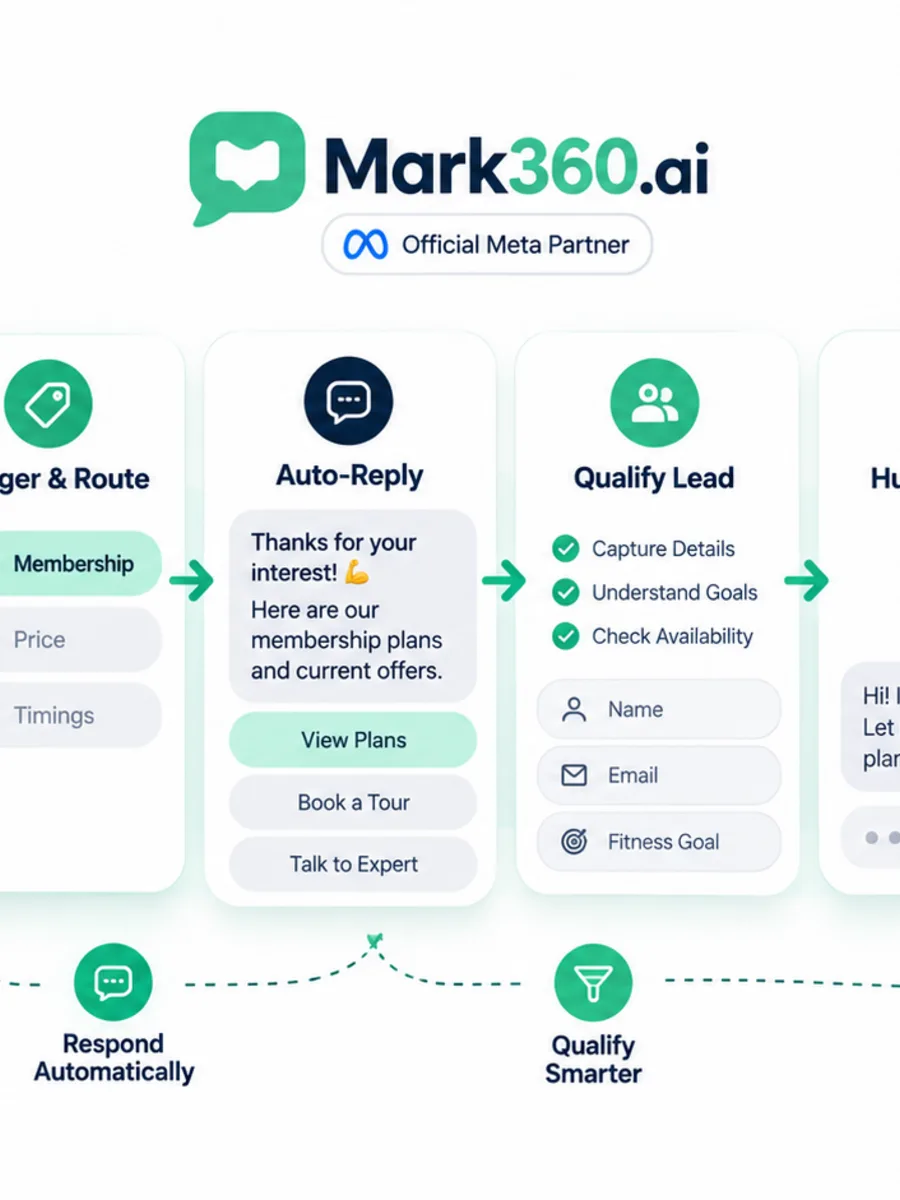
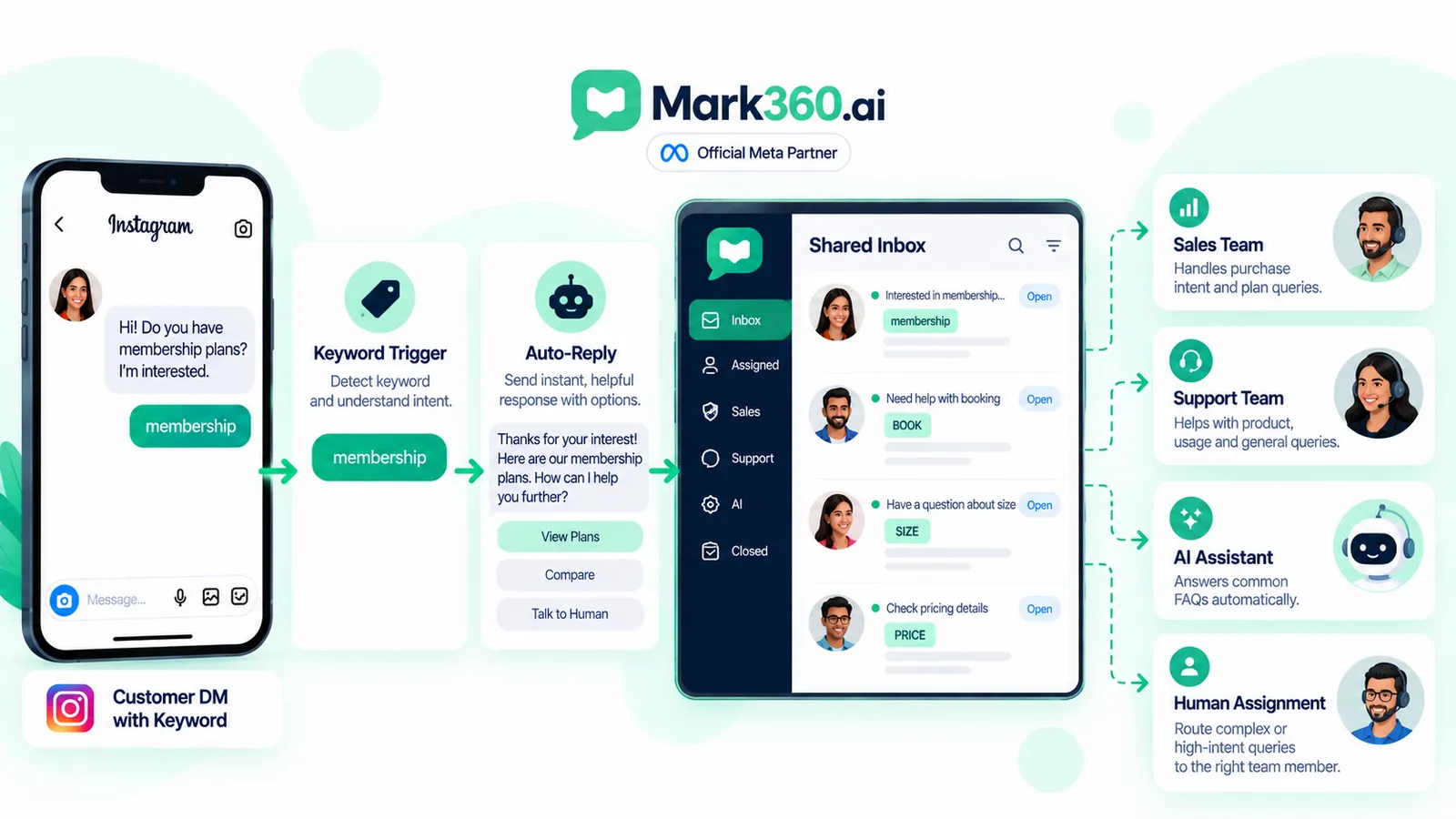
For ecommerce brands, creators, agencies and local services, this creates a simple route from intent to action: customer sends keyword → automation recognises intent → first reply answers or qualifies → high-intent conversations reach a human → WhatsApp can become the next channel when appropriate.
Direct answer: An Instagram DM keyword auto-reply works by connecting an eligible professional Instagram account to a supported messaging workflow, detecting configured keywords in incoming messages, and returning a relevant response. The best workflow does not treat a keyword as permission for unlimited promotion. It uses the customer's inbound message as context, delivers the expected answer, applies sensible frequency and consent controls, and provides a human escalation path when automation is no longer appropriate.
This guide focuses specifically on inbound Instagram DMs containing keywords. It is different from comment-to-DM, Story-reply automation, follow-gates and cold outbound messaging.
Comment-to-DM vs DM Keyword Triggers: Two Different Entry Points
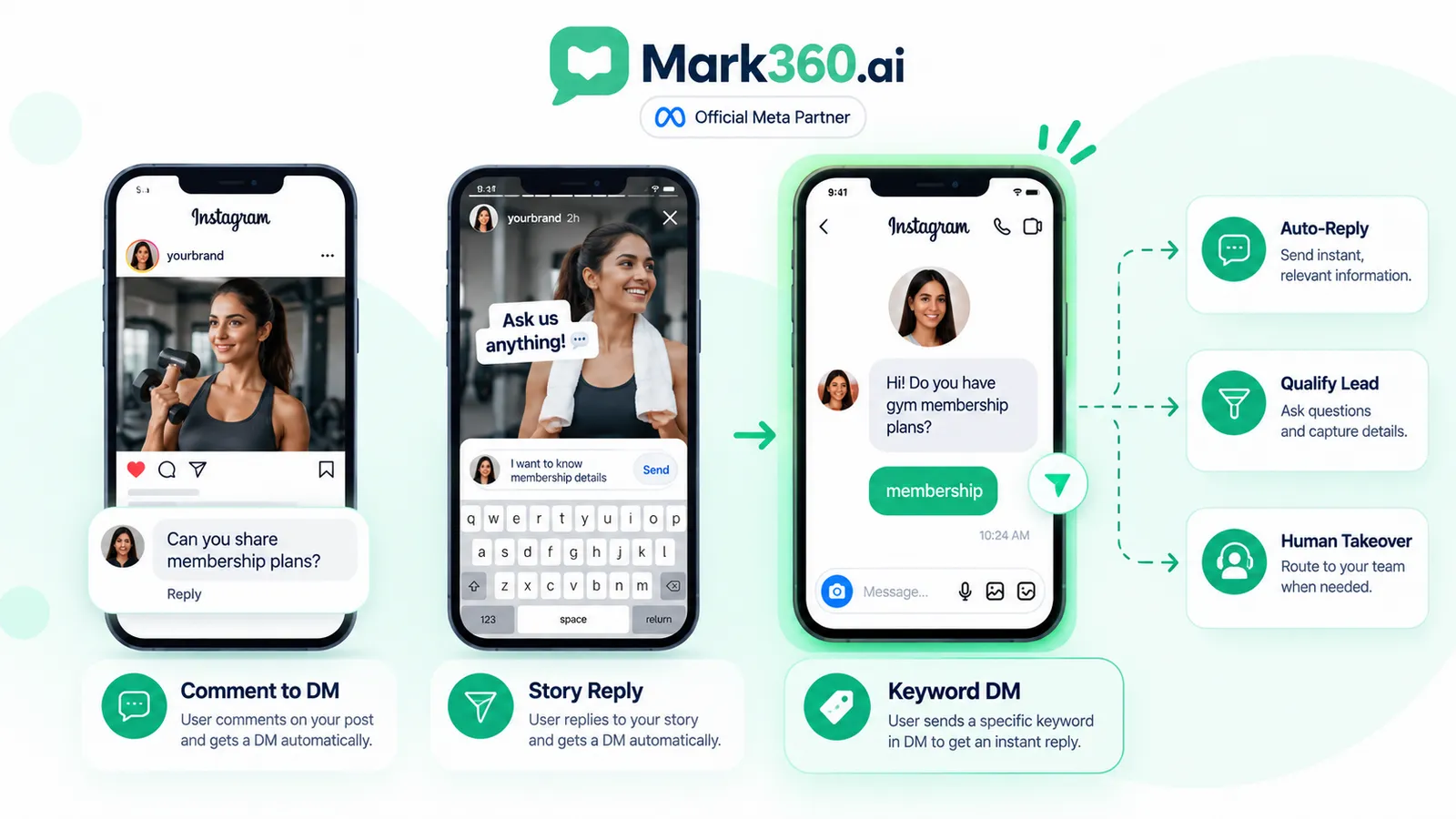
Instagram automation becomes easier to design when the entry point is explicit. A comment-to-DM workflow starts from a public interaction on a post or Reel. A DM keyword trigger starts after the customer has already sent a private message containing a configured word or phrase.
For example, imagine a fashion brand publishing content about a new collection. A comment-to-DM campaign might ask people to comment GUIDE. A DM keyword campaign instead tells interested customers: “Send us PRICE for the current product information.” The customer then opens the private conversation and sends PRICE.
| Entry point | Customer action | Automation context | Typical next step |
|---|---|---|---|
| Comment-to-DM | Comments on content | Post or Reel + comment | Private response where supported |
| DM keyword | Sends a keyword | Inbound message + keyword | Answer, qualify or route |
| Story reply | Replies to a Story | Story interaction | Relevant conversation flow |
| Direct question | Sends natural-language DM | Conversation context | AI or human response |
The distinction matters because an inbound DM provides stronger conversational context. The person has already opened the private channel and taken an action. That makes keyword routing particularly useful for repetitive questions such as pricing, sizing, booking, product availability or requests for a catalogue.
Mark360's related Instagram Comment-to-DM to WhatsApp guide covers the public-comment entry point. For Story-specific interactions, see Instagram Auto Reply & Story Reply Automation. The architecture in this article deliberately stays focused on inbound DMs.
Why the distinction changes the automation design
A comment trigger needs to establish why the customer is being contacted privately. An inbound DM keyword already contains that starting context. The automation therefore has less reason to manufacture engagement and more reason to answer efficiently.
What Instagram Allows for Automated DM Replies in 2026
Instagram messaging automation should be built around Meta-supported capabilities rather than browser simulation, scraping or password-based automation. The exact permissions, account requirements, supported message types and product behaviour can change, so a workflow should be checked against current official documentation before launch.
For the technical layer, use Meta's current Instagram platform documentation and messaging documentation as the source of truth:
- https://developers.facebook.com/docs/instagram-platform/
- https://developers.facebook.com/docs/instagram-platform/instagram-api-with-instagram-login/messaging-api
- https://developers.facebook.com/docs/instagram-platform/instagram-api-with-instagram-login/messaging-api
The important operational principle is that an Instagram autoresponder should respond to an eligible inbound conversation rather than inventing a reason to contact someone. A keyword such as PRICE is useful because the customer supplied the signal. It does not mean the business can subsequently send unlimited unrelated promotional messages.
Do not build around undocumented API limits, delivery guarantees or assumptions copied from old tutorials. Verify current Meta capabilities, permissions and account eligibility for the specific implementation.
For teams that need a broader policy reference, Mark360's Instagram Messaging API Rules and Limits guide provides additional context, while the official Meta documentation remains the appropriate source for current platform behaviour.
Use official integrations, not scraping
Avoid tools that ask for Instagram passwords, scrape follower lists, imitate browser activity or promise mass cold-DM capabilities outside supported platform behaviour. Besides creating operational risk, these approaches make the automation dependent on implementation details that can change without notice.
Native Meta Business Suite Keywords vs API-Based Tools
Businesses evaluating Instagram messaging automation will encounter different layers of tooling. Meta's own business products provide native messaging and business-management capabilities, while API-based platforms can add workflow logic, routing, automation, AI assistance, shared inboxes and business-specific actions.
The right choice depends on the complexity of the workflow rather than on whether one category is universally better.
| Approach | Useful for | Consider |
|---|---|---|
| Native Meta tools | Basic business messaging operations | Check current native automation capabilities and account eligibility |
| Instagram-focused automation tool | Keyword replies and lightweight DM flows | Review trigger coverage, routing and current platform support |
| Broader conversational platform | DM automation plus team workflows | Evaluate shared inbox, AI, handoff and other channel support |
An Instagram chatbot can be useful when keyword rules are only the first layer. For example, PRICE could return an initial answer, while a second customer message can be handled by an AI-assisted FAQ flow or routed to a sales agent. The key is to keep the automation grounded in the customer's actual conversation rather than creating an endless scripted sequence.
When comparing vendors, check the current product documentation, connected account requirements, available permissions, supported triggers and human-handoff behaviour. Avoid choosing based only on a screenshot or an old feature list.
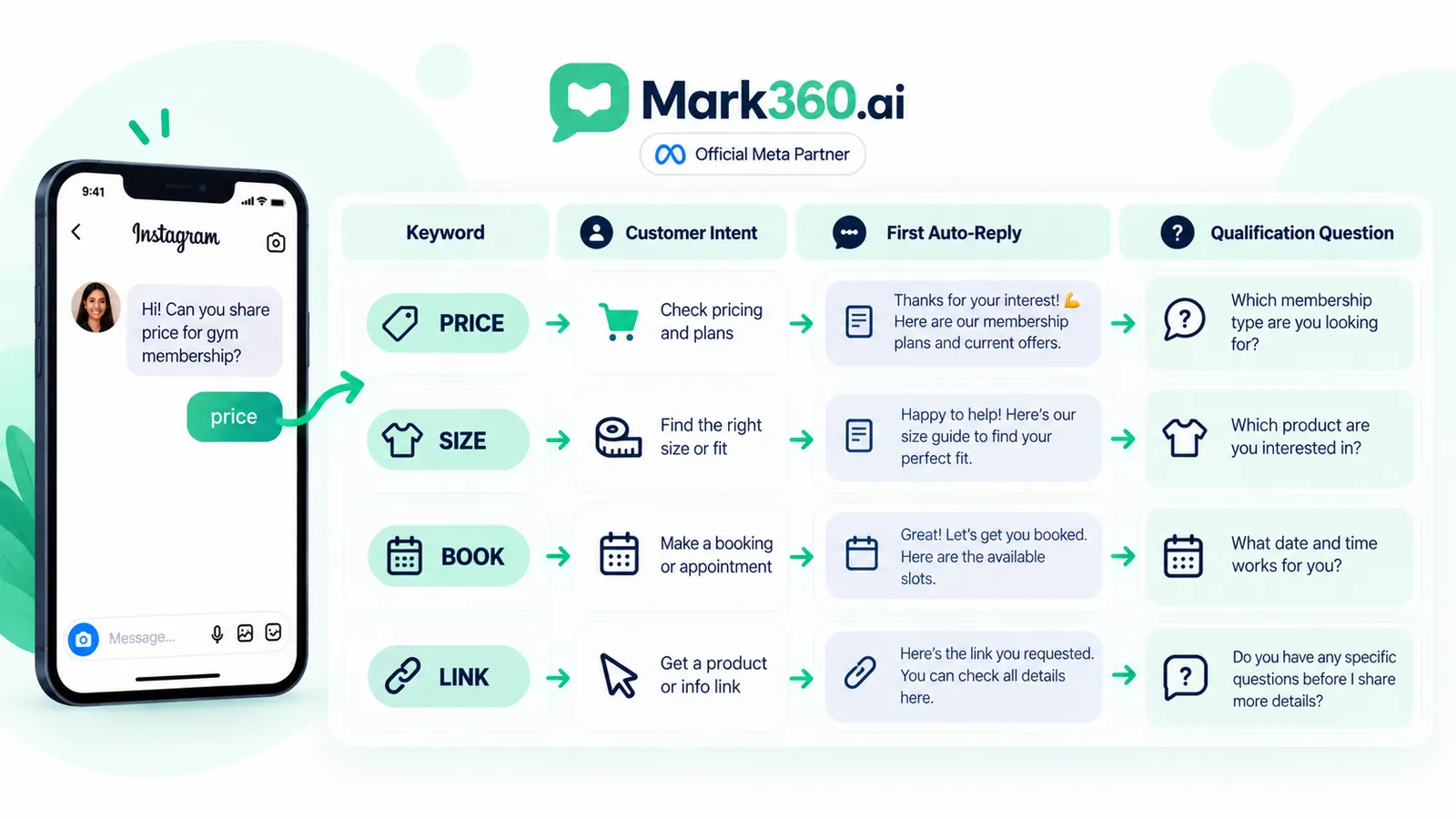
Choosing Keywords That Match Purchase Intent (PRICE, SIZE, BOOK, LINK)
A useful keyword is short, memorable and tied to a specific customer need. Four practical patterns are PRICE, SIZE, BOOK and LINK.
| Keyword | Likely intent | First response | Qualification option |
|---|---|---|---|
| PRICE | Wants commercial information | Relevant current pricing context or destination | Ask which product or option they mean |
| SIZE | Needs fit information | Size guide or sizing explanation | Ask product or measurements if needed |
| BOOK | Wants an appointment or consultation | Booking next step | Ask service or preferred timing |
| LINK | Wants a specific destination | Relevant page or resource | Ask what they are looking for if ambiguous |
The keyword should also be distinct enough to avoid accidental matches. A broad word can appear naturally in unrelated conversations, while a specific keyword creates clearer intent.
Design the keyword around the customer's job
Do not start by asking, “What keyword can our software detect?” Start with, “What is the customer trying to accomplish?” If the customer wants a catalogue, CATALOGUE may be more meaningful than a generic keyword. If they want a booking, BOOK may be appropriate.
For ecommerce, the keyword can map to a product category. For creators, it can deliver a promised resource. For local services, it can start a booking or quote conversation. The automation becomes easier to understand when the keyword and promise are aligned.
Building the First Reply: Buttons, Links, and Opening the Messaging Window
The first automated response is where many keyword workflows either become useful or immediately feel robotic. Treat it as the beginning of a customer conversation, not as a dumping ground for every available link.
A practical first reply has four parts:
- Acknowledge: recognise the keyword or request.
- Deliver: provide the information or destination promised.
- Clarify: ask one relevant question if more context is needed.
- Escalate: provide a clear path to a human when the request is complex or high-intent.
For example:
Customer: “PRICE”
Auto reply: “Sure — are you asking about the Classic or Premium option? Reply CLASSIC or PREMIUM and I’ll point you to the relevant details.”
This is usually more useful than sending a generic sales paragraph. It keeps the conversation focused on the customer's stated intent.
Buttons, quick replies and links can make a flow easier to navigate where the connected platform and current Meta capabilities support them. Do not assume that every interface element is available for every Instagram account or message context.
Do not confuse an inbound keyword with unlimited permission
The keyword provides conversation context. It should not be treated as a blanket permission to send unrelated promotional sequences. If the customer asked for PRICE, answer PRICE. If the customer asks to stop receiving messages, respect the request and provide an appropriate route for further communication.
Routing Hot Keywords to Humans (Takeover) vs Automated Answers
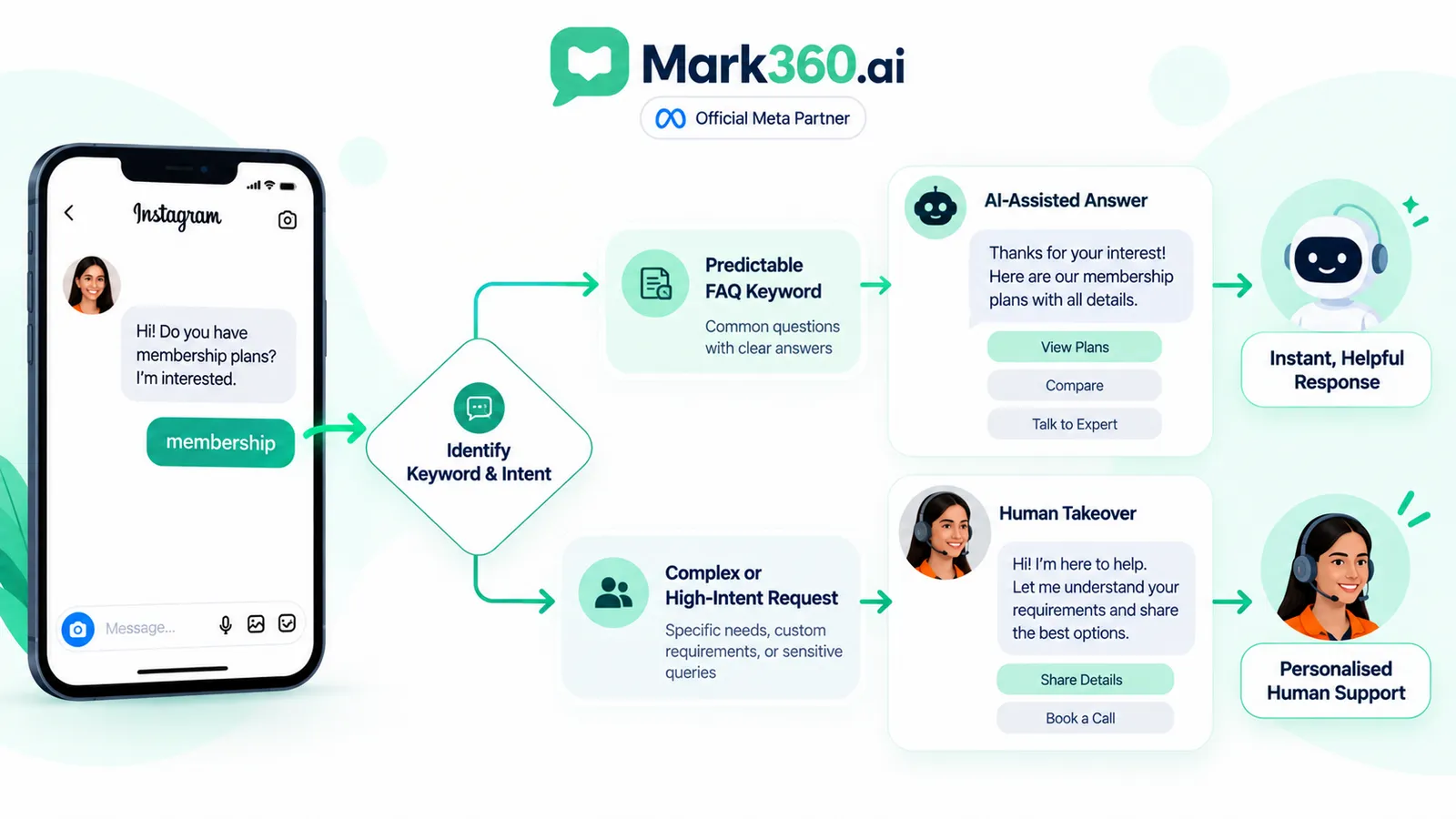
Not every keyword deserves the same automation path. A useful routing model separates predictable questions from conversations where a human should take over.
| Intent category | Example | Automation | Human role |
|---|---|---|---|
| Simple FAQ | SIZE | Answer from approved information | Available if follow-up is needed |
| Resource request | LINK | Return relevant destination | Handle additional questions |
| High purchase intent | PRICE | Initial qualification | Sales takeover |
| Appointment | BOOK | Start booking route | Handle exceptions |
| Sensitive or unusual request | Custom message | Limited automation | Human review |
An Instagram chatbot becomes more valuable when it knows when not to continue. A customer asking a nuanced product question may need a person even if the first keyword was simple. Likewise, a customer who begins with PRICE may quickly become a high-value sales conversation.
AI can help with repetitive FAQs when the underlying information is reliable and the system has a clear boundary. It should not invent inventory, discounts, delivery promises or product facts that are not available from a trustworthy source.
Connecting Keyword Hits to WhatsApp When the Deal Needs Chat Persistence
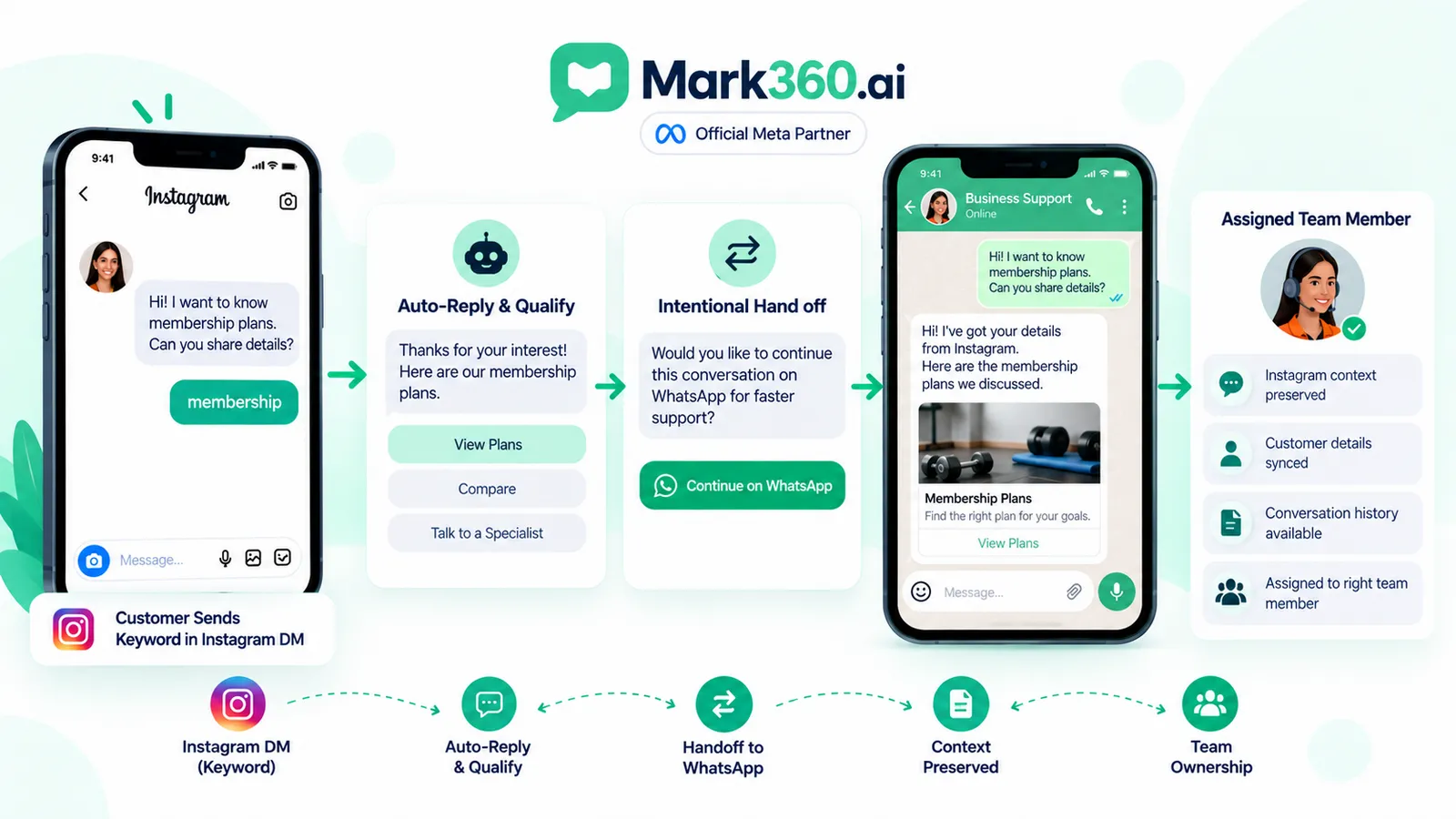
Instagram can be the first private conversation, while WhatsApp can become the next channel when the customer intentionally wants to continue there and the business already operates a WhatsApp workflow.
The handoff should be useful, not automatic for every keyword. A customer asking a basic sizing question may never need WhatsApp. A customer comparing products, asking for assisted sales or requesting continued support may have a stronger reason to move channels.
A sensible flow is:
- Customer sends an Instagram keyword.
- Instagram auto reply fulfils the immediate request.
- The automation asks a relevant qualification question when needed.
- A human or workflow recognises that the conversation would benefit from continued support.
- The customer is offered an appropriate WhatsApp route.
- The team continues the conversation with the available context.
WhatsApp has its own business messaging requirements. Current WhatsApp Business policy says businesses need appropriate user permission for subsequent WhatsApp messages and should respect opt-out requests. WhatsApp also provides specific rules around business-initiated conversations, templates and customer-service messaging. Check the current official policy before designing the handoff:
https://business.whatsapp.com/policy/
Mark360's Instagram DM Automation + IG/WA Shared Inbox guide covers the broader operational model.
Tags, Contact Fields, and Simple Qualification Without Overbuilding CRM
Keyword automation does not need a giant CRM project to become useful. Start with a small amount of structured context that helps the next person understand why the customer contacted the business.
Useful lightweight fields can include:
- Intent: PRICE, SIZE, BOOK or LINK.
- Product interest: the product or category mentioned.
- Stage: new enquiry, qualified, human handoff or resolved.
- Source: Reel, Story, profile, ad or direct DM where available.
- Owner: the person or team handling the conversation.
Tags should answer operational questions rather than become a collection of arbitrary labels. If the sales team cannot explain why a tag exists or what action it triggers, it may not be useful.
For Shopify brands, this lightweight context can complement commerce workflows without pretending to be a full enterprise CRM synchronization layer. Mark360's Ecommerce Instagram DM Automation guide covers product, cart and handoff use cases in more detail.
Capture only what the workflow needs
Collecting more information does not automatically make an automation smarter. If a customer only needs a product link, do not turn a simple request into a long qualification form. Ask for additional information when it changes the next action.
Team Inbox Workflow: Assignment After a Keyword Fires
A keyword trigger becomes operationally valuable when the conversation can move cleanly from automation to a person. Without assignment and context, a customer may receive an instant reply but then wait while the team works out who owns the conversation.
A simple team workflow can look like this:
- Incoming DM: customer sends the keyword.
- Trigger: automation identifies the configured keyword.
- Auto reply: customer receives the immediate answer.
- Qualification: the customer answers a short follow-up if needed.
- Routing: the conversation receives the appropriate owner or queue.
- Takeover: a human continues the conversation.
The team should also be able to see the relevant conversation history. If the customer has already explained what they need, the agent should not have to ask the same question again.
This is where an Instagram WhatsApp shared inbox can become useful for businesses operating across both channels. The objective is not simply to place two message streams on one screen; it is to preserve enough context for the team to understand the customer's journey and continue it appropriately.
Measuring Keyword Performance (Hits, Opt-Ins, Handoffs, Sales)
The first metric is not simply how many messages the automation sends. Measure whether the keyword workflow actually improves the customer journey.
| Metric | Question it answers | What to investigate |
|---|---|---|
| Keyword hits | How often do customers use the trigger? | CTA clarity and customer intent |
| First-reply delivery | Did the expected response occur? | Trigger rules and integration health |
| Conversation continuation | Do customers respond after the first reply? | Relevance and clarity of the response |
| Qualified conversations | How many enquiries meet the team's criteria? | Keyword and qualification design |
| Human handoffs | Which conversations need people? | Routing and agent capacity |
| WhatsApp handoffs | Which customers intentionally continue on WhatsApp? | Channel fit and handoff wording |
| Sales outcomes | Does the journey contribute to business results? | Attribution and downstream process |
Do not manufacture benchmark numbers. Your own baseline matters more than an arbitrary industry percentage. Compare similar keywords, campaigns and customer intents over time, and make sure the business outcome is attributable enough to support the conclusion.
For example, if PRICE generates many keyword hits but few continued conversations, the problem may be the first reply, the information provided or the qualification step. If BOOK creates fewer conversations but most are handed to the correct team, the workflow may be functioning as intended.
Compliance: Messaging Windows, Frequency, and No Cold Auto-DM
The central guardrail is simple: an inbound message should drive the response. Do not use an Instagram auto reply system as a reason to contact new followers or people who have not initiated a qualifying interaction.
Keyword matching is useful context, but it is not permission to spam. Keep replies relevant to the customer's request, avoid repetitive promotional sequences, provide a human escalation path and respect requests to stop or change the conversation.
Messaging windows and supported message behaviour are platform-specific and can change. Do not copy an exact window or quota from an old blog post and assume it applies to every Instagram workflow. Check current official Meta documentation for the connected account and API implementation.
For WhatsApp, current business policy is explicit that businesses should obtain appropriate permission for subsequent WhatsApp messages and respect requests to stop communications. The policy also describes customer-service messaging and approved templates for business-initiated conversations. Verify the current policy at https://business.whatsapp.com/policy/ before implementing an Instagram-to-WhatsApp sequence.
Good governance also means limiting automation to information the system can answer reliably. If a customer asks something outside the automation's knowledge or a situation requires judgement, hand off to a person.
Do not build cold follower automation
A person following a business is not the same as a person sending an inbound keyword DM. Keep those entry points separate. This article is about customers who initiate a qualifying private conversation.
Playbook Examples for Ecommerce, Creators, and Local Services
Ecommerce: PRICE and SIZE
A fashion brand can invite customers to send PRICE for a product category. The first reply can identify the requested item and provide the relevant current destination. SIZE can route to a sizing explanation. If the customer then asks about fit or alternatives, a human can take over.
The important part is that the automated response does not invent current prices or availability. If those values change, use a reliable current data source or send the customer to the appropriate live destination.
Creators: GUIDE and LINK
A creator selling a course or digital product can invite an audience to DM GUIDE for a checklist. The automation can provide the requested resource and then ask whether the person wants more information about the related offer. Any separate marketing subscription should use the appropriate consent mechanism rather than assuming that requesting a guide means unlimited promotional permission.
Local services: BOOK
A salon, consultant, fitness business or other local service can use BOOK as an inbound intent signal. The first reply can identify the requested service and direct the customer toward the next booking step. If the request needs availability confirmation or special handling, the workflow can route the conversation to a staff member.
Agencies: route by client and intent
An agency managing several brands can standardise the pattern while keeping each client's keywords, replies and routing rules separate. The shared operational model can be simple: detect intent, fulfil the immediate request, record lightweight context and hand off when the conversation needs expertise.
For brands that want the Instagram and WhatsApp sides managed together, Mark360 is a natural fit to evaluate. Its documented product direction includes incoming Instagram DM keyword auto-replies, AI-assisted FAQ and qualification flows, human assignment and takeover, and a unified Instagram and WhatsApp shared inbox. Shopify-oriented commerce workflows can support the broader journey, while the exact depth of any integration should be verified against the current product implementation rather than assumed.
The goal is not to automate every message. It is to make a customer's intentional inbound message easier to answer, route and close.