What Is Instagram Auto Reply?
Instagram auto reply is a workflow that automatically responds to an eligible Instagram interaction instead of requiring a team member to type every response manually. For Stories, the interaction can be a reply or reaction to a Story, after which an automation can send a relevant DM, provide a requested link, answer a predefined question, collect useful information, or route the conversation to a human.
The most effective approach is not to automate every Instagram conversation. It is to automate predictable first steps while preserving a clear human path for questions that require judgement, support, sales assistance, or context.
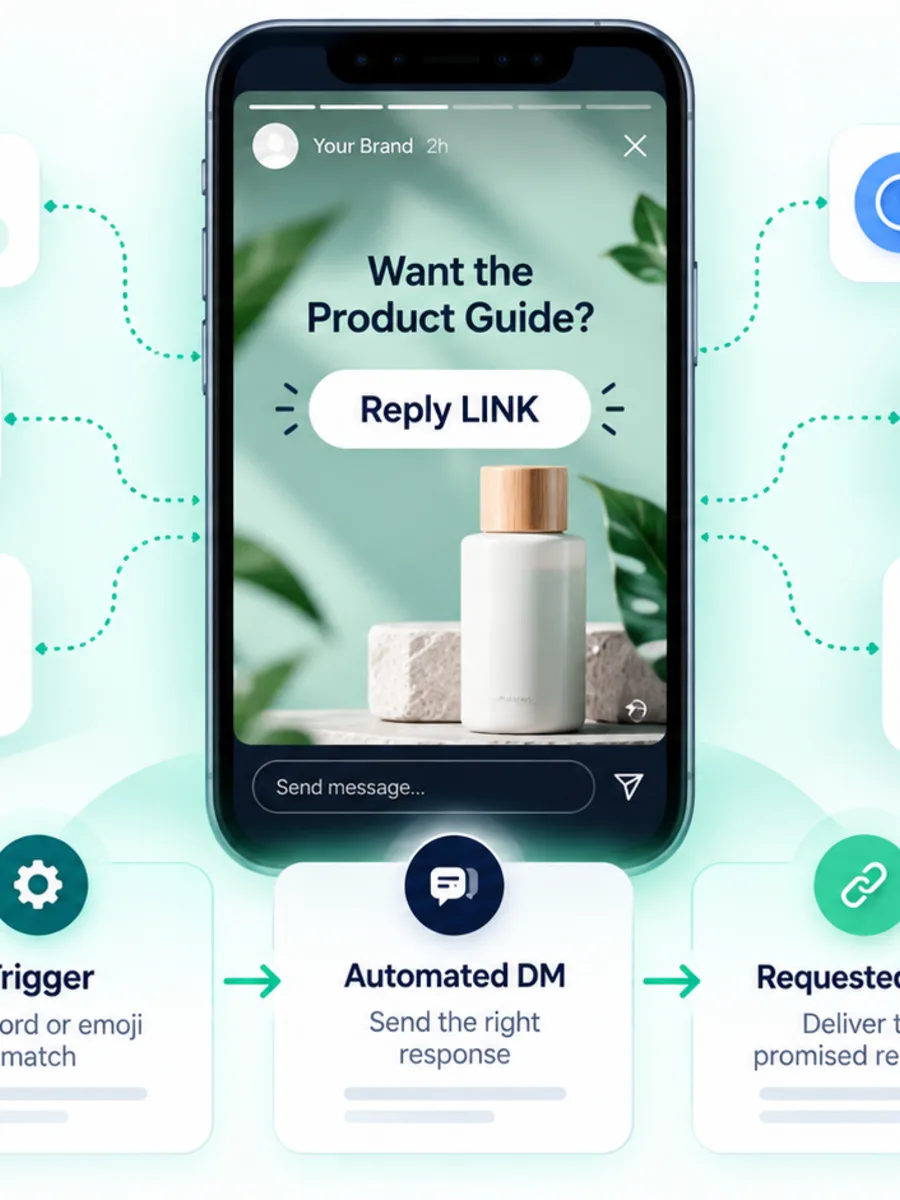
For example, a brand might publish a Story saying “Reply LINK and we’ll send the product guide.” A customer replies “LINK”, the automation recognises the configured trigger, and the customer receives the promised resource in the DM conversation. The customer has initiated the interaction, so the workflow is based on an explicit action rather than unsolicited cold messaging.
Meta's current Instagram API documentation describes messaging capabilities for Instagram professional accounts, including business messaging permissions and the ability to send and receive messages through supported API flows. Postman +1
Direct Answer: How Does Instagram Story Reply Automation Work?
Instagram Story reply automation works by detecting an eligible reply or reaction to a business or creator's Story, matching that interaction against configured conditions, and starting an automated DM flow. Depending on the platform and current Meta capabilities, conditions can include a keyword, a selected Story, a reply type, or another supported trigger.
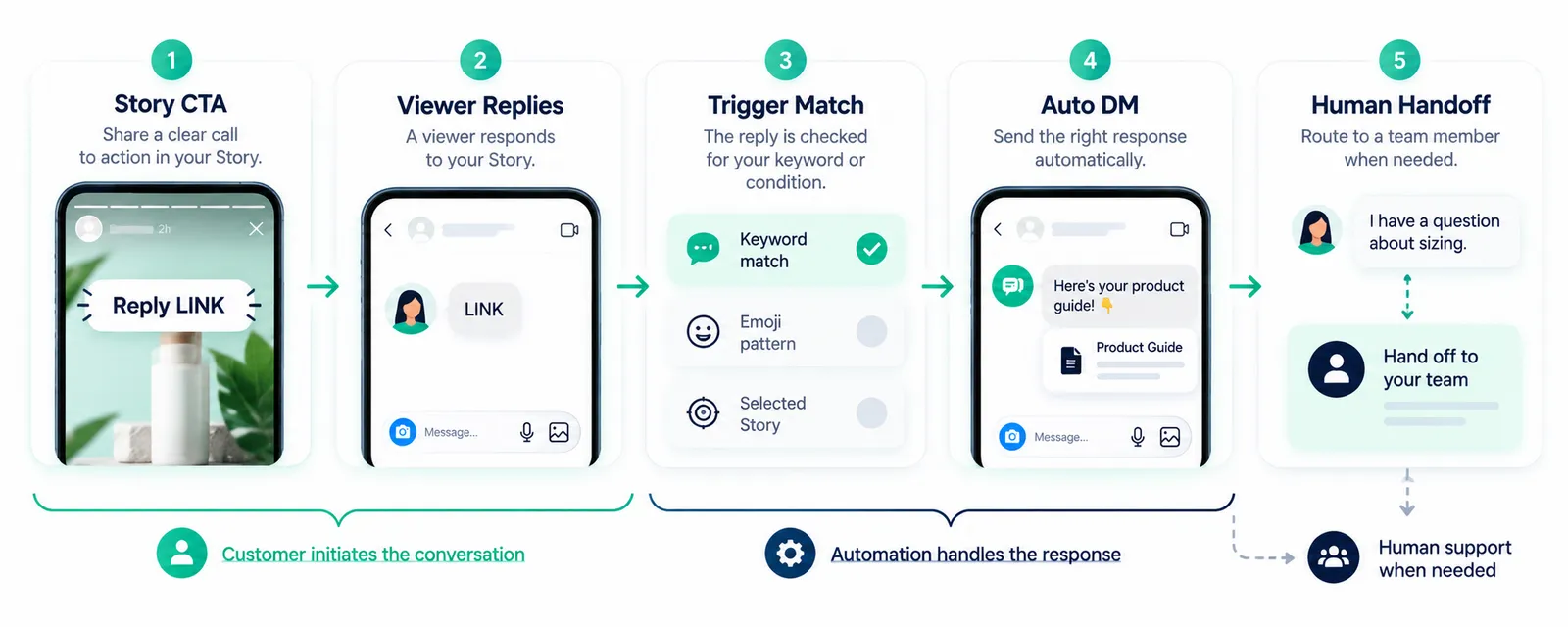
A simple workflow looks like this:
- Publish a Story with a clear CTA.
- A viewer replies to the Story.
- The automation receives the eligible event.
- The workflow checks the configured trigger or condition.
- An opening DM is sent with the promised response.
- The customer can continue the conversation or request human help.
ManyChat currently documents an Instagram Story Reply trigger that starts an automation when someone replies to a Story, including replies sent as messages or emoji reactions. Manychat Help InstantDM and ReplyKaro also document Story reply automation using keyword-based or broader Story interaction triggers. InstantDM +1
Story Reply vs Comment-to-DM vs Icebreaker or Welcome
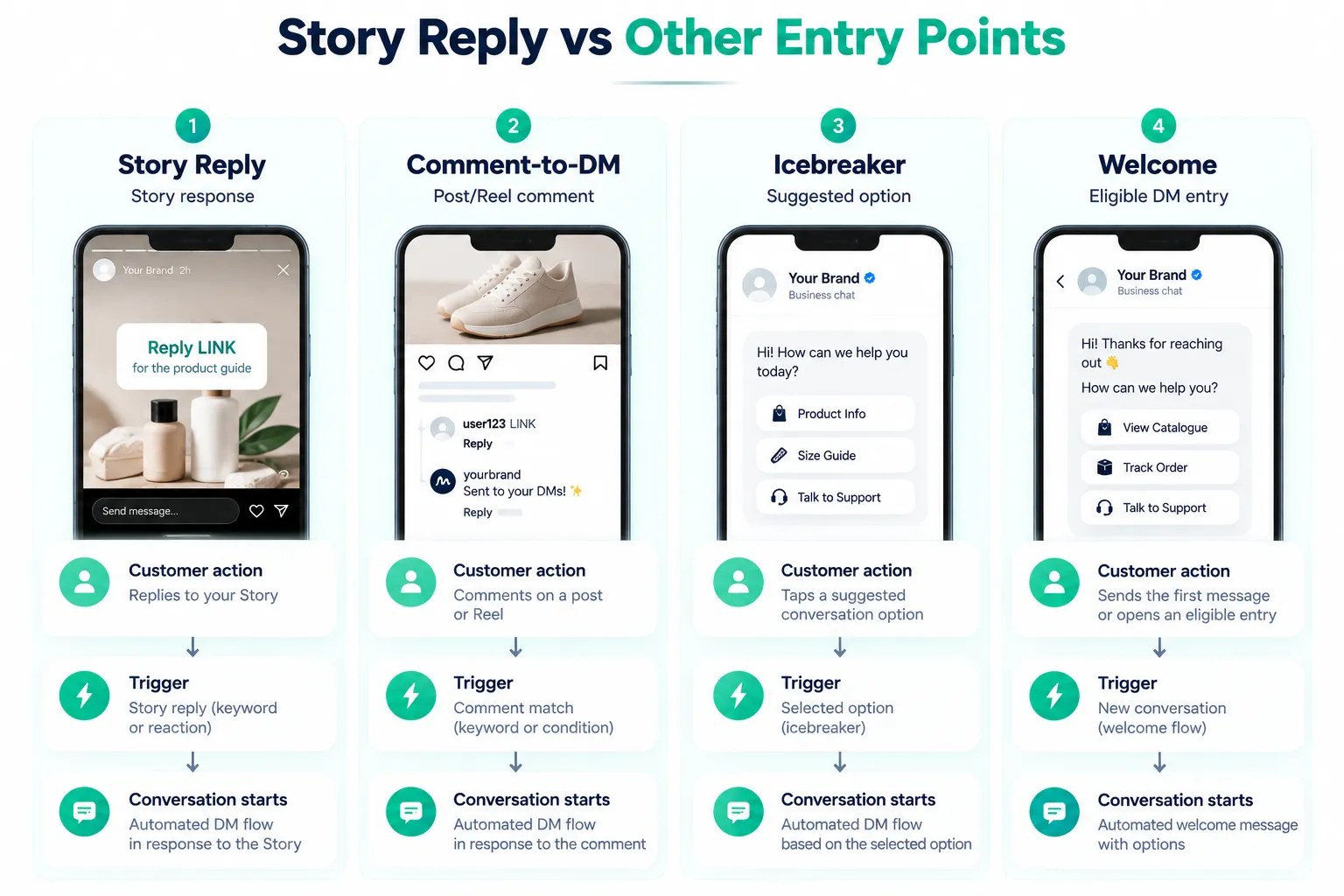
These terms are related but they describe different entry points. Understanding the distinction prevents teams from choosing a tool or workflow based on a misleading feature label.
| Workflow | Customer action | Typical use |
|---|---|---|
| Story reply | Viewer replies to your Instagram Story | Send requested information, answer a Story question, start a conversation |
| Comment-to-DM | User comments on a post or Reel | Deliver a link, resource, product information or campaign response |
| Icebreaker / conversation starter | User chooses a suggested conversation option | Start a guided DM interaction |
| Welcome message | User enters an eligible messaging journey | Introduce the business or guide the next action |
A Story reply is therefore not simply another name for comment automation. The source event is different, and platform rules can treat different entry points differently.
Meta's current API documentation describes Instagram conversations as beginning when an Instagram user sends a message to the professional account through supported entry points, including Stories and other surfaces. Postman +1
Why Stories Are Useful for DM Conversations
Stories are naturally suited to short, contextual calls to action. A brand can show a product, explain a problem, demonstrate a feature, answer a question, or announce an event and then invite the viewer to respond.
The DM becomes the next layer of the interaction. Instead of putting every detail on the Story itself, the Story can invite a small action and the conversation can provide the relevant information privately.
For ecommerce, a Story might say “Reply SIZE for the size guide.” For a service business, it could say “Reply BOOK for consultation availability.” A creator might say “Reply GUIDE for the checklist.” These examples work because the CTA tells the viewer exactly what action to take and what to expect next.
The automation should then fulfil that promise. If the customer asks for a size guide, the first automated message should not suddenly become a generic promotional sequence.
Story CTA Patterns That Work Well
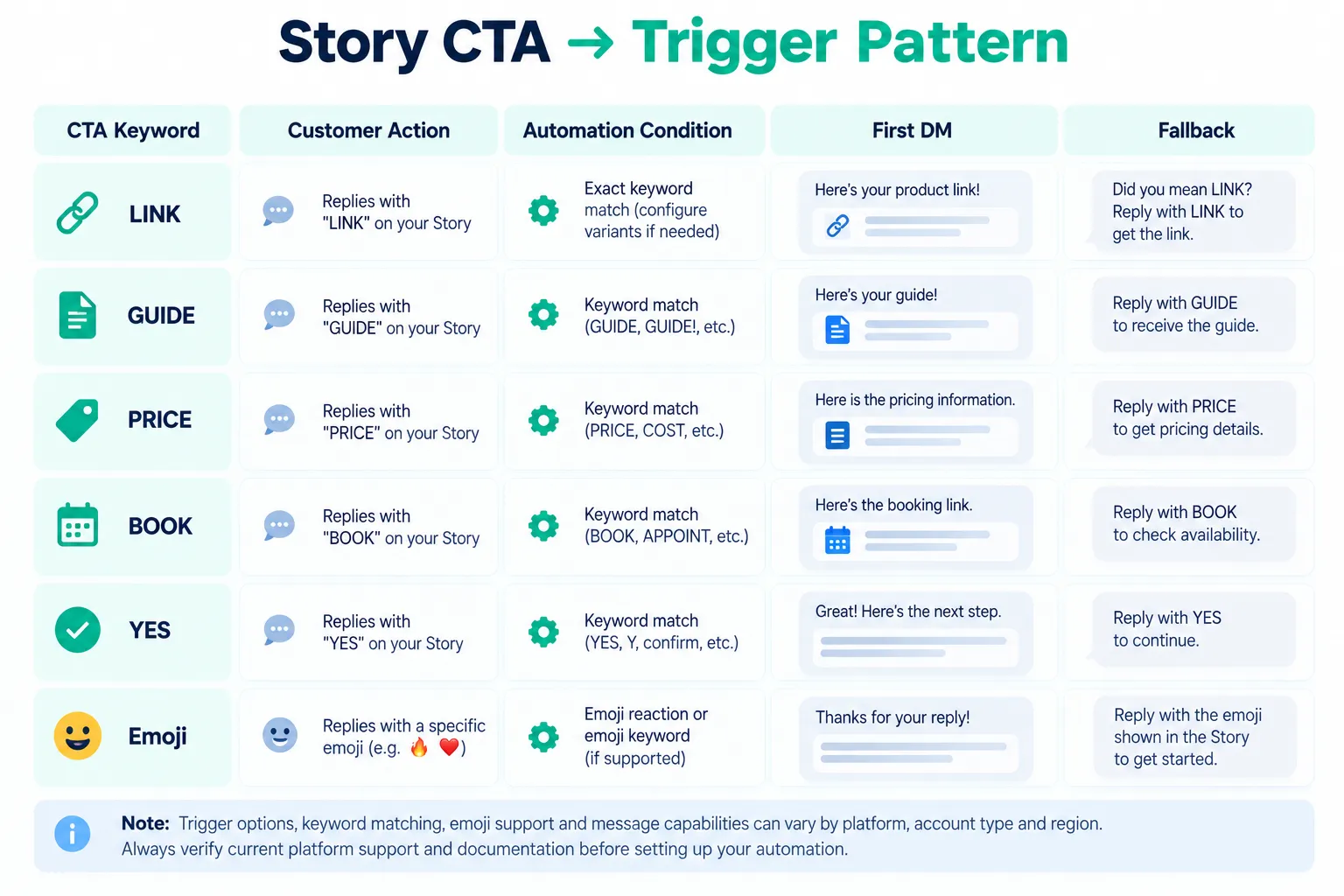
A useful Story CTA is short, specific and easy to understand. Common patterns include:
- Reply LINK for a product or resource link.
- Reply GUIDE for a downloadable resource.
- Reply PRICE for pricing information where appropriate.
- Reply BOOK for a booking or consultation path.
- Reply YES to request the next step in a campaign.
- Reply with a question when the goal is conversational support rather than a fixed resource.
Emoji triggers can also be used as a pattern when the selected automation platform and current Meta capabilities support them. For example, a Story might invite a viewer to reply with 🔥 or ❤️. However, emoji-trigger support should not be assumed across every tool or account configuration. ManyChat currently documents Story replies that can be triggered by message replies or emoji reactions, while InstantDM separately documents emoji-based Story automation. Manychat Help +1
Use the CTA as an invitation, not a trick. The customer should know that their reply will start a DM interaction.
What Should the First Automated DM Say?
The opening message should connect directly to the Story interaction. A useful structure is:
- Acknowledge the request.
- Deliver what was promised.
- Offer one relevant next step.
- Provide a human option where appropriate.
For example:
“You asked for the product guide — here it is: [link]. If you want help choosing the right option, reply with your question and our team can help.”
That is usually better than immediately sending three promotional messages. The first response should resolve the reason the customer engaged.
If the next step requires additional information, explain why. For example, a booking flow may need a preferred date. A product recommendation may need size or use case. Keep the request proportional to the customer's original action.
Instagram Chatbot vs Instagram DM Bot
An instagram chatbot generally describes a broader conversational system that can interpret user input, branch between multiple paths, answer questions, and potentially use AI or a knowledge base. An instagram dm bot can be a simpler rule-based automation that sends predefined messages when specific conditions occur.
The terminology is not standardised across vendors. One product may call a keyword workflow a chatbot, while another reserves “bot” for an AI agent. Evaluate the actual behaviour rather than the label.
For Story campaigns, a simple rule can often be preferable. If “LINK” always means the same resource, a deterministic workflow is easy to understand and test. If customers ask open-ended product questions after receiving the link, a more capable conversational layer may become useful.
The key design principle is to keep automation within the confidence of the information it has. A bot that confidently invents stock, delivery commitments, product specifications, or policy details creates a support problem instead of solving one.
Instagram Story Automation: A Practical Architecture
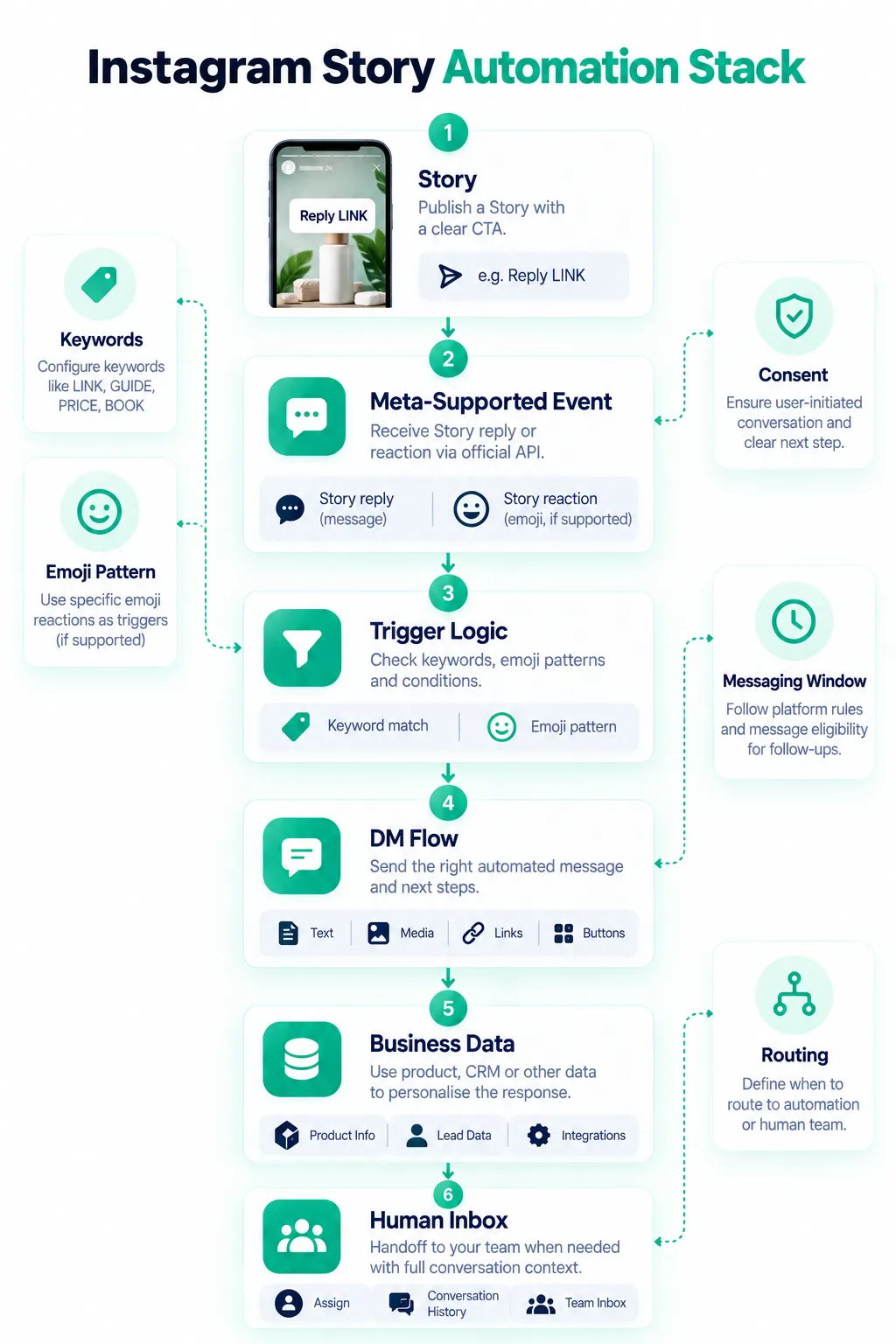
A production workflow can be thought of as six layers:
- Story layer: the content and CTA shown to the audience.
- Trigger layer: Story reply, keyword, reaction, or another supported event.
- Decision layer: determines which automation should run.
- Message layer: sends the appropriate opening DM and follow-up options.
- Business layer: connects relevant lead, product, booking or support information.
- Human layer: hands the conversation to an agent when automation should stop.
This separation makes the system easier to debug. If a customer replied but nothing happened, start with the trigger and permission layer. If the wrong message arrived, inspect the decision and content mapping. If the automation works but the team cannot see the conversation, inspect the inbox and routing configuration.
Messaging Windows and Why Timing Matters
Instagram automation is not a licence to message someone indefinitely after a single interaction. Messaging permissions, eligible entry points, response windows, and follow-up capabilities are governed by Meta's platform rules and can also be constrained by the automation vendor's implementation.
Meta's current API documentation states that an Instagram professional account needs the appropriate messaging permission to use the Messages API, and that the recipient must have sent a message to the professional account for the documented Send API flow. Postman +1
The practical implication is important: do not design a Story automation around the assumption that you can keep sending promotional messages forever because someone once replied to a Story.
Some vendors expose additional workflow restrictions or their own interpretations of supported messaging windows. Always check the current vendor documentation and Meta requirements for the account, region, API configuration and message type you are using.
Messaging windows can also affect human handoff. If a customer asks for support after the permitted interaction period, the agent may not have the same ability to proactively send a message as they would during an active conversation.
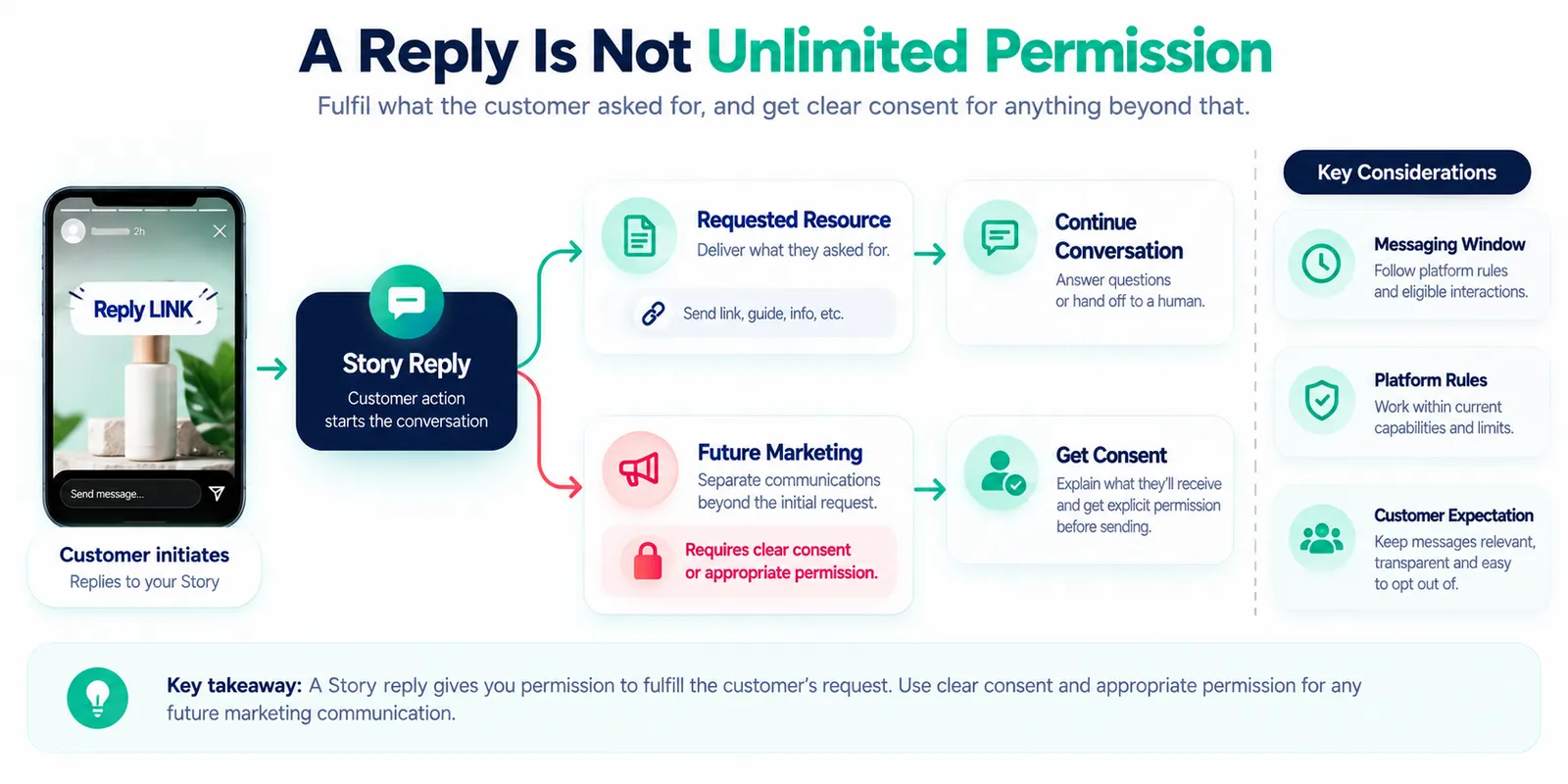
Consent: The Story Reply Is the Start, Not Unlimited Permission
A customer replying “LINK” has clearly asked for the link. That does not automatically mean the customer has agreed to every future marketing communication your business might want to send.
Keep the first response aligned with the request. If you want to collect an email address, move the customer to WhatsApp, enrol them in a marketing list, or send a separate promotional sequence, explain the purpose and use the appropriate consent mechanism.
This distinction is especially important for global businesses. Privacy, electronic marketing, data retention and consent requirements vary by jurisdiction. A global workflow should be designed so that local requirements can be applied rather than assuming one universal consent model.
Consent should also be easy to understand. Avoid burying an unrelated subscription request inside a message that the customer reasonably expects to contain a product link or guide.
Human Handoff Should Be Part of the Flow
The best automation workflows know when to stop.
Useful handoff triggers include a direct request such as “agent” or “human”, a complaint, an unusual support issue, uncertainty in the automated response, a high-value sales enquiry, or a request that requires access to internal systems.
The handoff should preserve context. An agent should ideally be able to see that the customer replied “PRICE” to a particular Story, received a specific product message, and then asked about availability. This prevents the customer from repeating the entire conversation.
For teams, a shared inbox can make this transition operationally useful. The automation handles the predictable first step, while a sales or support agent takes over when the conversation becomes more complex.
ManyChat Story Reply and Other Automation Options
ManyChat currently documents a dedicated Instagram Story Reply trigger that starts an automation when someone responds to a Story. Its documentation also distinguishes Story Mention Reply from Story Reply, showing why buyers should inspect the actual trigger rather than relying on the broad term “Instagram automation.” Manychat Help +1
Other products expose similar capabilities. InstantDM documents Story Reply Automation with keyword triggers, Story selection and automated DM replies. InstantDM ReplyKaro documents Story Reply and Story Mention automation and says its workflows use the official Meta API. ReplyKaro +1 Chatfuel describes Story replies as an Instagram automation entry point and also documents broader Instagram automation across Stories, comments, mentions and DMs. Chatfuel +1
These descriptions are useful for understanding categories, but feature availability and pricing can change. Check each vendor's current documentation, plan page and account-specific capabilities before making a purchase.
Cautious Tool Comparison for Story Reply Automation
The table below is intentionally feature-oriented rather than a ranking. It focuses on whether current vendor documentation describes Story reply triggers and automated reply flows. Confirm exact plan availability, limits, account eligibility and current pricing before implementation.
| Tool | Story reply trigger | Auto-reply flow | Other relevant Instagram automation | Pricing note |
|---|---|---|---|---|
| ManyChat | Documented | Documented Story Reply trigger and automation flow | Comments, mentions, ads and other Instagram entry points | Check current regional plans and feature availability |
| InstantDM | Documented | Keyword-based Story reply automation and flow options documented | Comments, DMs, mentions and flow automation | Check current plans and limits |
| ReplyKaro | Documented | Story Reply and Story Mention automation documented | Comments, keyword triggers and other Instagram automation | Check current pricing and plan limits |
| CreatorFlow | Verify current product documentation | Verify exact Story reply workflow before purchase | Review current Instagram automation scope | Check current pricing and availability |
| Chatfuel | Documented | Story Reply automation and Instagram flows documented | Comments, Stories, mentions, DMs and lead workflows | Check current pricing and plan scope |
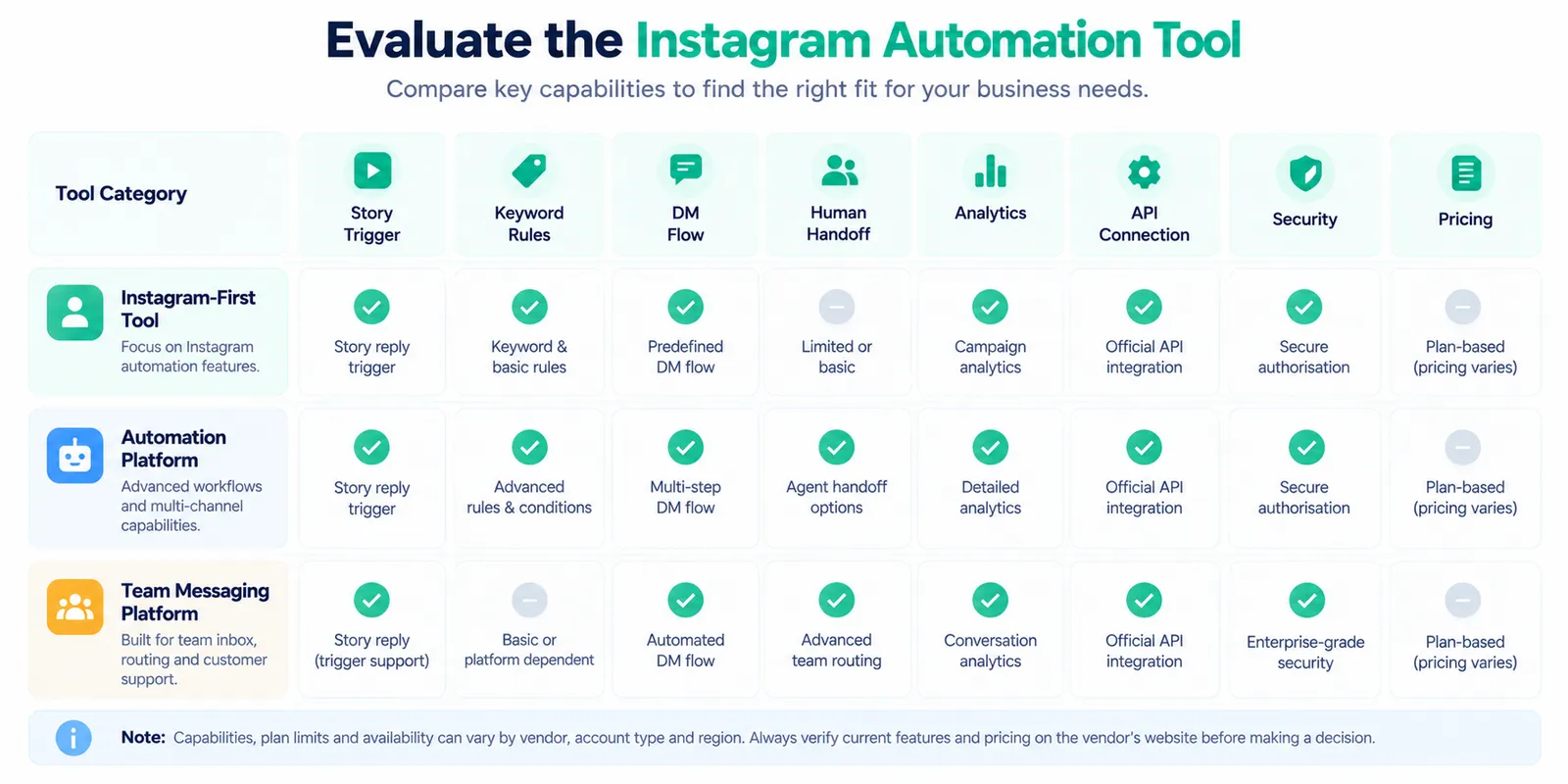
The phrase best instagram automation tool should therefore be treated as a decision question rather than a universal ranking. The best fit for a solo creator may be the tool with the simplest Story trigger and flow builder. A support-heavy ecommerce team may care more about inbox routing, agent handoff, CRM connectivity and channel coverage.
How to Choose an Instagram Automation Tool
Start with the trigger you actually need. If your campaign is “Reply LINK to receive the guide”, verify that the platform supports Story reply triggers and keyword conditions exactly as required.
Then inspect the complete conversation path:
- Can the tool connect to your Instagram professional account through supported Meta authorisation?
- Can you select the Story or define the appropriate Story scope?
- Can you distinguish keywords where necessary?
- Can you send the promised resource in the first DM?
- Can you provide buttons or structured next steps where supported?
- Can a customer reach a human?
- Can agents see the relevant conversation context?
- Can you measure useful outcomes?
- Does the tool document current Meta API usage?
- Does it require an Instagram password, browser extension, or scraping mechanism?
Do not choose based solely on the number of automation features. A smaller product with a reliable trigger and clear workflow can be more useful than a larger platform whose extra features you will never use.
Official Meta Graph API: What Buyers Should Verify
The technical baseline for production Instagram automation should be official Meta-supported API access.
Meta's current Instagram API documentation identifies Instagram professional accounts—businesses and creators—as the supported account category for the API. The Instagram Login setup includes permissions such as instagram_business_manage_messages and instagram_business_manage_comments.
Postman
+1
When evaluating a vendor, ask how the account is connected. A normal OAuth-style authorisation through Meta is materially different from handing a vendor your Instagram password.
Avoid password scrapers, browser bots and services that promise to bypass Instagram limits. Scraping and unofficial automation can create security, reliability and platform-compliance risks. A business workflow should not depend on pretending to be a human operating the Instagram website.
Also verify what the vendor actually means by “Meta API”. Ask which permissions are required, which Instagram account types are supported, whether webhooks are used, how access tokens are handled, and what happens if Meta changes an API capability.
Global Audience Considerations
Story automation can work across markets, but the surrounding customer experience should not be treated as globally identical.
Language is an obvious example. A brand serving India may receive English, Hinglish and regional-language replies. A global ecommerce business may receive short messages in several languages. Keyword triggers should be tested against the language patterns your customers actually use.
Time zones also matter for human handoff. If a Story is published globally, customers may ask questions when the local support team is offline. The automated response should set realistic expectations instead of implying that an agent is immediately available.
Privacy and marketing rules also vary. If the Story workflow collects email addresses, phone numbers, booking information or other personal data, the business should apply the relevant privacy and data-handling requirements for the markets it serves.
Finally, platform features and vendor availability can vary by region, account type and plan. Verify the actual connected account rather than assuming that a feature documented on a vendor's website will be available in every market.
Instagram Story Automation for Ecommerce
Ecommerce brands can use Story replies for product education rather than treating every interaction as a sales blast.
Examples include:
- “Reply SIZE for the size guide.”
- “Reply SHADE for the available colour guide.”
- “Reply INGREDIENTS for the product details.”
- “Reply LINK for today's featured product.”
- “Reply HELP if you want a product recommendation.”
The automation should use a trusted source for dynamic information. Do not hard-code inventory, delivery promises, discounts, or prices if those details can change.
If the customer asks a question that the automated flow cannot answer reliably, move to a human. That is especially important for order problems, returns, payment issues and unusual product requirements.
Instagram Story Automation for Creators and Service Brands
Creators can use Story replies to distribute resources, collect interest, guide followers to a booking page, or answer recurring questions. Service businesses can use them to route enquiries, share service details, or start a qualification conversation.
The strongest flows are often simple. A creator might ask viewers to reply GUIDE. A consultant might ask them to reply BOOK. A fitness business might invite a response such as PLAN. The automation can then deliver the promised information and offer a relevant next step.
For service businesses, avoid allowing automation to make commitments that require a human or live system. “We have an appointment available tomorrow at 4 PM” should only be sent if the workflow has reliable access to current availability.
Instagram Auto Reply Troubleshooting
When an automation does not behave as expected, diagnose it from the entry point outward.
| Problem | What to check |
|---|---|
| Story reply does not trigger | Instagram account type, connection, permissions, selected Story, trigger status and current vendor support |
| Only some replies trigger | Keyword matching, spelling, emoji handling and trigger conditions |
| DM is not delivered | Messaging eligibility, current platform limits, flow configuration and recipient state |
| Wrong response is sent | Overlapping automation rules, Story selection and content mapping |
| Agent cannot take over | Inbox connection, routing, permissions and handoff logic |
| Automation stopped after a platform update | Vendor status, Meta API changes and permissions |
Test from a separate Instagram account before launching. ManyChat, InstantDM and other vendors provide their own setup or testing guidance, and their current documentation should be used when troubleshooting vendor-specific behaviour. Manychat Help +1
Instagram Story Auto Reply Setup Checklist
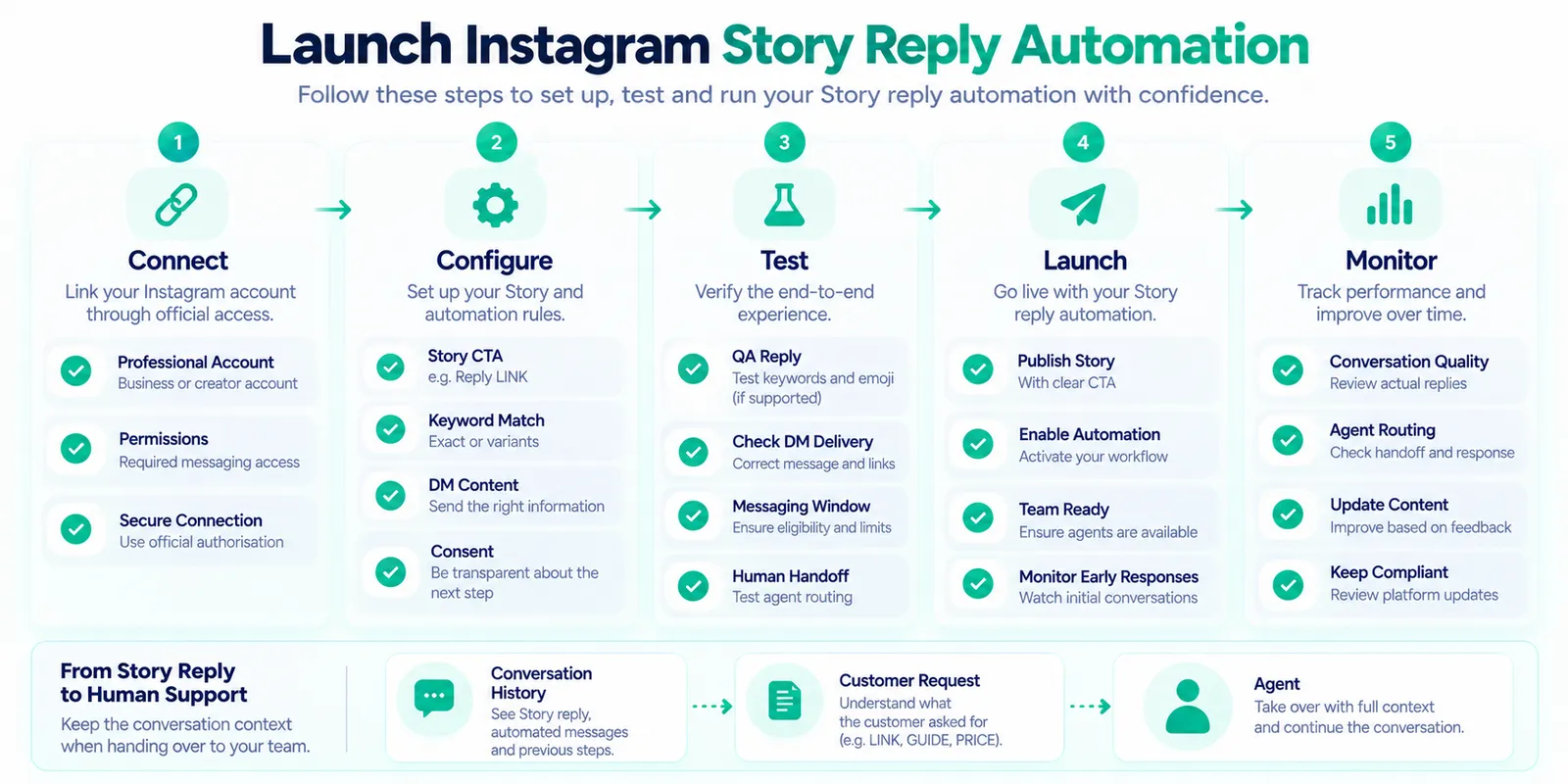
Before publishing a production Story automation, run through this checklist:
- Confirm the Instagram account is eligible and connected through the supported Meta authorisation flow.
- Choose one clear Story CTA.
- Define the exact keyword or interaction condition.
- Decide whether emoji triggers are actually supported by the selected implementation.
- Write the opening DM around the customer's request.
- Verify every link, product detail and resource.
- Define the human handoff condition.
- Check team inbox and routing behaviour.
- Review current messaging-window restrictions.
- Test from another account.
- Test an incorrect keyword.
- Test a request that needs human assistance.
- Confirm analytics or event tracking.
- Document what the automation is allowed to send.
- Review the workflow whenever Meta or the vendor changes the relevant API behaviour.
How to Measure Story Reply Automation
Do not judge an automation only by how many replies it sends. Measure whether the workflow resolves the customer's intended task.
Useful signals can include Story interactions, eligible trigger events, automated responses, resource clicks, completed lead forms, qualified conversations, handoffs and downstream business outcomes where attribution is reliable.
For ecommerce, a useful measurement chain might be Story interaction → automated DM → product page visit → purchase or assisted conversion. For a service business, it might be Story reply → information delivered → qualified enquiry → booked consultation.
Also inspect failed conversations. If customers frequently ask for a human immediately after the automated response, the first message may not be addressing the actual intent. Conversation quality should guide iteration.
Where Mark360.ai Fits in Instagram Story Automation
Mark360.ai can fit when Instagram conversations are part of a broader customer engagement operation that also includes WhatsApp Cloud API, team inbox workflows, automation, lead handling or cross-channel customer support.
The important qualification is that this article does not claim that Mark360.ai has a currently shipped dedicated Instagram Story Reply feature. If Story-specific automation is required, verify the current Mark360.ai product capability before planning a campaign around it.
Where Mark360.ai is a better conceptual fit is after the conversation becomes an operational customer journey. For example, an Instagram interaction may need to be handed to a sales team, coordinated with WhatsApp Cloud API, or managed alongside other customer conversations in a team environment.
That makes the product decision straightforward: if you only need a narrowly scoped Story auto reply, evaluate Instagram-first automation tools. If you need broader WhatsApp and team-inbox operations as well, then Mark360.ai can be evaluated as part of that larger architecture.
Best Practices for 2026
- Make the Story CTA explicit.
- Keep the first DM tightly aligned with the customer's action.
- Use keyword triggers when the intent is predictable.
- Treat emoji triggers as implementation-dependent patterns, not universal guarantees.
- Do not use Story replies as an excuse for unrelated cold outreach.
- Use official Meta-supported API access.
- Never request an Instagram password for normal business automation.
- Avoid scraping and browser-based mass-DM systems.
- Respect messaging windows and current platform rules.
- Keep a human handoff path.
- Verify dynamic business information before sending it.
- Review vendor pricing and feature availability before purchase.
Frequently Asked Questions
What is an Instagram auto reply?
An Instagram auto reply is an automated response to an eligible Instagram interaction. In Story workflows, it can respond to a Story reply or supported reaction with a predefined DM or a larger conversational flow.
Can I automatically reply to Instagram Stories?
Yes, supported automation platforms can automate Story reply workflows for eligible Instagram professional accounts. The exact triggers and message capabilities depend on the current Meta API and the vendor's implementation. ManyChat currently documents an Instagram Story Reply trigger. Manychat Help
Can a Story reply trigger a DM?
Yes. A Story reply can be used as the entry point for an automated DM flow when the connected platform and current API capabilities support that workflow.
Can emoji reactions trigger an Instagram auto reply?
Some platforms document emoji-triggered Story automation, but support is not universal. Verify the selected vendor's current documentation and test the exact interaction before relying on it in a campaign. Manychat Help +1
What is the difference between an Instagram chatbot and an Instagram DM bot?
The terms overlap. An Instagram chatbot usually implies a broader conversational system, while an Instagram DM bot may refer to a narrower rule-based automation. The actual workflow capabilities matter more than the label.
Is Story reply automation the same as comment-to-DM?
No. Story reply automation starts from a reply or supported interaction with a Story. Comment-to-DM starts from a comment on a post or Reel. They are separate entry points even though both can lead into a DM flow.
What should I check before choosing the best Instagram automation tool?
Check the exact Story trigger, keyword support, message capabilities, Meta API connection, messaging restrictions, human handoff, team inbox, analytics, integrations, security model and current pricing.
Can Instagram auto reply send unlimited follow-up messages?
You should not assume that. Messaging eligibility and windows are governed by platform rules and can vary by interaction and implementation. Check current Meta and vendor documentation before designing follow-up sequences.
Is Instagram Story automation safe?
API-based automation using supported Meta authorisation is the appropriate model for business use. Avoid tools that require your Instagram password, scrape accounts, simulate browser actions, or attempt to bypass platform restrictions.
Does Mark360.ai have Instagram Story Reply automation?
This article does not claim a currently shipped dedicated Story Reply feature for Mark360.ai. Verify the current product capability. Mark360.ai is more relevant when Instagram is part of a broader WhatsApp Cloud API, team inbox and conversational customer-engagement workflow.
Sources
- Meta Instagram API and Send API documentation: Instagram professional accounts, messaging permissions and supported messaging architecture. Postman +2 Postman +2
- ManyChat Instagram Story Reply Trigger documentation, updated August 27, 2026. Manychat Help
- ManyChat Instagram Story Mention Reply documentation, updated August 27, 2026. Manychat Help
- InstantDM Instagram Story Reply Automation documentation. InstantDM +1
- ReplyKaro Instagram Story Automation documentation. ReplyKaro +1
- Chatfuel Instagram automation and Story Reply documentation. Chatfuel +1
Verification note: Instagram API capabilities, permissions, messaging windows, vendor plans and pricing can change. Always verify the current Meta documentation and the vendor's current product and pricing pages before implementation.