Quick Answer: Which ManyChat Alternative Should You Consider?
If your use case is simple—someone comments LINK on an Instagram post or Reel and you want to send the requested resource by DM—a focused Instagram automation tool may be enough. If you need sophisticated journeys, multiple channels, advanced routing, or broader conversational marketing, ManyChat remains a category to evaluate. If your real requirement is to turn Instagram interest into a managed sales or support conversation across Instagram and WhatsApp, a shared-inbox platform becomes a different category of solution.
There is no universal winner here. A useful manychat alternative depends on what happens after the first DM. A creator delivering a PDF needs a different stack from an ecommerce brand qualifying shoppers and handing conversations to a sales team. Teams comparing alternatives to manychat should use that workflow distinction as their starting point.
The important distinction is also permission-based Comment-to-DM. The customer initiates the interaction by commenting on your content and requesting something such as a link, guide, catalogue or offer. That is fundamentally different from scraping profiles and sending unsolicited messages to new followers. This guide focuses on the former.
For 2026, compare tools on official Meta API access, trigger controls, public comment replies, private replies, follow-gates, lead capture, analytics, conversation windows, team collaboration, routing, and the ability to move a customer into another supported channel with clear consent.
The Problem: “Comment LINK for DM” Sounds Simple Until Volume Arrives
The familiar creator workflow looks like this: publish a Reel, write “Comment LINK and I’ll send it,” then wait for comments. When the comments arrive, someone has to notice them, reply publicly, send the private message, provide the correct link, and possibly answer the next question.
At small volume, manual handling can work. The operational problem appears when the same post generates more conversations than the team can comfortably process. A customer may comment while the team is offline. A public response may be missed. A link may be sent to the wrong person. Or the customer may receive the link but have no path to ask the next question.
This is where instagram comment automation becomes useful. Instead of treating the comment as a notification, the system treats it as the beginning of a defined conversation flow.
But automation should not turn the workflow into indiscriminate outreach. The cleanest pattern is still: customer action → requested response → optional next step → human handoff when needed.
What Permission-Based Comment-to-DM Actually Means
Permission-based Comment-to-DM starts with an intentional customer action. The business says what will happen, and the customer chooses to comment. For example: “Comment GUIDE and we’ll send the checklist.” The comment is the trigger, and the DM delivers what was promised.
The safest mental model is request fulfilment, not follower harvesting. The automation should fulfil the thing the person asked for. If you later want to introduce another channel, collect additional information, or send promotional communication, make that next step clear and use the relevant consent mechanism.
This is also why a Comment-to-DM workflow should not be confused with unsolicited new-follower messaging. Some platforms and tools now expose follower-triggered automation features, but a new follower is not automatically equivalent to a request for a specific resource. ManyChat currently documents a Follow-to-DM feature separately and notes limits around how often such messages can be delivered. ([Manychat Help][1])
For creators and ecommerce teams, the practical rule is straightforward: automate the conversation the customer started, not a conversation you wish they had started.
How the Instagram Comment-to-DM Flow Works
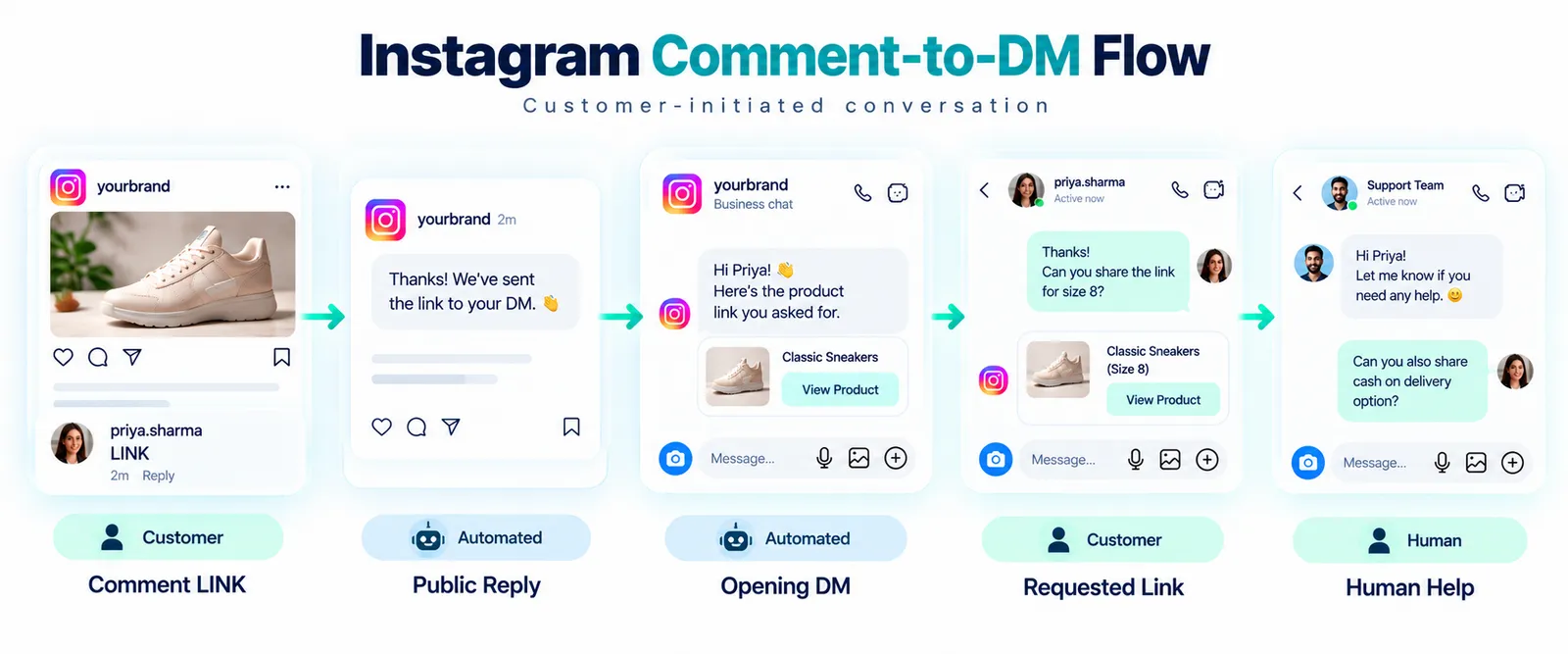
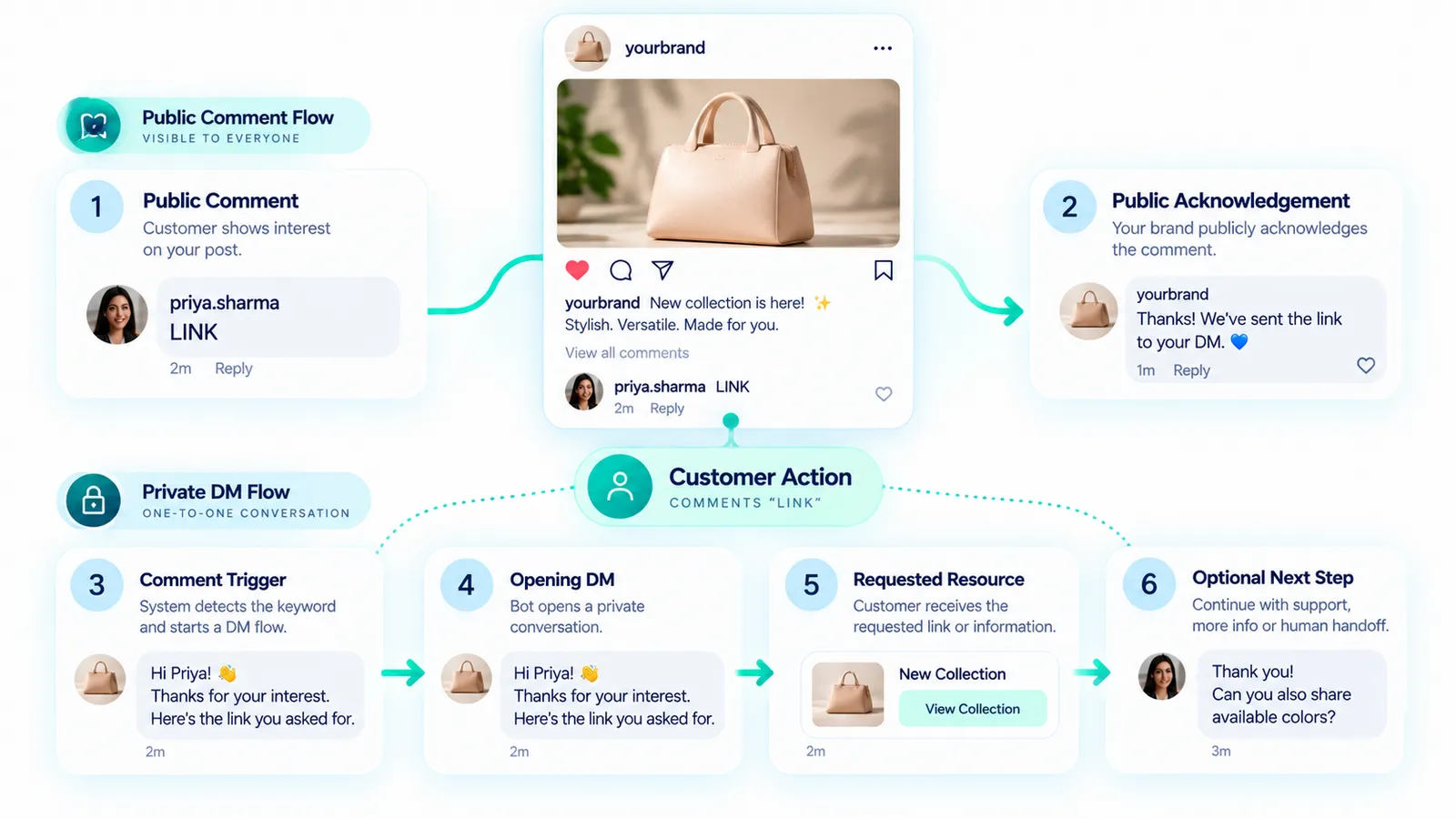
A robust flow normally contains several distinct stages:
- Keyword trigger: the system detects the intended comment or configured trigger.
- Public reply: the account can acknowledge the request publicly when appropriate.
- Opening DM: the customer receives the promised private response.
- Optional interaction: the customer can select a button, answer a question, or request more information.
- Follow-gate, where appropriate: a workflow may ask the person to follow before receiving something, provided the implementation and current platform capabilities support it and the request is transparent.
- Link or lead capture: the workflow delivers the requested resource or collects only the information actually needed.
- Human handoff: the conversation moves to a person when the customer needs support, sales assistance, or an answer outside the automation.
ManyChat currently documents Instagram post and Reel comment triggers that can combine a public reply, private DM, and lead movement into its automation system. ([Manychat Help][2]) Respond.io also documents private replies triggered by Instagram comments and describes delivery into the user's Inbox or Message Requests depending on the relationship with the account. ([respond.io][3])
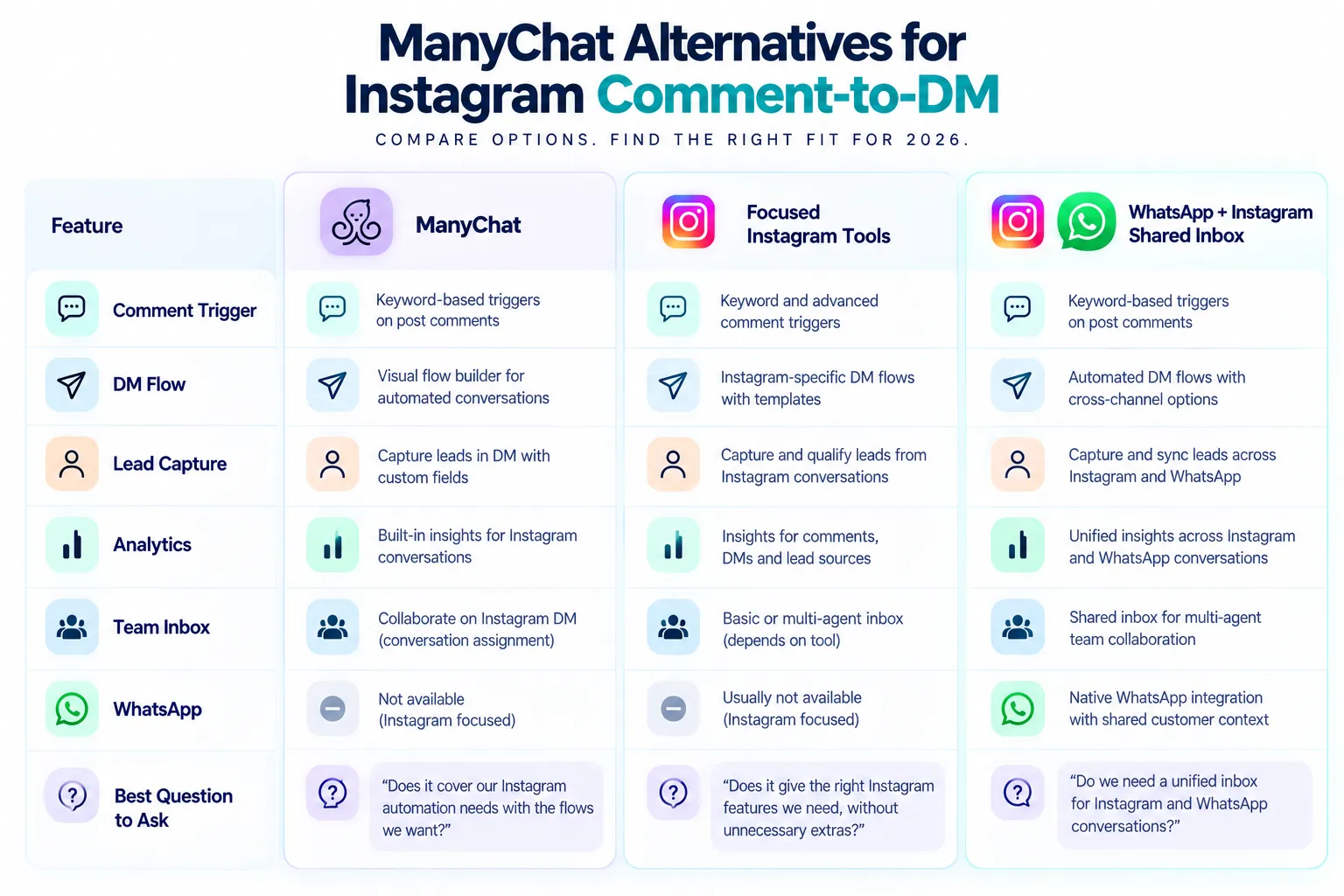
What to Compare in a ManyChat Alternative
Do not start with a feature checklist containing dozens of generic chatbot functions. Start with the exact workflow you need.
- Can it detect comments on posts and Reels?
- Can it match a specific keyword instead of every comment?
- Can it send a private reply through the supported Instagram API?
- Can it publish a public acknowledgement?
- Can it deliver a link or structured resource?
- Does it support a follow-gate if your use case requires one?
- Can it capture lead information appropriately?
- Can a customer reach a human?
- Can multiple agents manage conversations?
- Does it show useful campaign and conversation analytics?
- How does it handle Instagram messaging windows and platform limits?
- Does it use official Meta-supported infrastructure rather than browser automation or scraping?
Pricing deserves its own check. Vendors change plans, included usage, contact models, message limits, regions, and feature availability. Do not use an old comparison article as a pricing source. Verify the vendor's current pricing and terms before switching.
ManyChat: The Broad Automation Category to Benchmark
ManyChat is a useful benchmark because its Instagram product covers comment replies, DMs, link delivery, lead capture and other Instagram automation patterns. Its current documentation specifically supports post and Reel comment triggers, while its Instagram product pages position comments and DMs as part of a broader automation system. ([Manychat Help][2])
ManyChat also supports multiple channels and has a unified inbox model on some plans. Its current pricing documentation shows that the company changed its pricing model in March 2026 and that availability can vary by region and account creation date. That is exactly why this article does not present a fixed “ManyChat costs X” claim as a permanent fact. ([Manychat Help][4])
The practical takeaway is not that ManyChat is automatically right or wrong. It is that its feature breadth can be valuable when your workflow extends beyond one Comment-to-DM campaign. If all you need is one keyword and one link, the additional platform surface may be more than you need. If you need broader automation, routing, AI, or multiple channels, the larger feature set may matter more.
ManyChat also explicitly states that it connects to Instagram through official APIs and that Meta controls platform restrictions. Its own compliance guidance warns that even approved tools cannot override Meta's rules or spam detection. ([Manychat Help][5])
Flat-Rate Instagram Automation Tools
A second category focuses tightly on Instagram. These products often position themselves around predictable subscription pricing rather than contact-based expansion, although the exact billing model varies by vendor.
Examples visible in the 2026 market include tools such as Tadlo, ReplyKaro, Repli, CreatorFlow, ReelDM, BeSociel and similar focused products. Their published feature sets commonly centre on comment triggers, Instagram auto replies, follow-gates, lead capture, analytics, or multi-account management. Vendor claims, plan limits and pricing can change, so treat those pages as starting points for evaluation rather than permanent benchmarks.
This category can be attractive when your primary requirement is instagram auto dm from comments and you do not need a large omnichannel customer-support environment. Some products deliberately keep the interface narrow: connect Instagram, select the content, define a keyword, write the DM, and monitor results.
WhatsApp + Instagram Shared Inbox Platforms
The third category starts with a different problem: the customer conversation does not end on Instagram.
Platforms such as respond.io and WATI document workflows that bring Instagram conversations into a shared team environment alongside other business messaging channels. Respond.io, for example, documents Instagram DMs, comments and ad inquiries in a shared inbox and describes integrations with systems such as Shopify and CRM platforms. ([respond.io][6]) WATI documents a multi-channel Team Inbox that combines WhatsApp and Instagram conversations in one workspace. ([Wati Help Center][7])
That does not mean every creator needs a shared inbox. A solo creator distributing a free guide may gain little from an enterprise-style workspace. An ecommerce company with sales, support and retention teams can have a very different requirement.
Honest Category Comparison
| Category | Primary strength | Comment-to-DM | Team inbox | WhatsApp operations | Best evaluation question |
|---|---|---|---|---|---|
| ManyChat | Broad automation and channel coverage | Yes | Available within its product tiers | Supported channel options vary by plan | Do I need broader automation beyond Instagram? |
| Focused flat-rate Instagram tools | Simple Instagram-first workflows | Common core feature | Varies | Usually not the primary focus | Do I mainly need comment-triggered Instagram automation? |
| Shared inbox platforms | Team collaboration and cross-channel operations | Available on supported Instagram integrations | Core category feature | Common focus | Will Instagram leads become ongoing customer conversations? |
| Mark360.ai | Instagram + WhatsApp conversational operations | Supported use case | Core capability | Core capability through WhatsApp Business API | Do I need Instagram plus WhatsApp Cloud API and a team inbox? |
This is a category comparison, not a ranking. Capabilities change, plan boundaries differ, and the same feature label can mean different things across products. Validate the exact workflow during a trial or technical review.
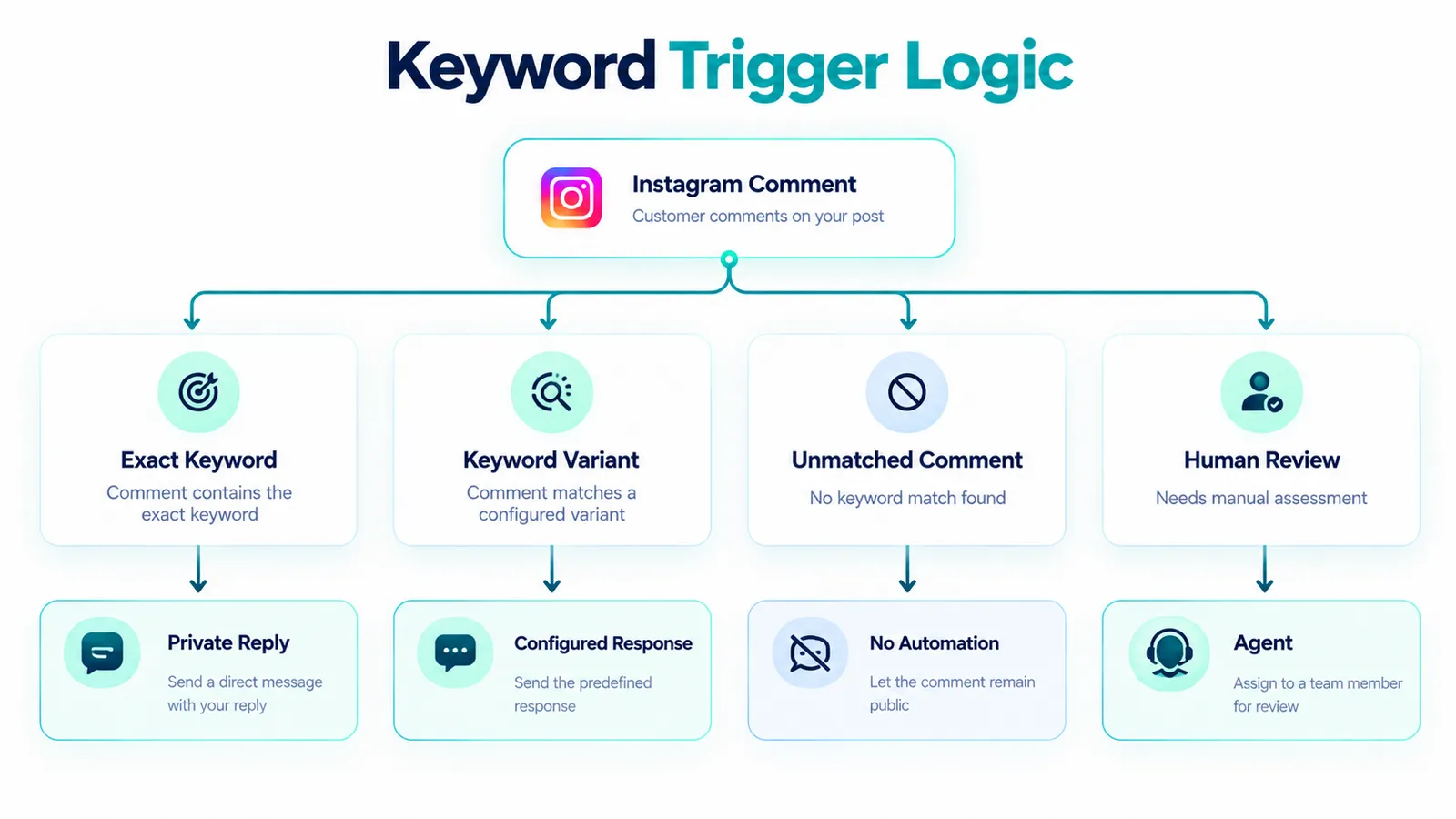
Keyword Triggers: The First Technical Decision
The classic pattern is “Comment LINK for DM”. The keyword should be easy to type, distinctive enough to avoid accidental triggers, and relevant to the resource being offered.
A useful setup might distinguish between LINK, PRICE, CATALOG, and HELP. Avoid building a dozen overlapping keywords when one clear intent would do. If the trigger is too broad, ordinary conversation can accidentally activate the automation. If it is too restrictive, legitimate requests may fail because users use punctuation, spelling variations, or natural-language phrasing.
Public Reply, Opening DM, Follow-Gate and Lead Capture
These four stages should be designed separately.
Public reply: this can acknowledge the customer's request without repeating the entire offer. A concise response such as “Sent it to your DMs” makes the workflow visible to the commenter and to people reading the thread.
Opening DM: this should immediately connect the private conversation to the public action. “You asked for the guide—here it is” is clearer than a generic promotional greeting.
Follow-gate: this is an optional conversion mechanism, not a reason to message strangers. If used, explain the condition plainly. Do not imply that a person has consented to unrelated marketing simply because they followed an account or commented once.
Lead capture: only ask for information that has a clear purpose. If a link is enough, do not turn a simple resource request into a long form. If an ecommerce team genuinely needs qualification, ask the minimum useful questions and state what happens next.
ManyChat's current Instagram documentation illustrates the combination of public replies, private DMs and lead capture, while focused tools in the market commonly offer follow-gates and form-based capture as part of their Instagram workflows. ([Manychat Help][2])
Messaging Windows, Consent and Compliance
One of the easiest mistakes is assuming that an automated DM creates unlimited permission to keep messaging the person.
Messaging platforms apply rules around how conversations can be initiated, continued, and used for promotional communication. Those rules can change. A compliant tool does not remove the responsibility from the business using it.
For example, respond.io currently documents a limitation that its Instagram private replies are one-time per comment and must be sent within a stated seven-day period for its implementation. That is a vendor-specific implementation detail, not a universal promise for every Instagram integration. ([respond.io][3])
The practical rule is to verify the current platform and vendor documentation for your exact account and trigger. Do not build a campaign around an assumed message window copied from an old blog post.
Consent also matters when moving from Instagram to WhatsApp. A customer asking for a link on Instagram should not silently become a marketing subscriber on another channel. Explain why you want to continue on WhatsApp, what the person will receive, and how they can stop receiving messages. For regulated markets, apply the relevant privacy and electronic-communications requirements as well.
Meta Graph API: Why the Infrastructure Matters
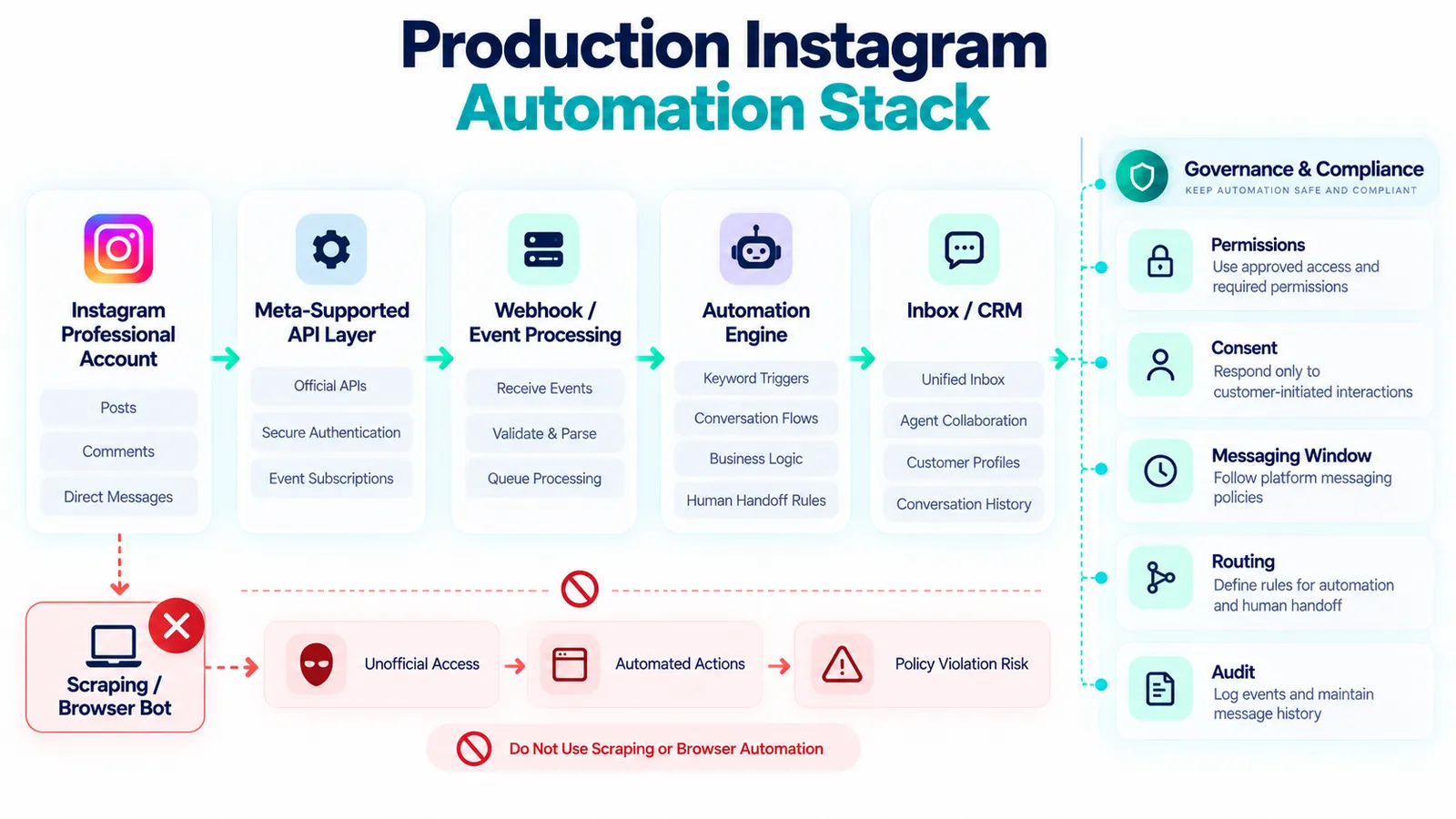
A legitimate Instagram automation product should be built around Meta's supported business messaging infrastructure rather than pretending to be a human user in a browser.
The term Meta Graph API is often used broadly by vendors to describe the API layer used to access supported Instagram business functionality. The exact endpoints, permissions, login method, webhook events, and capabilities can change, so technical teams should verify the current Meta developer documentation and the vendor's implementation before deployment.
ManyChat currently documents connection methods through Meta, Instagram, and Meta Business Suite, with the Meta connection described as the route for its latest functionality. ([Manychat Help][8]) Respond.io likewise documents connecting an Instagram Business Account to its platform for customer messaging. ([respond.io][9])
The important buyer question is not simply “Does this vendor say API?” Ask: Which official API and permissions are being used? Does the connection use OAuth or another supported authorization process? Does the vendor require your Instagram password? How are tokens handled? What happens when Meta changes an API capability?
Avoid scraping. Tools that ask for passwords, automate a browser session, harvest profiles, or imitate user behaviour are fundamentally different from a supported business messaging integration. Meta has publicly described efforts to combat unauthorized scraping, and developers should not design systems around bypassing platform controls. ([Meta][10])
How to Set Up Comment-to-DM Without Overbuilding
Start with one campaign. Do not migrate your entire Instagram operation before proving the basic loop.
- Choose one resource: guide, catalogue, product page, coupon or booking destination.
- Choose one keyword: use a distinctive, easy-to-type word such as LINK or GUIDE.
- Write the public reply: keep it short and factual.
- Write the opening DM: clearly explain why the person is receiving it.
- Deliver the requested asset: avoid unnecessary questions before fulfilment.
- Add the next step: only if it is relevant, such as “Need help choosing?”
- Define handoff: specify when a human should take over.
- Add tracking: use appropriate campaign parameters and measure downstream outcomes.
- Test edge cases: misspellings, repeated comments, non-keyword comments, blocked users, expired content, and disconnected permissions.
Run the test with a small internal audience before putting the workflow into a high-visibility campaign. The goal is not merely to prove that a DM arrives. You need to verify that the correct content arrives, the public reply behaves correctly, the team can see the conversation where required, and the workflow stops when it should.
Instagram Comment-to-DM Troubleshooting
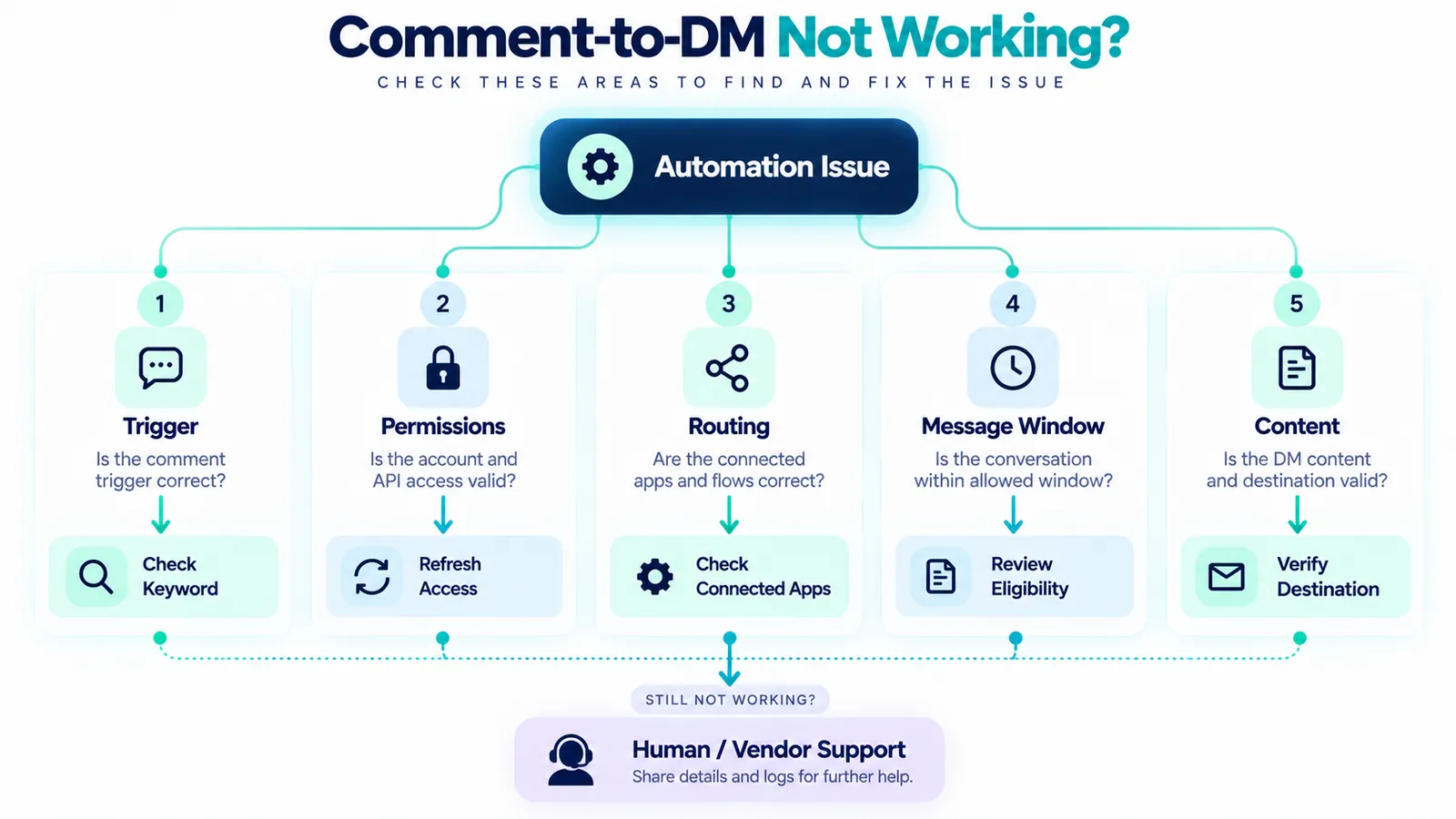
When a flow fails, isolate the problem by layer rather than rebuilding everything.
| Symptom | Likely area to inspect | First check |
|---|---|---|
| Comment does nothing | Trigger | Keyword, post/Reel selection, account permissions |
| Public reply works but DM does not | Messaging permission or flow | Connection, private-reply configuration, message eligibility |
| DM arrives but wrong link is sent | Content mapping | Campaign ID, destination URL, branch conditions |
| Some comments trigger unexpectedly | Keyword logic | Broad matching and overlapping rules |
| Automation conflicts with another tool | Routing | Conversation routing and connected apps |
| Team cannot see or own the conversation | Inbox | Agent permissions, assignment rules and channel connection |
| Workflow stopped after an API change | Platform integration | Vendor status, permissions and current Meta requirements |
Conversation routing deserves special attention when more than one app interacts with the same Instagram account. ManyChat currently documents Instagram Conversation Routing as a mechanism for deciding which connected application handles a conversation and warns that multiple connected apps can interfere if routing is not configured correctly. ([Manychat Help][11])
Analytics: Measure the Funnel, Not Just DMs Sent
A dashboard that says “1,000 DMs sent” does not tell you whether the automation worked.
For a Comment-to-DM campaign, consider the chain: eligible comments → triggered workflows → delivered DMs → customer interaction → link clicks or lead capture → qualified conversations → business outcome.
The exact metrics available depend on the tool. ManyChat promotes real-time results and lead movement within its Instagram automation product, while respond.io describes reporting around response times, agent performance and campaign results. ([ManyChat][12])
Decision Framework: Which Category Fits Your Business?
Use the following decision sequence rather than asking which platform is “best”.
- Only need Comment-to-DM? Start by evaluating focused Instagram tools.
- Need complex Instagram journeys? Compare broader automation platforms such as ManyChat and similar products.
- Need several agents? Prioritise shared inbox, assignment, permissions and conversation history.
- Need WhatsApp as part of the same customer journey? Evaluate platforms that support both Instagram and WhatsApp operations.
- Need ecommerce integration? Check whether product, order and CRM data can be connected reliably.
- Need agencies or multiple brands? Inspect account isolation, roles, client access and reporting.
- Need strict compliance review? Verify API connection, permissions, data handling, consent, retention and vendor terms before launch.
Where Mark360.ai Fits—and Where It Does Not
Mark360.ai is not positioned here as a universal replacement for every Instagram automation use case. If your only requirement is “Comment LINK and send one Instagram DM,” a focused Instagram tool may be a simpler category to evaluate.
Mark360 becomes more relevant when Instagram is one part of a broader customer messaging operation and you also need WhatsApp Cloud API, a shared team inbox, automation, routing, and human collaboration. Mark360's published product material describes Instagram shared inbox capabilities and WhatsApp Business API operations in the same broader messaging stack. ([Mark360][13])
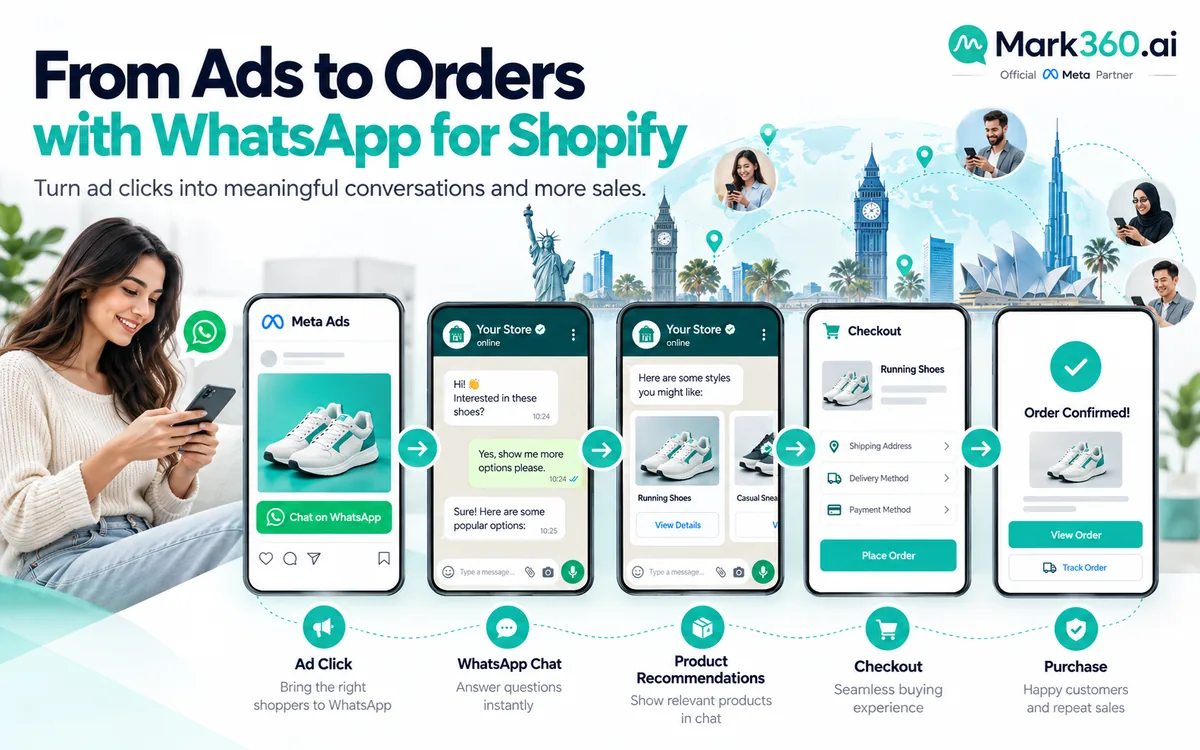
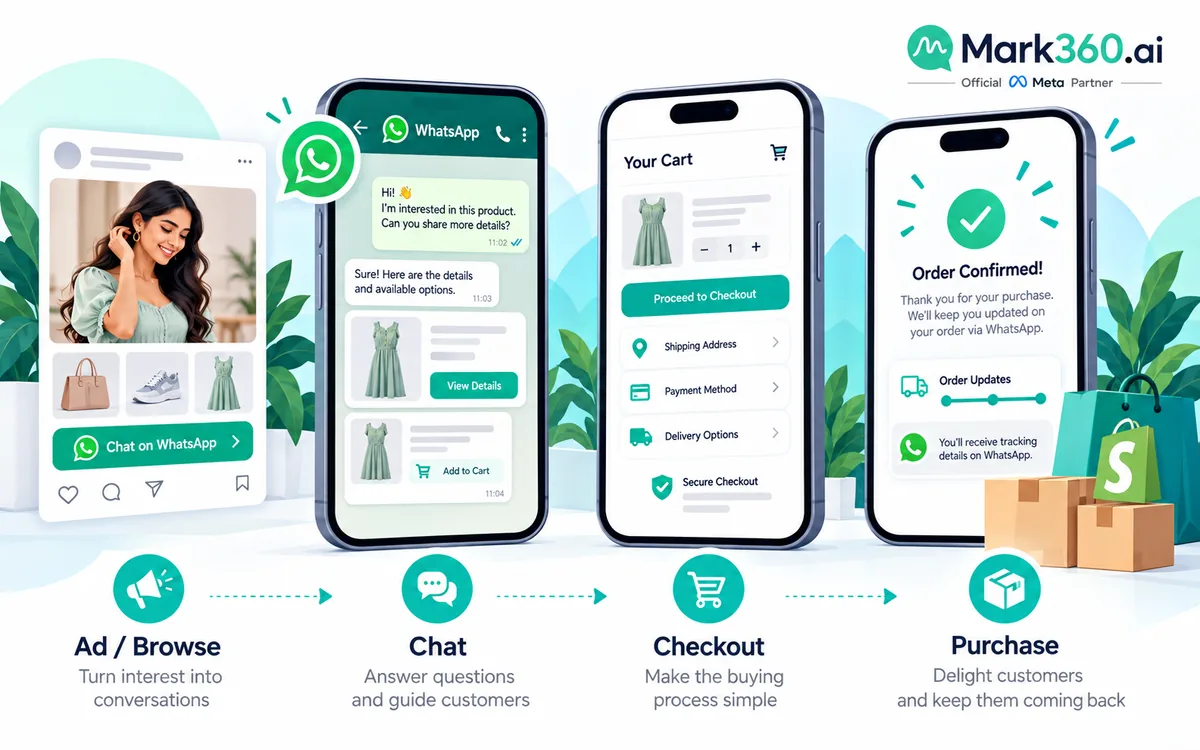
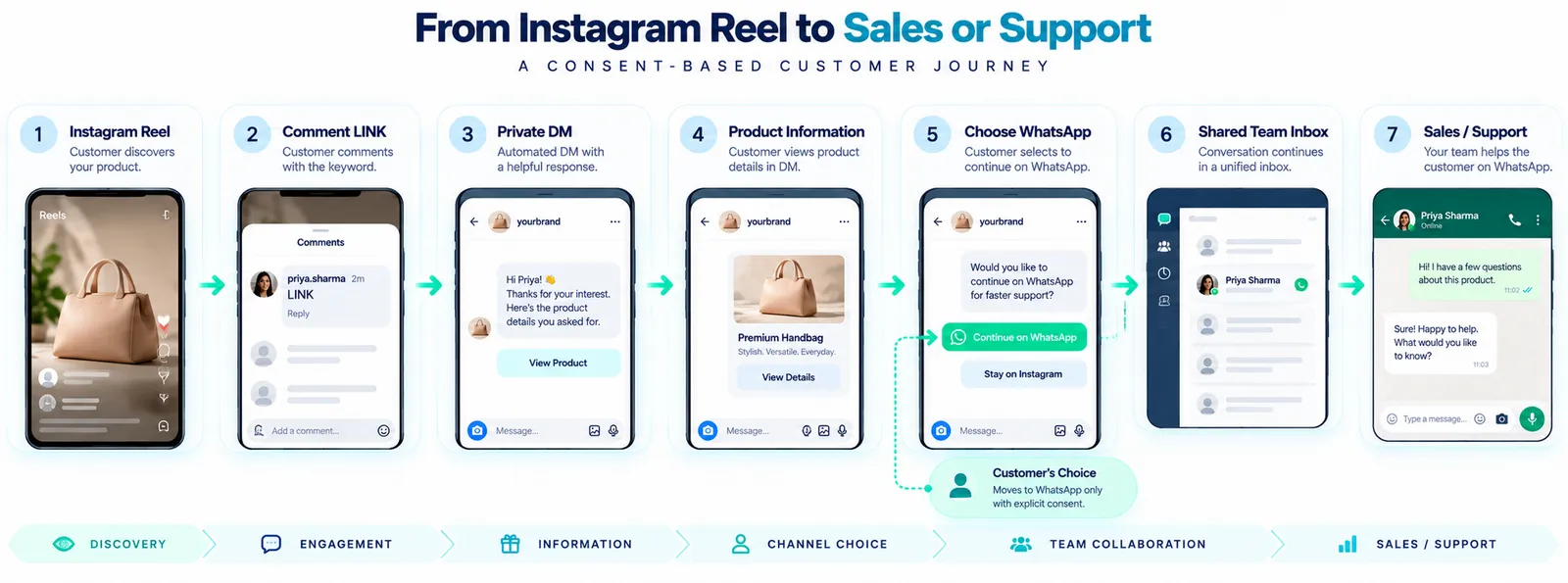
A practical example is an ecommerce brand where a customer comments “LINK” on Instagram, receives the requested product information, then chooses to continue the conversation on WhatsApp for sizing, payment or order support. In that scenario, the business is no longer solving only an Instagram automation problem. It is solving a cross-channel conversation problem.
That distinction matters. Do not buy an omnichannel platform simply because it has more features. Buy it when the additional channel, team workflow, or operational requirement actually exists.
Global Use: The Same Pattern, Different Operations
Comment-to-DM is not limited to one market. Creators can use it for digital products, newsletters, events, courses, templates and community resources. Ecommerce teams can use it for catalogues, product pages, size guides and offers. Service businesses can use it for booking pages, consultation information and qualification.
What changes globally is the surrounding operation: language, privacy requirements, working hours, customer expectations, payment flows, support channels, and regional platform availability.
For Indian brands, mixed-language comments and a natural transition between Instagram discovery and WhatsApp conversation can be especially relevant. For teams operating internationally, the same workflow may need different consent copy, data-handling practices, routing rules, and destination channels by market.
Migration Checklist for a ManyChat Alternative
Before replacing an existing platform, document the workflows rather than simply exporting contacts.
- List every Instagram trigger currently in production.
- Record the keywords and matching rules.
- Document each public reply and opening DM.
- Map every destination link and campaign parameter.
- Document follow-gate behaviour, if used.
- Record lead fields and where they are stored.
- Document human handoff conditions.
- List connected CRM, ecommerce and analytics integrations.
- Review conversation routing if multiple apps are connected.
- Test the new system with internal accounts before switching live traffic.
- Keep the old workflow documented until the new flow has passed production checks.
The migration should be treated as a workflow migration, not merely a software migration. The business logic is the valuable asset.
Frequently Asked Questions
What is the best ManyChat alternative for Instagram Comment-to-DM?
There is no universal best choice. A focused Instagram tool may fit a simple Comment-to-DM campaign, while a broader automation platform or shared inbox may fit teams that need more channels, routing, CRM integration or human support.
What is an instagram dm automation tool?
It is software that uses supported Instagram business messaging capabilities to automate responses to defined customer actions, such as comments, messages or other eligible interactions. The exact triggers depend on the platform and current Meta capabilities.
What does automated instagram messaging mean?
Automated instagram messaging means that a business uses predefined rules, workflows or supported AI features to respond to eligible Instagram interactions without requiring a person to type every first response manually.
Is instagram auto dm from comments allowed?
Comment-triggered private replies are supported by business messaging tools using Meta's supported infrastructure, but the exact capabilities, limits and message windows depend on the current API and vendor implementation. Use an official integration and verify current platform rules.
Is Instagram comment automation the same as spam?
No. A customer-requested Comment-to-DM flow can fulfil a specific request made through a comment. Spam concerns arise when automation becomes unsolicited, repetitive, misleading or attempts to bypass platform controls. The safest design is action-based, transparent and easy to exit.
Do I need a follow-gate for Comment-to-DM?
No. A follow-gate is an optional step. If the customer has already asked for a resource, consider delivering the requested item first unless the platform-supported flow and your offer clearly establish a different condition.
Can a ManyChat alternative connect Instagram and WhatsApp?
Some platforms support both channels, but capabilities differ. If WhatsApp is an important part of sales or support, compare the shared inbox, WhatsApp Business API, consent flow, templates, routing and agent features—not just whether the vendor has an Instagram integration.
Should I use a scraping-based Instagram automation tool?
No. Avoid tools that require your Instagram password, simulate browser actions, scrape profiles, or attempt to bypass platform limits. Prefer supported API-based integrations with clear authorization and documented permissions.
How do I troubleshoot an Instagram Comment-to-DM flow?
Check the trigger first, then permissions, routing, private-reply eligibility, message windows, content mapping and team inbox access. If multiple automation apps are connected, inspect conversation routing for conflicts.
Sources and Verification Notes
This guide uses current vendor documentation to describe product capabilities and uses platform-level guidance where available. Because Instagram APIs, permissions, pricing, messaging rules and vendor plans can change, verify the current documentation before implementing or purchasing.
- ManyChat Instagram comments trigger and automation documentation. ([Manychat Help][2])
- ManyChat Instagram connection and API setup documentation. ([Manychat Help][8])
- ManyChat 2026 pricing and billing documentation. ([manychat.com][14])
- ManyChat Instagram compliance guidance. ([Manychat Help][5])
- Respond.io Instagram private replies and limitations. ([respond.io][3])
- Respond.io Instagram shared inbox and integration documentation. ([respond.io][6])
- WATI multi-channel Instagram and WhatsApp Team Inbox documentation. ([Wati Help Center][7])
- Meta privacy and anti-scraping information. ([Meta][10])
Pricing note: vendor pricing and feature availability change. This article intentionally avoids presenting a permanent price ranking. Verify each vendor's current pricing, regional availability, included usage, overages, API requirements and terms before making a purchasing decision.