


Direct answer: WhatsApp OTP is a one-time code sent through a Meta-approved authentication template on the WhatsApp Business Platform. For an India-based business messaging +91 numbers, Meta's rate card effective 1 October 2026 charges ₹0.115 per delivered authentication message. Users copy the code with one tap, or your Android app fills it in. Keep SMS OTP over DLT as the fallback for numbers that aren't on WhatsApp.
Key takeaways
- Meta charges ₹0.115 per delivered authentication message to Indian numbers (1 October 2026 rate card) and nothing for undelivered ones.
- Eligible businesses based outside India pay the authentication-international rate for Indian users: ₹2.4971.
- Meta fixes the wording, so there's no room for links, media or offers.
- Copy code works on any phone; one-tap and zero-tap need changes in your Android app.
- SMS OTP needs DLT registration but reaches every number, so use WhatsApp first and SMS as the fallback.
Prices and rules come from Meta's pricing page, its rate cards effective 1 October 2026 and its developer docs, checked on 17 October 2026. Meta updates rates, so check the linked pages before you budget. This guide is for businesses sending codes, not for receiving WhatsApp's own login code.
What is WhatsApp OTP?
A WhatsApp OTP is a one-time password delivered as a WhatsApp message instead of an SMS. Your server creates the code and sends it through the WhatsApp Business Platform, the official API, using a message template in Meta's authentication category. Meta's authentication templates documentation says that if your app lets users receive one-time codes on WhatsApp, you must use an authentication template.
Every authentication template has the same parts:
- Preset text you can't edit: "<code> is your verification code."
- An optional security line: "For your security, do not share this code."
- An optional expiry warning: "This code expires in N minutes", where N is from 1 to 90.
- A button: copy code or one-tap autofill. Zero-tap delivery shows no button when it works.
The fixed wording is deliberate: with no link or offer next to the code, phishing gets harder.
How much does WhatsApp OTP cost in India?
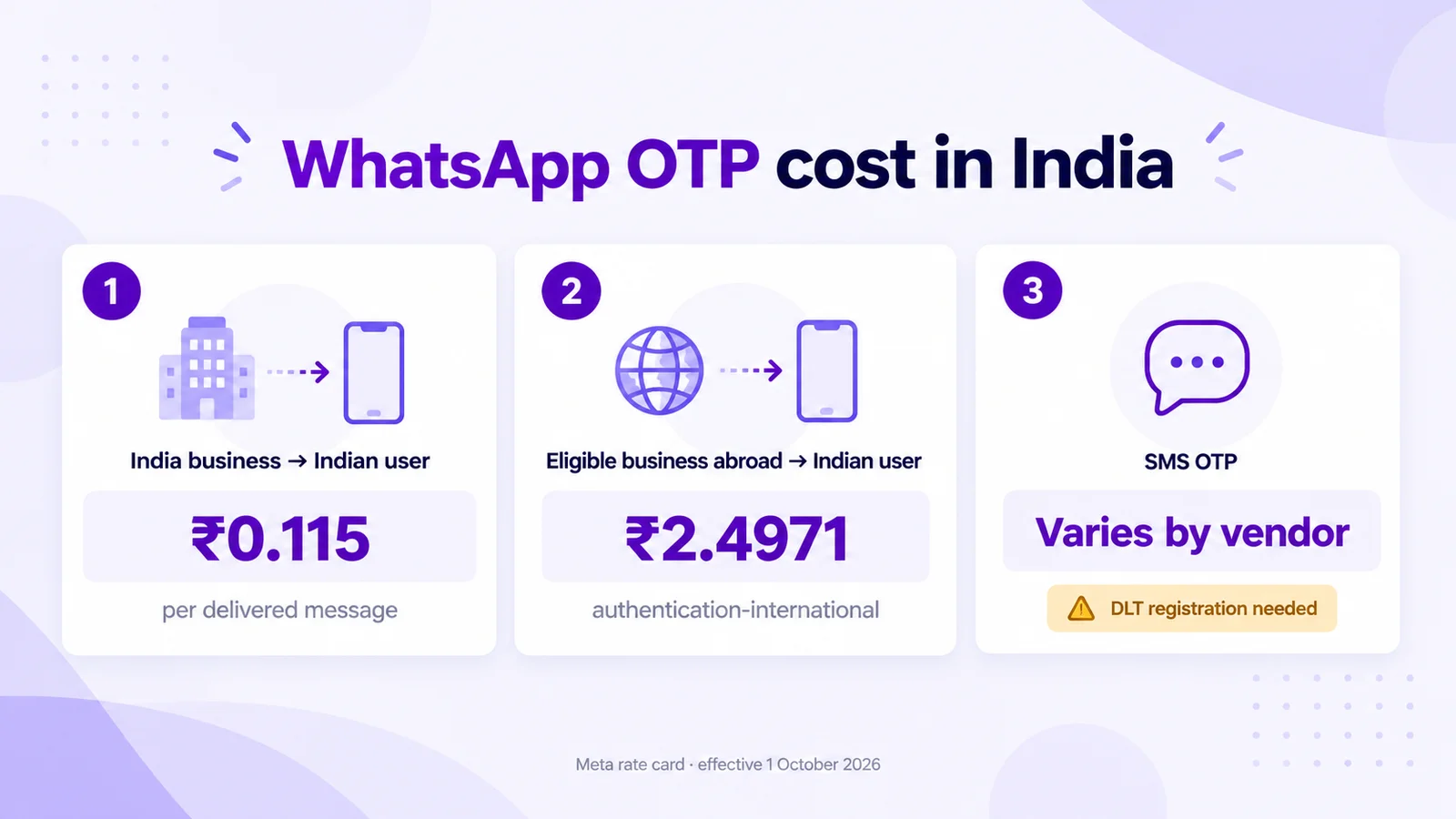
Meta charges per delivered message, based on the message category and the recipient's country calling code. Its pricing page states that businesses are only charged when a message is delivered. These are the India figures on Meta's rate cards effective 1 October 2026:
| Sender and recipient | Meta rate per delivered message (INR card) | USD card |
|---|---|---|
| India-based business → Indian (+91) user, authentication | ₹0.115 | US$0.0014 |
| Business based outside India, eligible for authentication-international → Indian user | ₹2.4971 | US$0.0304 |
| For comparison: India utility template | ₹0.115 | US$0.0014 |
| For comparison: India marketing template | ₹0.8631 | US$0.0118 |
A quick sum at Meta's list rate: 10,000 delivered OTPs a month cost ₹1,150 at ₹0.115 each. The same 10,000 at the authentication-international rate cost ₹24,971. Those figures leave out volume tiers, your provider's price and taxes.
When the authentication-international rate applies
Under Meta's authentication-international rules, the higher rate applies only when all three are true:
- Your business is eligible: it sent more than 750,000 messages outside customer service windows in a moving 30 days to users in markets with this rate.
- Your business is based in a different country from the user (your Primary Business Location).
- The message is delivered after your start time, which Meta sets 30 days after you become eligible. Eligibility is permanent.
So an Indian business verifying Indian customers pays ₹0.115. The rule matters for foreign companies verifying Indian users, and for large Indian senders with users abroad: the UAE, Saudi Arabia, Nepal and Sri Lanka are among the 18 markets with this rate.
Volume tiers and free messages
Utility and authentication messages get lower rates at higher monthly volumes. Meta counts volume per business portfolio, per market and category, such as India–authentication. Messages inside a free entry point window, which opens when you reply to someone who messaged you from a click-to-WhatsApp ad, aren't charged. Our WhatsApp Business API pricing guide for India and service message pricing explainer cover the other categories.
What you pay on Mark360
Mark360 bills WhatsApp messages per message from prepaid credits, on top of your plan, and every message shows up in Transaction History with its category and unit price. See today's per-message prices on our pricing page, or estimate a month in the WhatsApp API pricing calculator. The Free plan is $0 a month with no credit card. Scale is $19 a month billed quarterly.
WhatsApp OTP vs SMS OTP in India
Neither channel wins every row. WhatsApp has a published price, paid only on delivery, plus autofill buttons. SMS reaches every number.
| WhatsApp OTP (authentication template) | SMS OTP (DLT route) | |
|---|---|---|
| Price | Meta rate card: ₹0.115 per delivered message (India business to +91) | Set by your SMS vendor; varies by vendor, volume and route |
| What you register | A WhatsApp Business Platform number and an approved authentication template | Entity, sender ID and content template on an operator's DLT platform |
| When you're charged | Only when delivered | Per your vendor contract (submitted or delivered) |
| Reach | Only numbers that use WhatsApp | Any mobile number |
| Wording | Fixed by Meta | Your DLT-approved template |
| Autofill | Copy code, one-tap or zero-tap; iOS 26+ keyboard suggestions | Keyboards usually suggest SMS codes |
| Users abroad | Priced by country code; some markets have an authentication-international rate | Your vendor's international SMS rates |
What DLT means for SMS OTP
Under TRAI's rules on commercial communication, businesses that send SMS in India register on a telecom operator's DLT (Distributed Ledger Technology) platform, such as Jio's TrueConnect or Vi's Vilpower. You register your business, your sender ID (the header) and each message template before your SMS vendor can deliver them. Per-SMS prices vary by vendor, volume and route, so compare written quotes. WhatsApp messages travel over the internet through Meta, not telecom SMS routes, so they skip DLT and go through Meta's template review instead.
Copy code, one-tap and zero-tap: which button to use
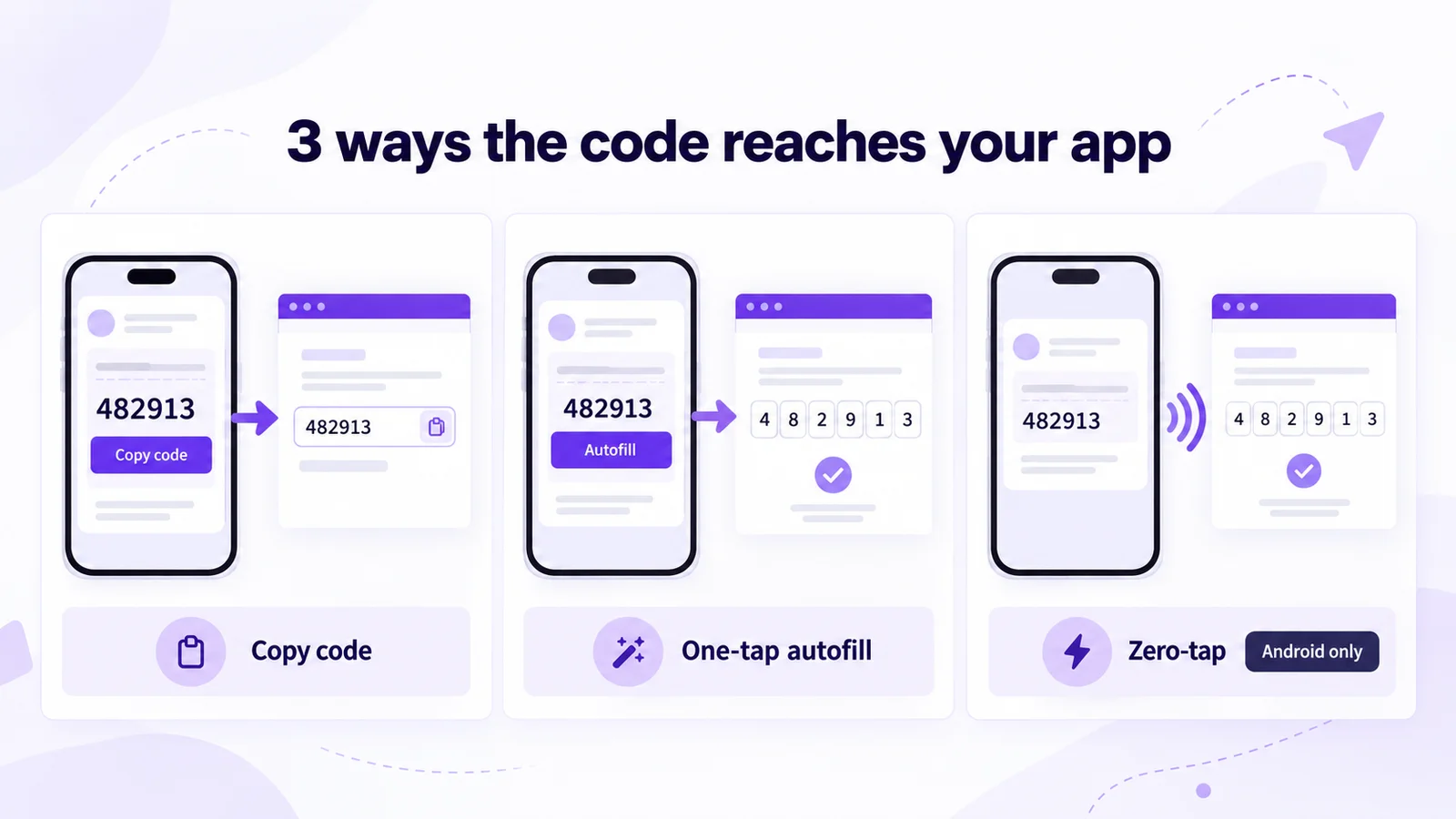
The button decides how much typing your user does. Meta calls one-tap autofill the preferred option, but it only works inside your own Android app.
| Button | What the user does | What you need to build | Good for |
|---|---|---|---|
| Copy code | Taps Copy code, then pastes it into your app or site | Nothing beyond the template | Websites, iPhones, your first OTP flow |
| One-tap autofill | Taps Autofill; your Android app opens with the code filled in | A handshake between your Android app and WhatsApp | Android apps |
| Zero-tap | Nothing; WhatsApp passes the code to your Android app | The handshake plus a broadcast receiver | High-volume Android logins |
On iPhones, iOS 26 and later offers the code from the WhatsApp notification as a keyboard suggestion, with no work on your side. Earlier versions don't, so copy code is the safe default. If users worry about codes filling in automatically, WhatsApp's help article About security codes that automatically fill on WhatsApp explains it in plain language.
Authentication template rules to know before you submit
- Use the authentication category. Codes in a utility or marketing template break Meta's rules.
- Keep to the preset. You pick the language, security line, expiry and button, not the body.
- No links, media, emoji or offers. Our payment OTP template and exam login OTP template show what an approvable authentication message looks like.
- Set a short time-to-live. Meta's time-to-live setting defaults to 10 minutes for authentication templates. If WhatsApp can't deliver in time, Meta stops trying, so stale codes don't turn up late.
- Expect primary-device delivery. Linked device security shows the code only on the user's main phone, not WhatsApp Web.
How to set up WhatsApp OTP with Mark360
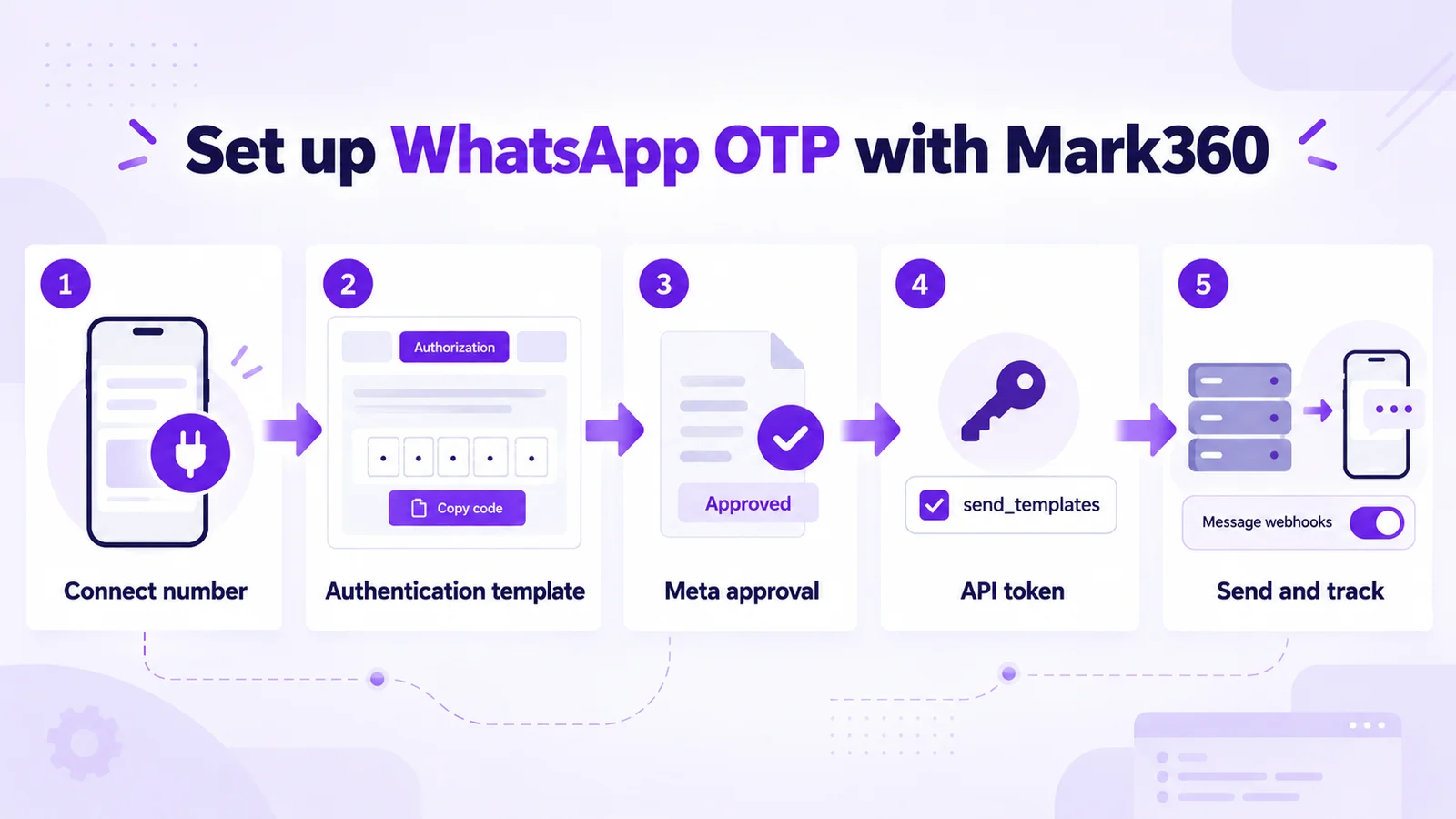
Only one step needs code, so a small team can usually send its first OTP in an afternoon. Template approval is Meta's step, and its timing varies.
- Connect your number to a free Mark360 workspace through Meta's official Cloud API. Still choosing? See Cloud API vs Business App vs a BSP.
- Create the template. In Templates, choose Create Template, pick the Authorization category (Mark360's label for authentication) with a Copy Code button, or start from our WhatsApp template examples.
- Submit it for approval with a six-digit sample code, not the word "OTP".
- Issue an API token with only the
send_templatespermission, and keep it on your server. - Send from your backend. Generate a random code, store its hash with an expiry, and call the Mark360 API to send the approved template with the code as its variable. Our API page covers tokens and webhooks; the request reference comes from the docs or our team.
- Turn on message webhooks so your system records what happened.
- Test on Android and iPhone, then add the SMS fallback below.
Mark360 sends templates Meta has already approved; your backend creates and checks the codes. See the Mark360 WhatsApp Business API page for more.
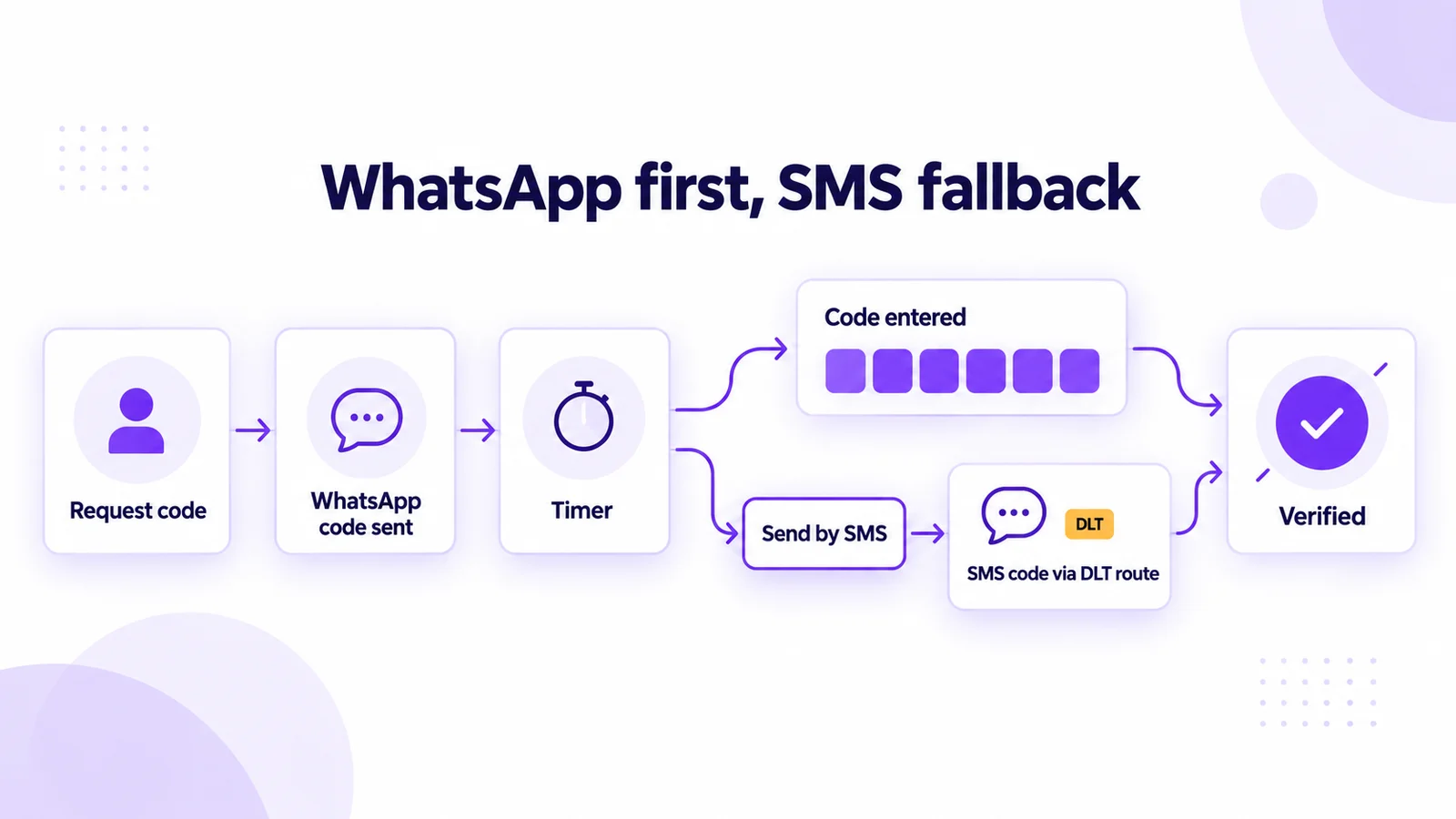
Add SMS fallback without paying twice
Some users don't have WhatsApp on that number, or are offline. Build the fallback so you pay for SMS only when it's needed:
- Say where the code went: "We've sent a code to WhatsApp." Meta's best practices ask you to make the channel clear.
- Start a short timer. When it ends, show "Didn't get it? Send by SMS".
- Judge success by code entry, not receipts. A delivered status doesn't prove the user saw the code.
- Send SMS only on request or after the timer, so most logins cost one message.
- Keep one live code per attempt. A new SMS code cancels the WhatsApp one.
The SMS route still needs DLT. Mark360's integration catalog includes Twilio and workflows have a Send SMS step, but most teams keep fallback logic in their backend, where the code and timer live.
WhatsApp OTP security checklist
- Use six random digits, make them expire within minutes, and accept each one only once.
- Limit wrong attempts and resends per number and per device.
- Store a hash of the code, not the code itself, and never log it.
- Send a code only when the user is on your login or payment screen and asked for it. An OTP nobody requested looks like phishing.
- Never put a code in a marketing or utility message, or next to a link.
Gupshup, Twilio Verify or Mark360 for WhatsApp OTP?
All three use the same Meta platform. The difference is how much of the flow they run for you.
- Twilio Verify is a verification API that sends and checks the code for you. Its Verify WhatsApp docs say you bring your own WhatsApp sender, and automatic WhatsApp-to-SMS channel selection is a limited pilot. See our Twilio WhatsApp alternatives.
- Gupshup is a large messaging BSP. Its WhatsApp OTP guide also promotes a sign-in-with-WhatsApp option it calls 1-Click-Auth.
- Mark360 suits small and mid-sized teams that want OTP templates, the inbox, campaigns and chatbots in one workspace, with your backend checking the codes.
To compare per-message pricing across providers, see our WhatsApp API pricing comparison. For what the free tiers actually include, read what's actually free on the WhatsApp API.
Send OTPs via the Mark360 API in an afternoon
Mark360 is an Official Meta Business Partner based in Surat, India, trusted by 100+ businesses. Connect your number on the Free plan, build a Copy Code authentication template, issue a send_templates token and send your first code. Scale is $19 a month billed quarterly, with messages billed per message.
Start with the Mark360 API, see the payment OTP template or check pricing.