WhatsApp Cloud API vs Business App vs BSP: Which Should Indian SMBs Choose? (2026)
If your WhatsApp inbox is still handled by one or two people, the Business App can be enough. The decision changes when you need multiple agents, Shopify events, automated order updates, AI support, CRM workflows or reliable campaign operations.
For Indian SMBs, there are three practical ways to think about the stack: the WhatsApp Business App, the WhatsApp Cloud API, and a BSP or platform-managed WhatsApp API setup. They all connect your business to WhatsApp, but they solve very different operational problems.
Quick answer: Which WhatsApp setup should an Indian SMB choose?
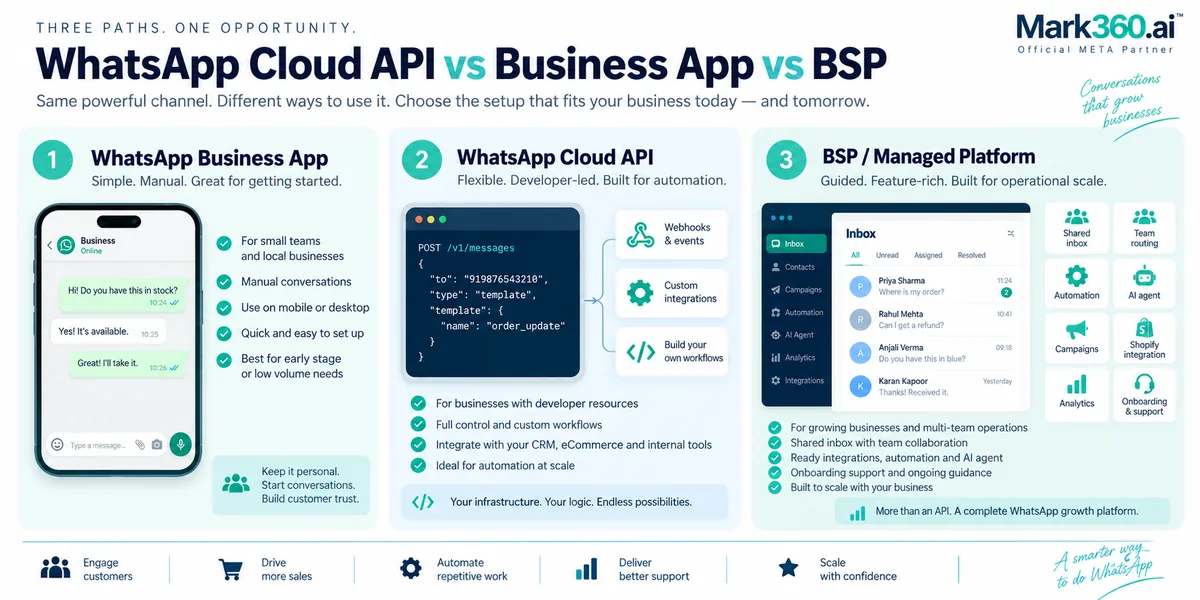
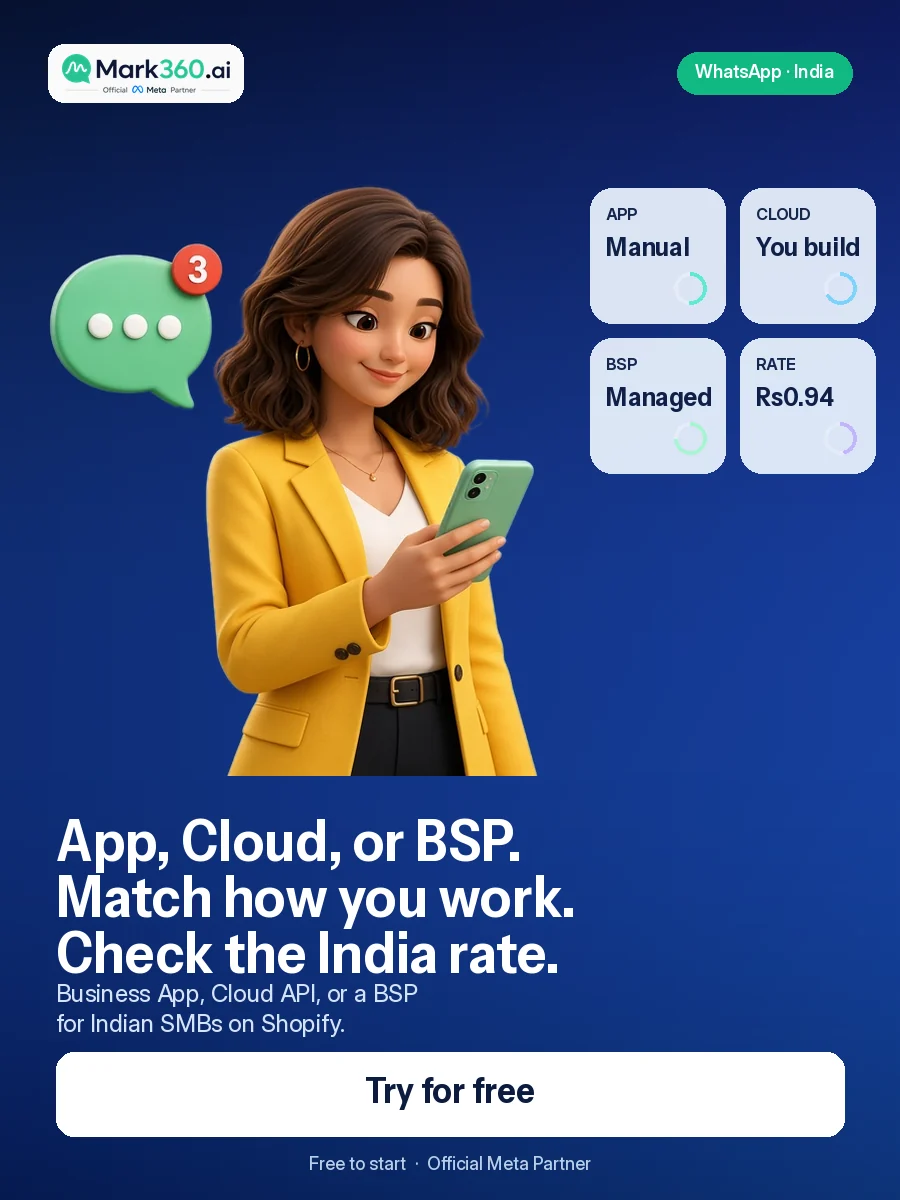
Choose the WhatsApp Business App if you have low conversation volume and one small team handling chats manually. Choose Cloud API if you have developers and want direct API control. Choose a BSP or WhatsApp automation platform if you want the API plus a ready-to-run inbox, automation, AI agents, templates, integrations and operational support.
For most Shopify-led Indian SMB and D2C teams that want to automate customer conversations without building the entire messaging application themselves, a platform such as Mark360 is the practical middle layer: WhatsApp Business Platform access combined with AI agents, automation and commerce workflows.
| Decision | Business App | Cloud API | BSP / Platform |
|---|---|---|---|
| Best for | Small manual teams | Developer-led builds | SMBs needing managed automation |
| Setup effort | Low | High | Low to medium |
| AI agents | Limited | Build or integrate | Available through platform capabilities |
| Shopify workflows | Basic/manual | Custom development | Ready-made or configurable integrations |
| Team inbox | Limited operational model | Build yourself | Usually included |
| Developer control | Low | High | Moderate to high |
Five things to remember
- The Business App is a conversation tool. It is a sensible starting point when a small team can answer customers manually.
- Cloud API is an infrastructure layer. It gives developers direct programmatic access, but your team still needs to build the operational layer around it.
- A BSP or platform reduces the engineering work. You get API access together with inboxes, automation, templates, integrations and support, depending on the provider.
- Shopify changes the calculation. Once orders, carts, fulfilment and customer data need to trigger WhatsApp conversations, API-based automation becomes much more useful.
- AI agents are a separate capability from API access. Having an API does not automatically give you an AI support agent; the agent, tools, knowledge and guardrails still have to be implemented.
What is the WhatsApp Business App?

The WhatsApp Business App is the simplest option for a small business that wants to communicate with customers from a business profile. You install the app, configure the business account and manage conversations directly from the WhatsApp interface.
It works well when the primary job is human-to-customer messaging. A local service business, early-stage D2C store or small sales team may not need an API simply because WhatsApp is part of the customer-support mix.
When the Business App makes sense
- You have a small number of people handling conversations.
- Most replies are written manually.
- You don't need Shopify events to trigger messages automatically.
- You don't need a custom CRM integration.
- You aren't trying to run complex AI-led conversations.
- Your team can keep up with incoming chats without a dedicated routing system.
The biggest advantage is simplicity. You don't have to design webhooks, API authentication, message queues, template workflows or a custom inbox.
Where the Business App starts to become limiting
The limitation isn't that the App cannot be useful. It's that manual conversation management doesn't scale in the same way as event-driven automation.
Imagine a Shopify store receiving 300 new orders in a day. If every order needs a WhatsApp update, your team shouldn't have to copy order information into individual chats. The useful architecture is for the Shopify event to trigger an automated workflow, generate the correct message and record the outcome.
The same applies to support. If customers repeatedly ask “Where is my order?”, “Do you have size M?” or “Can I change my delivery address?”, an AI agent or structured automation can handle the repetitive part while humans take exceptions.
What is the WhatsApp Cloud API?
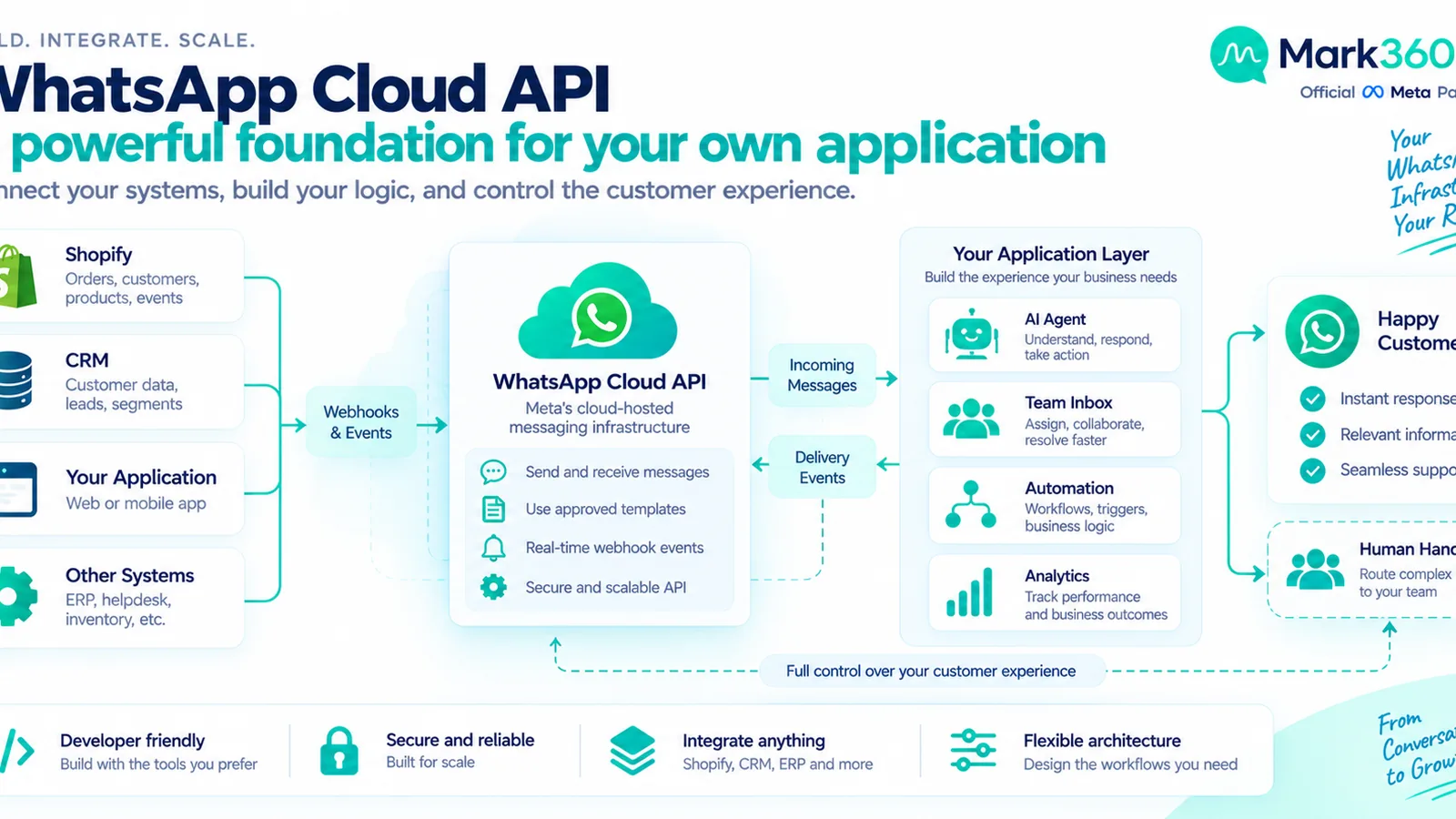
The WhatsApp Cloud API is Meta's cloud-hosted API for businesses that want programmatic access to WhatsApp Business Platform messaging. Instead of treating WhatsApp as only a phone-based inbox, your software can send and receive messages through API calls and webhooks.
That distinction matters. Cloud API is not simply a more advanced WhatsApp app. It is a developer interface that lets your application participate in customer conversations.
What Cloud API gives developers
- Programmatic message sending.
- Webhook-based incoming message and delivery events.
- Template-message workflows.
- Integration with CRM and commerce systems.
- Custom routing and business logic.
- The ability to build your own customer-facing WhatsApp experience.
For an engineering-led company, that control can be exactly what you want. Your team can decide how conversations are stored, how leads are assigned, how events are processed and which systems receive message data.
What Cloud API does not automatically give you
Cloud API does not magically provide a complete customer-support operation. You still need to build or buy the parts around the API: an agent inbox, authentication, message-state handling, webhook processing, retries, user assignment, CRM integration, analytics, template management and AI-agent orchestration.
That's the core trade-off. Cloud API can reduce dependence on a third-party application layer, but it increases the amount of engineering and operational work your team owns.
What is a BSP or managed WhatsApp API platform?
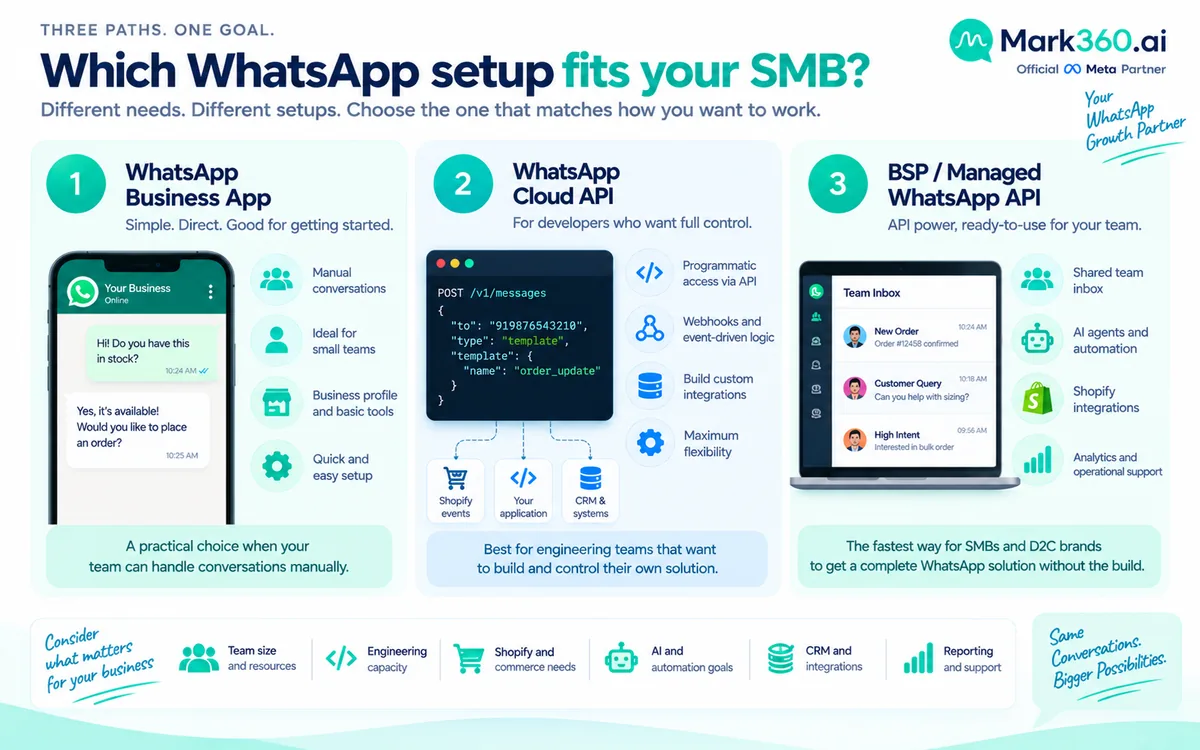
A BSP or managed WhatsApp API provider sits between the WhatsApp Business Platform infrastructure and your operating team. The exact product model varies by provider, but the goal is usually the same: make WhatsApp API capabilities usable without requiring your team to build every operational component from scratch.
A managed platform may provide a shared inbox, templates, campaign tools, automation builders, integrations, analytics, AI agents and onboarding support alongside WhatsApp Business Platform access.
This is why the BSP/platform category is often the most practical option for SMBs. You still get API-based automation, but your operations team doesn't have to become a messaging-infrastructure engineering team.
What to verify before choosing a BSP
- How WhatsApp Business Platform onboarding is handled.
- Whether the provider supports the workflows your business needs.
- How templates are created, submitted and managed.
- Whether incoming messages are available through webhooks or platform automation.
- How human handoff works.
- How Shopify and CRM data are connected.
- What analytics and export options are available.
- What support is available for Indian customers and business hours.
- How current WhatsApp platform rules and category changes are communicated.
Don't evaluate a BSP only from a feature list. Ask the provider to demonstrate one real customer journey from start to finish.
Cloud API vs Business App vs BSP: the real difference
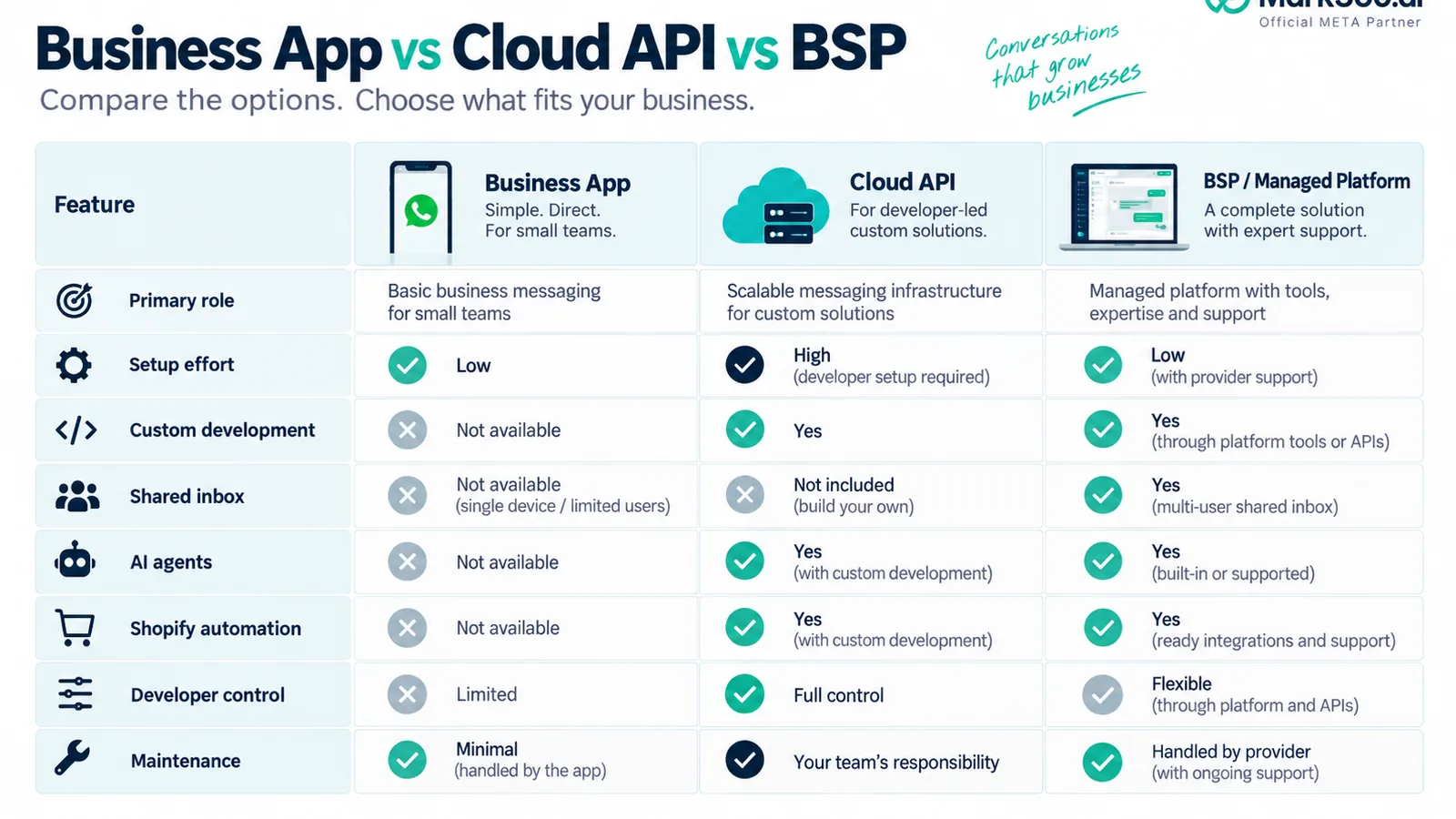
The simplest way to understand the three options is to separate interface, infrastructure and operating layer.
| Area | Business App | Cloud API | BSP / Managed Platform |
|---|---|---|---|
| Primary role | Manual messaging interface | Programmatic messaging infrastructure | Managed WhatsApp operating layer |
| Technical skill required | Low | High | Low to medium |
| Custom development | Minimal | Usually required | Optional depending on integration |
| Shared team workflow | Limited | Build yourself | Usually available |
| AI agent | Not the core model | Build/integrate | Can be provided as a platform capability |
| Shopify automation | Manual or limited | Custom webhooks/integration | Platform integration or workflow layer |
| Control | Simple | Maximum application control | Controlled through provider |
| Maintenance | Low | Your engineering team owns it | Shared with provider |
Which option is best for Shopify stores?

For a Shopify store, the key question is not how many WhatsApp messages you send. It's how many Shopify events should trigger a useful customer conversation.
An order can create a confirmation workflow. A fulfilment event can trigger a shipping update. An abandoned checkout can create a permitted follow-up. A customer question can be routed to an AI agent that has access to product or order information.
The Business App can handle the conversations, but the automation has to be manual. Cloud API gives developers the control to connect Shopify events themselves. A managed platform can provide the integration and workflow layer without forcing the store owner to build it from scratch.
Useful Shopify events to automate
- New order confirmation.
- Payment confirmation.
- Fulfilment and shipping updates.
- Delivery-related support.
- Abandoned checkout recovery where the applicable messaging and consent requirements are satisfied.
- COD confirmation workflows.
- Customer support escalation.
- Post-purchase assistance.
The important distinction is that automation should be tied to a useful customer event. More messages aren't automatically better. Every workflow should have a clear reason for contacting the customer.
Which option is best for AI agents?
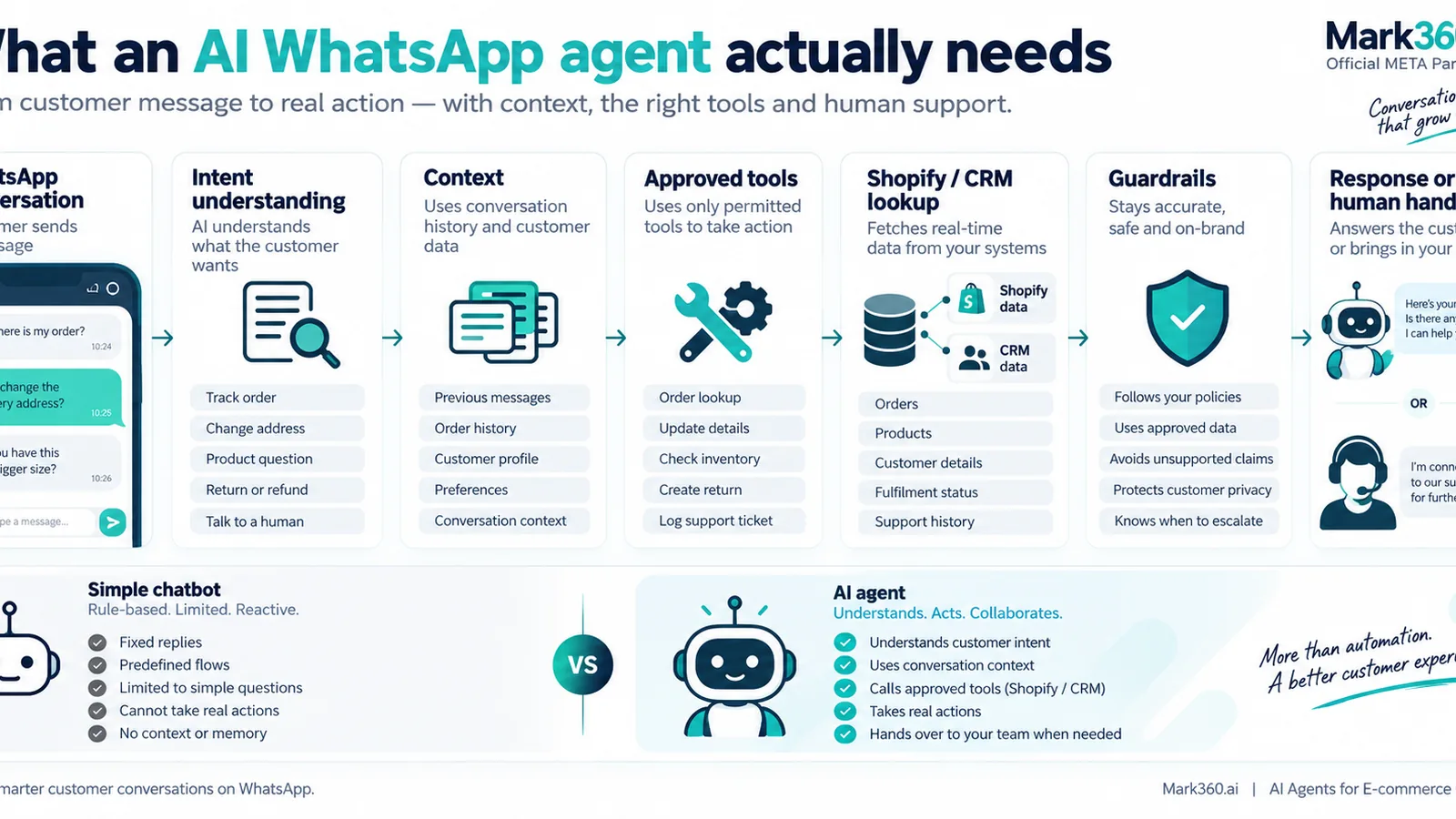
If AI agents are central to your WhatsApp strategy, the Business App alone isn't the architecture to evaluate. You need a programmable messaging layer and an AI system that can understand intent, access approved tools or data, follow guardrails and hand conversations to people.
Cloud API gives developers the messaging foundation. Your team then has to build or integrate the AI agent, knowledge retrieval, CRM tools, Shopify actions, conversation state and escalation logic.
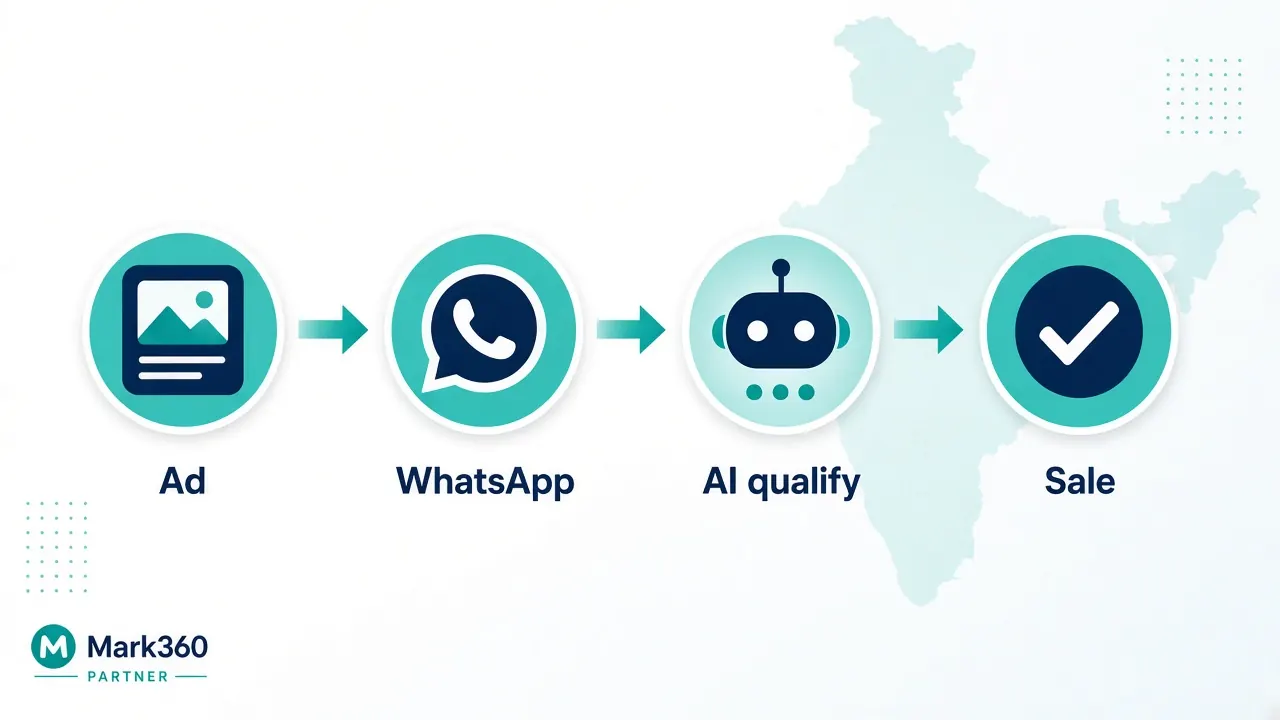
A managed platform can package those pieces into an operational workflow. For an SMB, that often means the team can configure an AI agent around real support and sales use cases instead of building messaging infrastructure first.
AI agent vs chatbot
A chatbot generally follows predefined paths. An AI agent can interpret intent and decide which approved action to take. That doesn't mean an AI agent should have unlimited access to your systems.
A production agent needs guardrails. It should know which questions it can answer, which data it can retrieve, which actions it can perform and when to stop and transfer the conversation to a human.
For example, an order-status agent might retrieve shipping information from Shopify and explain the latest status. A refund request may require a human approval step. A product-discovery conversation may be handled automatically until the customer asks for a commercial exception.
What does each option mean for your team?
The technology choice changes who owns the work.
| Responsibility | Business App | Cloud API | BSP / Platform |
|---|---|---|---|
| Conversation handling | Business team | Your application | Business team + platform |
| API integration | Not the core model | Your developers | Provider + your integrations |
| Webhook processing | Not required for basic use | Your developers | Provider/platform handles much of the workflow |
| Inbox design | Provided app interface | You build/buy it | Usually provided |
| Automation | Basic/manual workflows | Custom code | Workflow builder or managed automation |
| AI implementation | Separate tooling | Your engineering/integration work | May be included as a platform capability |
This is often the most overlooked part of the decision. Two platforms can both say “WhatsApp API,” while the amount of work your team must do after onboarding is completely different.
How WhatsApp message pricing fits into the decision

WhatsApp Business Platform pricing is separate from the question of whether you use the Business App, Cloud API directly or a managed provider. Meta's official documentation defines message categories and the applicable platform billing rules. Check the current WhatsApp Business Platform pricing documentation before budgeting because pricing and category rules can change.
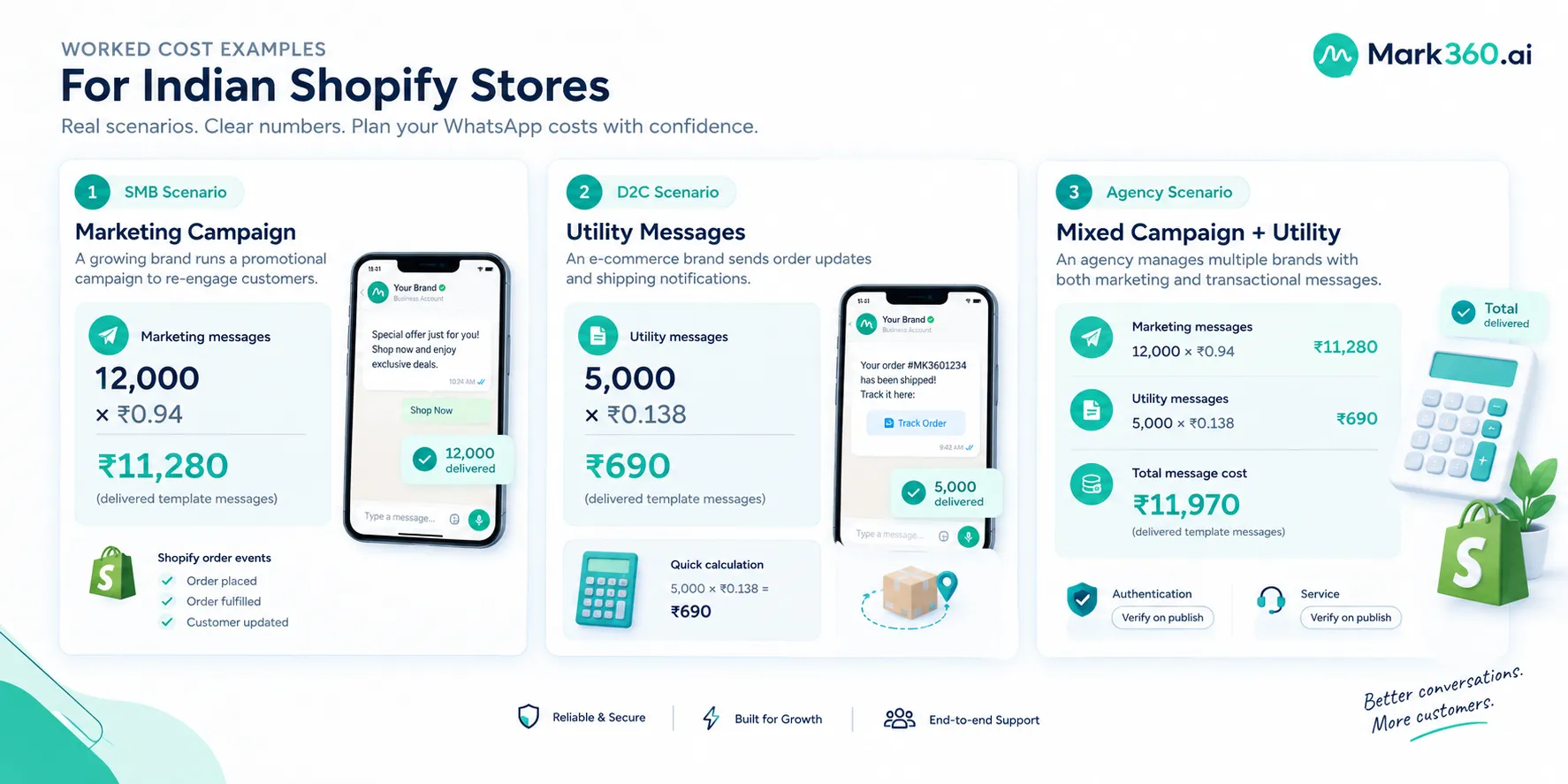
For Mark360's customer-facing India pricing referenced in this guide, the current figures are:
| Message category | Mark360 India customer-facing figure | Billing basis |
|---|---|---|
| Marketing | ₹0.94 | Per delivered template message |
| Utility | ₹0.138 | Per delivered template message |
| Authentication | Verify current pricing | Check current applicable pricing |
| Service | Verify current pricing | Check current applicable pricing |
These are Mark360 customer-facing figures and should not be treated as a statement of Meta's official India rate card. For current Meta platform rules and category definitions, use Meta's official documentation.
For an SMB, the more useful exercise is to model the workflows you expect to run. Separate advertising spend, WhatsApp messaging charges and any platform or software costs rather than treating “WhatsApp cost” as one number.
When should an Indian SMB move from the Business App to API?
There isn't one message-volume threshold that applies to every company. The right trigger is usually operational complexity.
Move toward API-based infrastructure when customers expect automated order information, several team members need to work from one customer operation, you need CRM or Shopify events to trigger messages, repetitive questions consume staff time, or you need structured campaign and template workflows.
Another trigger is response consistency. If three employees answer the same product question in three different ways, the problem isn't simply volume. You need a shared knowledge and workflow layer.
Signs you've outgrown the Business App
- Customers wait because nobody owns the inbox at certain times.
- Team members duplicate replies or miss conversations.
- Staff manually copy order details into WhatsApp.
- You need messages triggered by Shopify events.
- You want an AI agent to handle repetitive questions.
- You need structured human handoff and conversation routing.
- You need campaign or template reporting beyond a manual workflow.
- Your CRM needs WhatsApp conversation context.
When should you choose Cloud API directly?
Choose direct Cloud API when your company has the engineering capacity and a genuine reason to own the application layer. This can be attractive when WhatsApp is one component of a larger proprietary customer platform.
For example, an engineering team might already have its own CRM, agent console, event-processing system and analytics stack. In that case, adding WhatsApp Cloud API to the existing architecture can make more sense than introducing another complete customer-engagement application.
But calculate the full engineering scope before making that choice. API access is only one part of production readiness. You also need to handle authentication, webhooks, templates, retries, delivery states, conversation state, permissions, human routing, analytics, data retention and ongoing maintenance.
When should you choose a BSP or managed platform?
A managed platform makes sense when your team wants the benefits of API-based WhatsApp automation without becoming responsible for every component of the messaging stack.
This is particularly relevant to Indian SMB and D2C teams where the people running WhatsApp are marketers, CX managers, sales operators or founders rather than dedicated messaging engineers.
Mark360 is designed around this model. As an Official Meta Business Partner, Mark360 provides WhatsApp Business API capabilities alongside AI agents, automation and Shopify-oriented workflows. The exact features and integrations should be evaluated against your use case before implementation.
What should Indian SMBs ask a WhatsApp API provider?
Don't start the sales call with “What features do you have?” Start with the workflow you need to run.
- Show us a Shopify order event. What happens from the webhook or order event to the customer message?
- Show us human handoff. What does the agent see when an AI conversation needs escalation?
- Show us templates. How are templates created, approved and maintained?
- Show us the inbox. Can multiple people work on conversations without duplicating replies?
- Show us reporting. Can we see delivery, response, campaign and business outcomes?
- Explain the cost model. Which messaging categories apply to our workflows and what should we verify before budgeting?
- Explain onboarding. Who handles WhatsApp Business Platform setup and what information do we need to provide?
- Explain support. What happens if a template is rejected, a number has an issue or an integration stops working?
A good provider should be able to demonstrate these workflows instead of only presenting a feature grid.
Business App vs Cloud API vs BSP: a practical decision framework
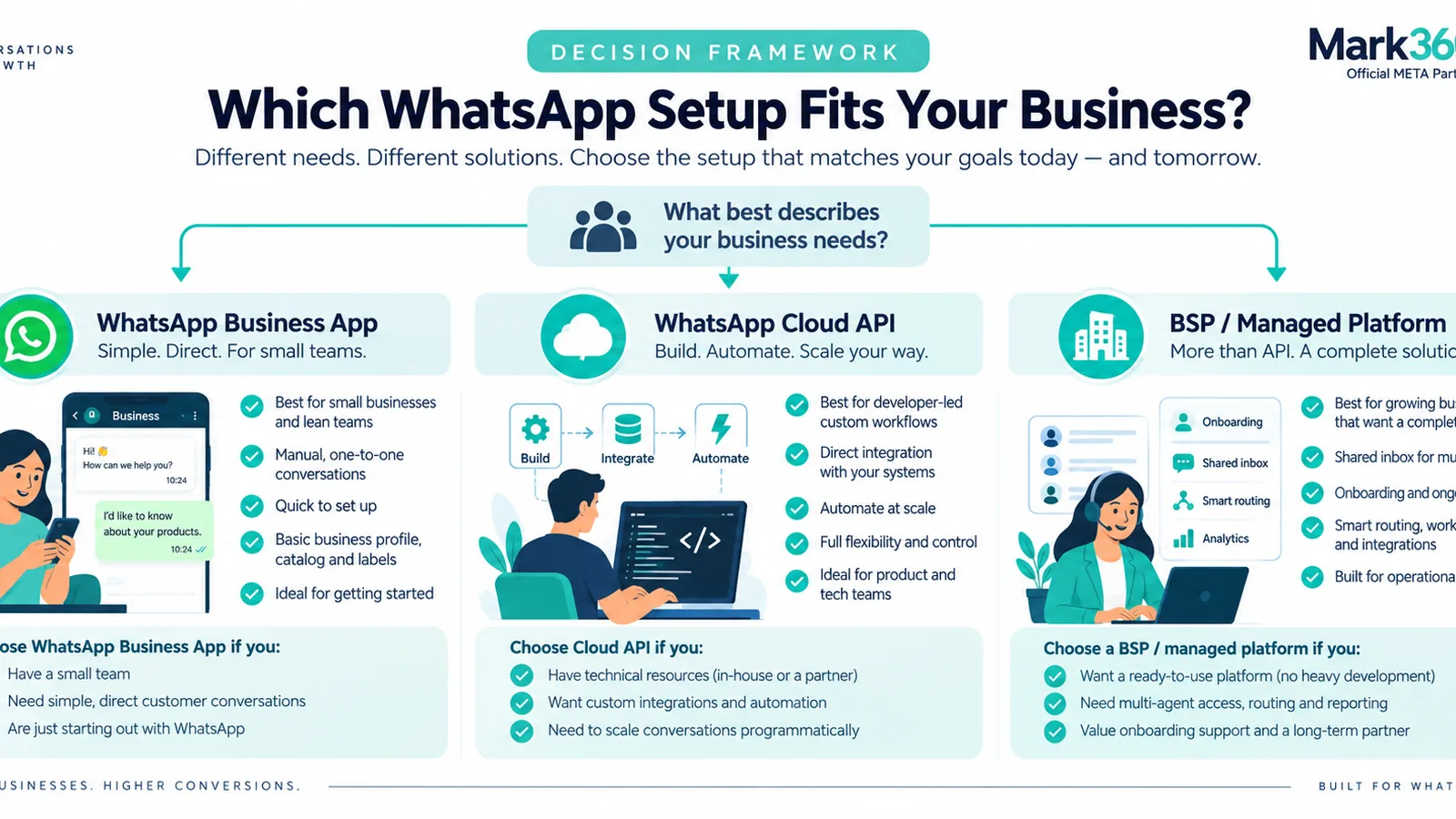
Use your current operating model to narrow the choice.
Choose WhatsApp Business App if
- Your team is small.
- Conversation volume is manageable manually.
- You don't need event-driven automation.
- Most conversations are simple human replies.
- You want the lowest operational complexity.
Choose Cloud API if
- You have developers who can own the integration.
- You already have an internal inbox or customer platform.
- You need custom application logic.
- WhatsApp needs to connect deeply with proprietary systems.
- Your organization wants direct control over the API layer.
Choose a BSP or managed platform if
- You need WhatsApp API capabilities without building the entire application layer.
- You need a shared inbox and team routing.
- You want AI agents and automation.
- Shopify or CRM events should trigger customer workflows.
- Your marketing and CX teams need to manage WhatsApp without depending on engineering for every change.
- You want onboarding and operational support around the WhatsApp platform.
Security, consent and WhatsApp policy still matter
Whichever architecture you choose, the platform doesn't remove your responsibility to use WhatsApp appropriately. Businesses need to follow WhatsApp Business and Meta policies, maintain accurate business information, obtain the required user permission for business-initiated communication, respect opt-outs and use approved templates when required.
Meta's Business Messaging Policy also distinguishes the customer-service window from business-initiated template messaging. Your automation design should therefore account for when a customer has messaged you, what kind of response is permitted, and when a template is required.
Automation should also include a clear human escalation path. An AI agent should not become a dead end when the customer has a complex complaint, asks for an exception or needs an action outside the agent's permissions.
How Mark360 fits the three-option decision

Mark360 is not the Business App and it isn't simply a raw Cloud API endpoint. It is a managed WhatsApp automation platform built for teams that want API-based WhatsApp workflows without having to build the entire operating layer themselves.
For a Shopify-led Indian SMB, that can mean connecting store events to WhatsApp, using AI agents for repetitive conversations, routing exceptions to humans and managing customer journeys from a shared operational layer.
The fit is strongest when your WhatsApp strategy has moved beyond “someone should reply to these messages” and toward “the system should handle this customer journey, then involve a person when necessary.”
If your business only needs a simple manual inbox, the Business App may be enough. If you have a strong engineering team and an existing customer platform, direct Cloud API may be appropriate. If you need managed automation, AI, Shopify and team operations, a platform such as Mark360 is worth evaluating.
Final decision: start with the work, not the API label
The difference between Business App, Cloud API and BSP isn't simply “basic versus advanced.” Each option puts different responsibilities in different hands.
The Business App prioritizes simplicity. Cloud API prioritizes developer control. A BSP or managed platform prioritizes operational speed by combining API access with tools your customer-facing team can actually use.
For an Indian SMB, the right choice usually becomes obvious once you map your real workflows. If WhatsApp is mainly a manual support channel, start simple. If your developers need to embed WhatsApp into an existing application, evaluate Cloud API. If you need AI agents, Shopify events, shared operations and automation without building everything internally, evaluate a managed WhatsApp platform.
Before you switch, document three workflows: one sales conversation, one support conversation and one Shopify-triggered notification. Ask each option to show how those workflows would run in production. That exercise will tell you far more than another generic WhatsApp feature checklist.
Explore Mark360 WhatsApp Business API and map your first automation workflow before deciding how much infrastructure your team actually needs.
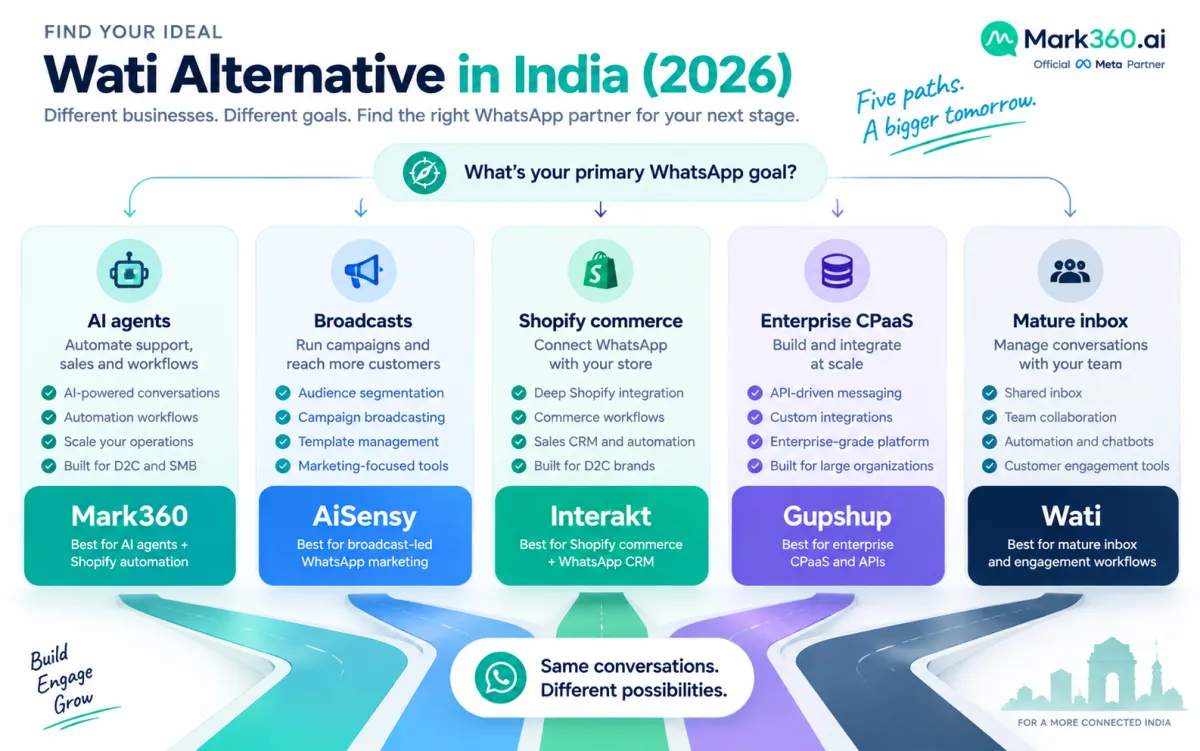
Related reading: WhatsApp Business API pricing in India, best Wati alternatives in India, and WhatsApp service message pricing changes.