

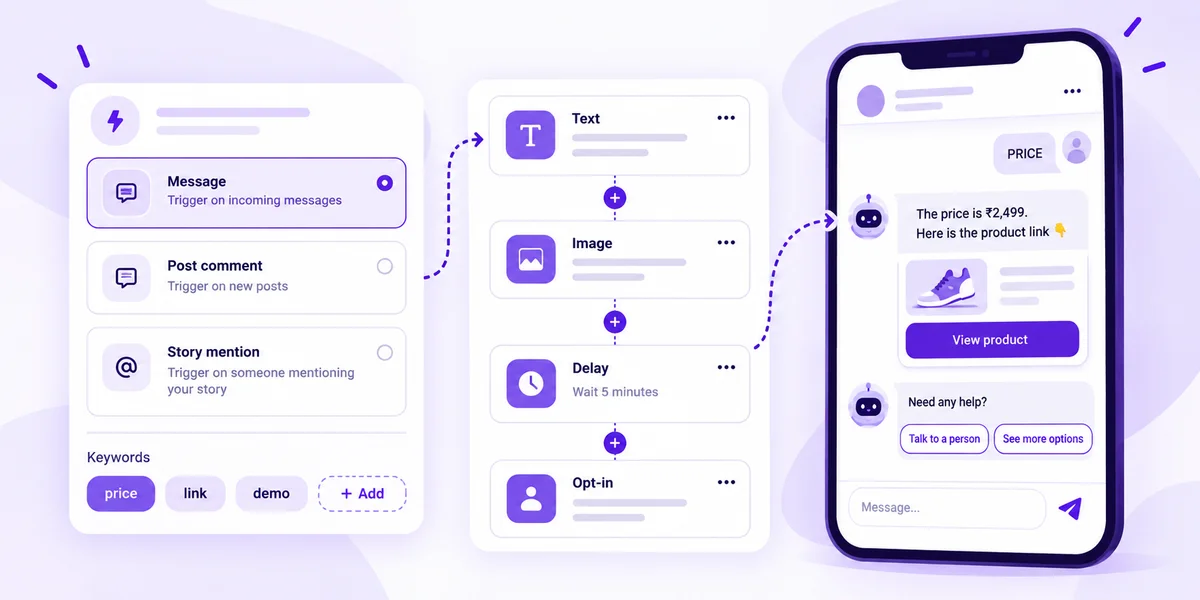
Direct answer: An Instagram DM bot is software that replies to Instagram direct messages, comments and story mentions for you. The safe way to run one is through Meta's official Instagram API. You connect an Instagram professional account to an approved tool, set triggers such as a comment keyword or an incoming DM, and the bot replies with text, links, media, an AI answer or a hand-off to your team. Under Meta's rules the customer has to message first. You then have a 24-hour window to reply, and a comment can get one private DM within 7 days. Bots that log in with your password, or that mass-follow, like or cold-DM, break Instagram's Terms of Use and put the account at risk.
Meta rules here were checked in October 2026 on Meta's Instagram messaging API docs, private replies docs and the Instagram Platform overview. Mark360 features and prices are from mark360.ai as of October 2026. Rules change, so check Meta's docs before you launch.
What is an Instagram bot?
People use “Instagram bot” for two very different things:
- Business messaging bots (Instagram DM bots or chatbots) answer people who contact your brand: a “price” comment, a delivery question, a story mention. They run on Meta's official API and are allowed.
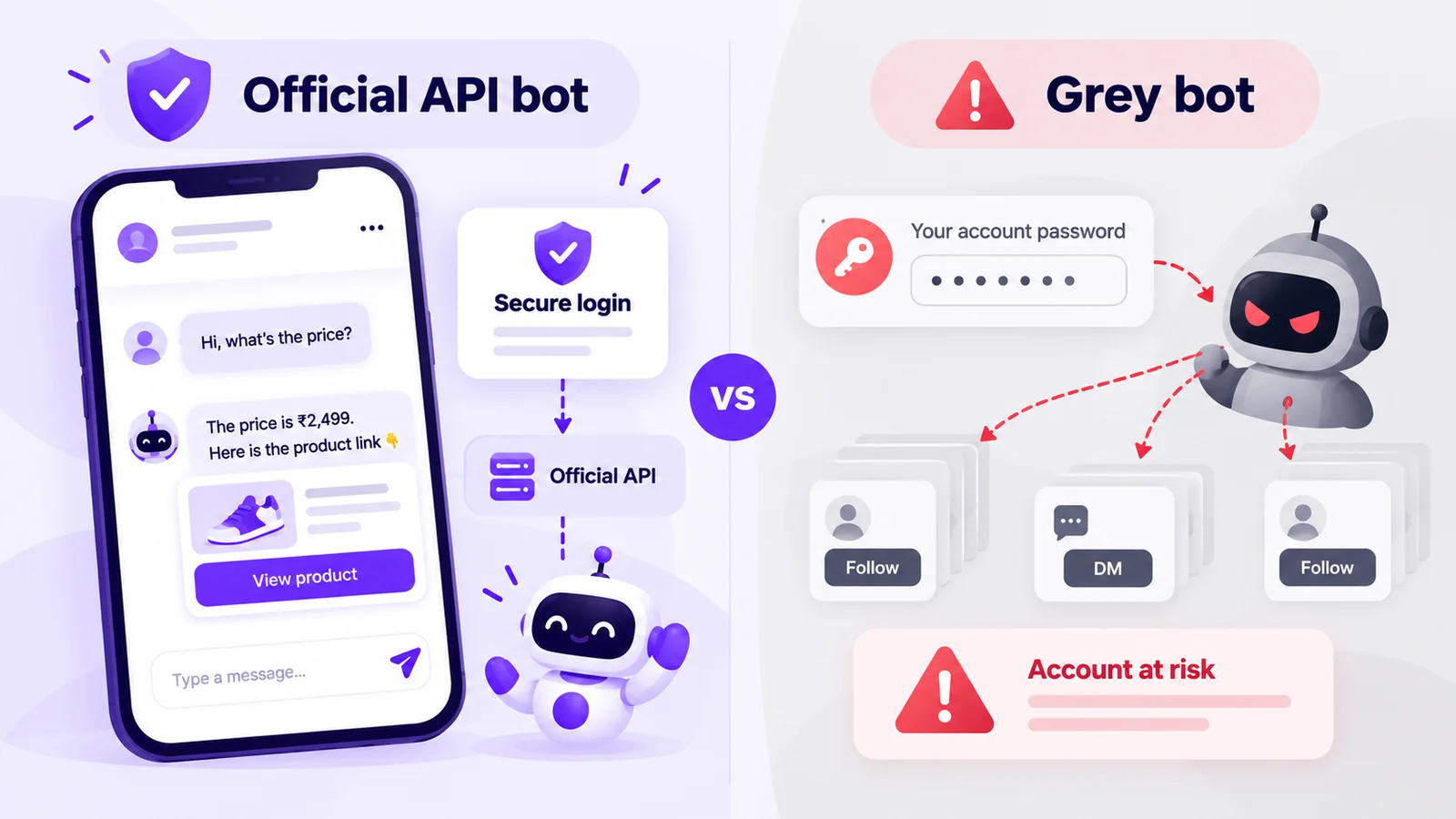
- Growth bots log in as you to auto-follow, auto-like, auto-comment or cold-DM strangers. Instagram's Terms of Use say you can't access or collect information “in an automated way without our express permission”, or collect other people's passwords or access tokens.
This guide covers the first kind. Coming from a password-based tool? Read why unofficial Instagram DM APIs get accounts banned first.
Official API bot vs grey “Instagram bots”: the ban risk
| Official API DM bot | Grey bot (password or browser automation) | |
|---|---|---|
| How it connects | Meta's login screen (Instagram or Facebook login). You approve permissions; the tool never sees your password | Asks for your username and password, or runs a script in a browser |
| Who it messages | Only people who messaged, commented or mentioned you | Often anyone: followers of competitors, hashtag lists, scraped accounts |
| What Meta says | Documented and supported, inside messaging windows and rate limits | Automated access without permission is against the Terms of Use |
| Risk to the account | Low when you follow the rules below | Action blocks, restrictions, or a disabled account |
| Team and data | Shared inbox, per-agent access, contacts saved with consent | One shared login; leads live in screenshots |
Quick test: if a tool wants your Instagram password in its own form, or promises to “DM all your followers”, it isn't using the official API. Mark360 is an Official Meta Business Partner and connects through Meta's own login, as do tools like Manychat and Wati.
The Meta rules every Instagram DM bot must follow (2026)
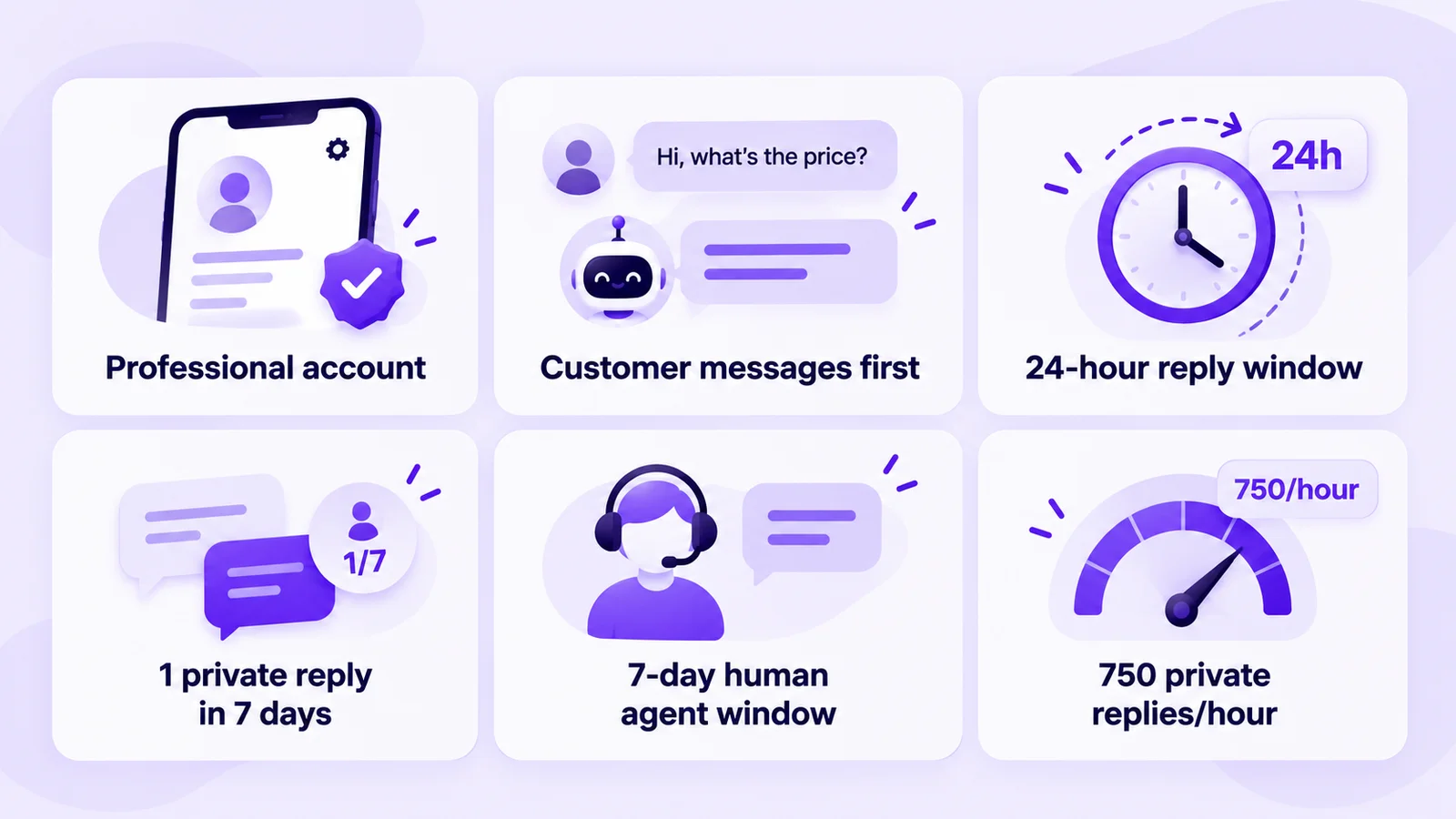
1. Only Instagram professional accounts
Meta's API works only for Instagram professional accounts (business or creator), connected through Instagram Login or through Facebook Login with a linked Page. Personal accounts can't use DM automation; switching is free in the app.
2. The customer messages first, then the 24-hour window
Per Meta's docs, conversations only begin when an Instagram user messages your account (from your feed, posts, story mentions and other entry points). Your app can then reply during the standard messaging window, which lasts 24 hours for most user actions. After a first message from a Click-to-Direct ad, it may last up to 7 days.
3. Comment-to-DM: one private reply within 7 days
Comment-to-DM uses Meta's private replies feature. The rules:
- You can send one private reply per comment, within 7 days of the comment (Instagram Live: only during the broadcast).
- More messages are allowed only after the person replies, and then within 24 hours of their reply.
- The DM lands in their main inbox if they follow you, or in Requests if they don't.
So make the first DM count: send what they asked for plus one question or button that earns a reply and opens the 24-hour window. Examples: Reels comment-to-DM in 2026.
4. Human agents get a 7-day window
If a person on your team needs more time, Meta lets the app tag the reply to use a separate 7-day Human Agent window. That tag is for real people replying. A bot can't use it to send automated follow-ups.
5. Rate limits
Per Meta's Instagram Platform overview, messaging limits are counted per Instagram professional account:
| API | Limit (per professional account) |
|---|---|
| Send API: text, links, reactions, stickers | 100 calls per second |
| Send API: audio or video | 10 calls per second |
| Private replies to post and Reel comments | 750 calls per hour |
| Private replies to Instagram Live comments | 100 calls per second |
| Conversations API | 2 calls per second |
The one most brands hit is 750 private replies an hour. A viral Reel can pass that, so your tool should queue comment replies rather than drop them. Remember the 7-day limit when it does.
6. Tell people they're talking to a bot
Where the law requires it (Meta calls out California and Germany), automated chats must say they're automated at the start, after a long gap, and when a chat moves from a human back to the bot. Meta recommends it everywhere. “I'm the [brand] assistant; a person can step in any time” covers it.
Also: text messages max out at 1,000 bytes, and you can only share media your account owns. Full developer view: Instagram Messaging API rules and limits.
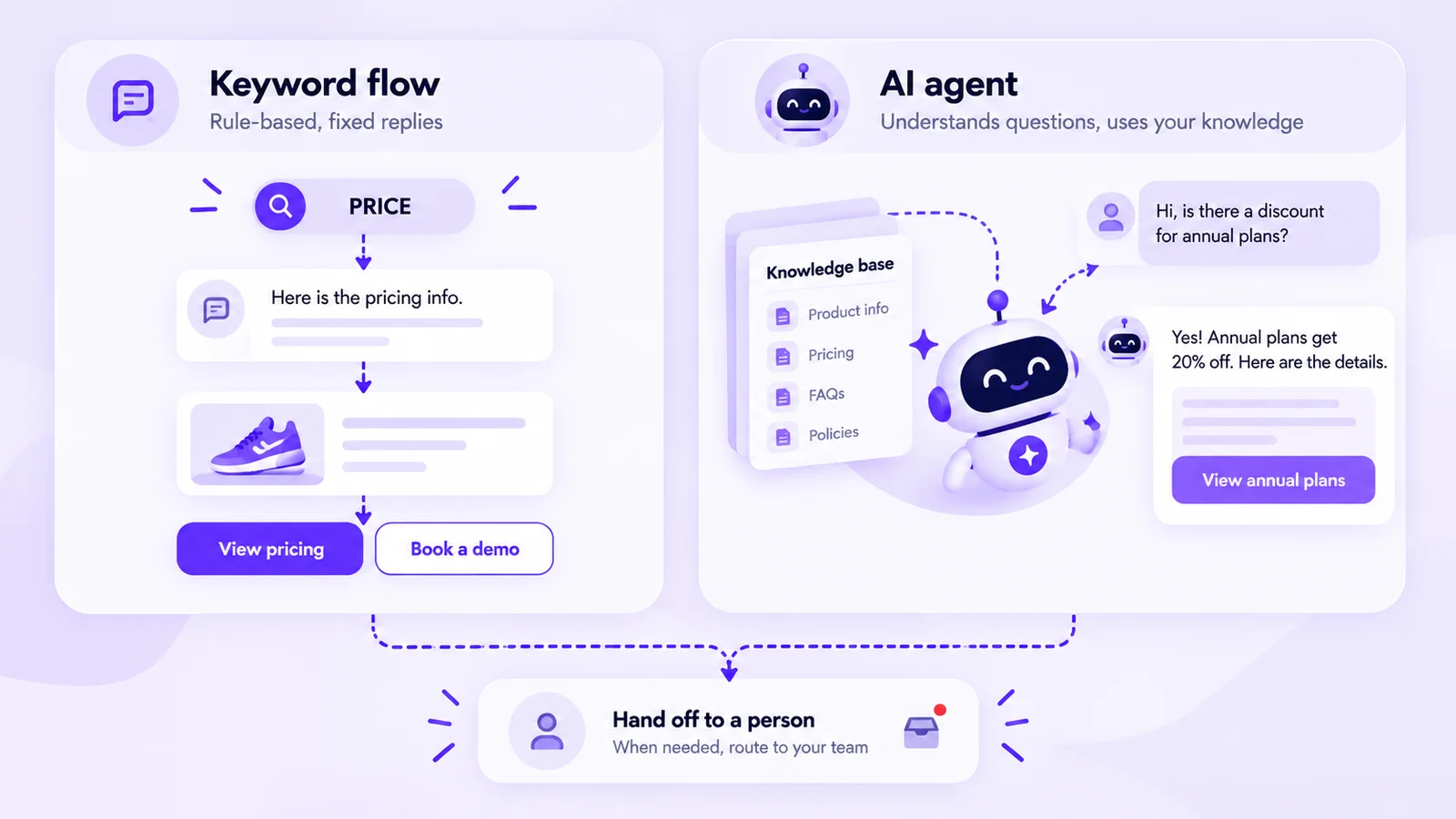
Keyword flows vs AI agent: which Instagram chatbot do you need?
| Keyword flow bot | Instagram AI chatbot (AI agent) | |
|---|---|---|
| Trigger | A set keyword in a comment, DM or story mention | Any free-text question |
| Reply | Fixed text, link, image, video or buttons you write | Generated from the knowledge base you upload (prices, policies, FAQs) |
| Best for | “Comment GUIDE”, price drops, lead magnets, giveaways | Product questions, sizing, delivery, “which plan is right for me?” |
| Weak spot | Breaks when people phrase things differently | Needs good source content, guardrails and a human hand-off |
Combine them: keyword triggers start the chat, an AI agent answers follow-ups, and a person takes refunds, complaints and ready buyers. Deep dive: Instagram AI agent vs Manychat flows. Keyword ideas: Instagram DM keyword auto-replies.
How to set up an Instagram DM bot in 6 steps
- Use a business account. Switch in the Instagram app if needed.
- Connect through Meta's login. In Mark360, choose Connect using Instagram or Connect using Facebook. You never share your password.
- Pick a trigger. Message (incoming DMs), Post (comments on a post or Reel) or Story Mention. Match any keyword or specific ones such as “price”, “link” or “demo”.
- Stack the reply. Combine text, image, video, audio, file, delay and opt-in blocks, or pull a saved reply from the library. Check the phone preview before you publish. To answer free-text questions, deploy an AI agent template (bookings, lead qualification, order tracking, support) and give it a knowledge base.
- Set the hand-off. Anything the bot can't match lands in the Instagram shared inbox under Unassigned, where an agent picks it up. Nobody has to share the Instagram login.
- Launch and measure. Use Re:Engage to automate posts published before you joined. Weekly, review hand-off rate, unanswered questions and opt-ins.
Every step above runs on the Mark360 Instagram chatbot through Meta's official API.
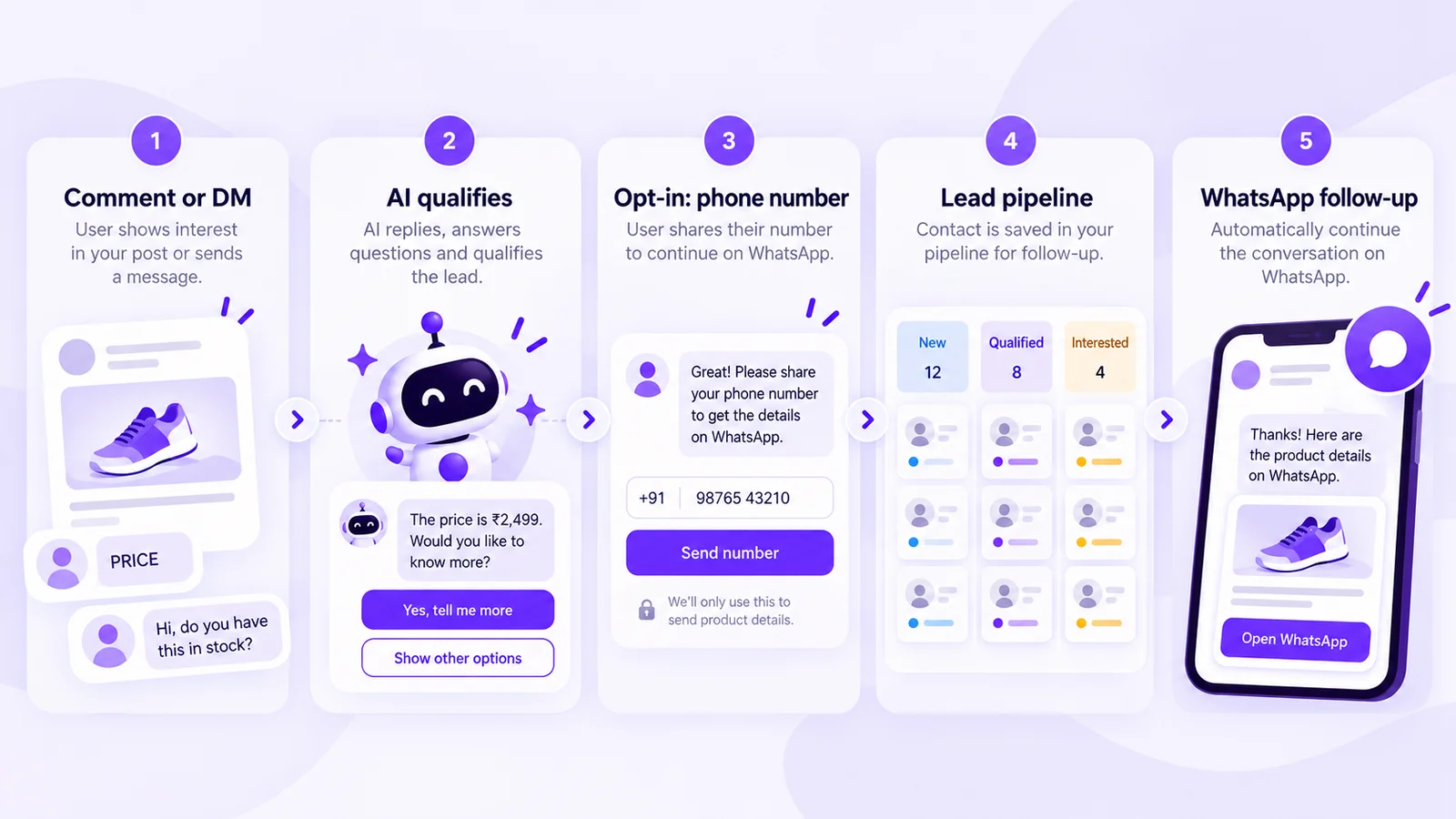
DM to WhatsApp handoff: where hot leads should go next
Instagram is great for starting conversations and weak for finishing them: once the 24-hour window closes, you can't follow up until the customer writes again. On WhatsApp you can follow up later with approved templates if the person opted in. So the best Instagram bots move ready buyers to WhatsApp:
- Qualify in the DM. Two or three questions at most: what they want, budget or size, and timing.
- Ask for consent clearly. “Want the price list and a callback on WhatsApp? Share your number.” On Mark360, an opt-in block collects the phone or email and saves the contact with what they shared.
- Move the lead into a pipeline. Contacts become cards in the Instagram leads pipeline, with stages and permissions.
- Follow up on WhatsApp from the same workspace. A WhatsApp drip sends the brochure, booking or payment link, and your team sees both channels in one inbox. Or send a click-to-chat link from the free WhatsApp link generator so the lead messages you first.
What the WhatsApp side costs: on Mark360 in India, a marketing template is ₹0.94 and a utility template is ₹0.138 per message (final prices, October 2026). For full funnels, see the Instagram comment-to-DM to WhatsApp funnel and Click-to-Instagram-DM ads with WhatsApp handoff.
Instagram bot mistakes that get accounts restricted
- Giving a tool your password or buying “DM all followers” features.
- Bot loops with no person. Always offer “talk to a person”.
- Private data in public comments. Keep order IDs and addresses in the DM.
- Moving people to WhatsApp without consent. Ask first and say what they'll get. More ideas: Instagram auto-reply and story automation.
What does an Instagram DM bot cost on Mark360?
| Plan | Price (October 2026) | What you get for Instagram |
|---|---|---|
| Free | $0/month, no credit card | Instagram DM and comment automation, 1 bot, 500 triggers, 1 agent seat |
| Scale | $19/month billed quarterly | No-code builder, 5 bots, 1,000 triggers, omnichannel inbox, WhatsApp API |
| Scale+ | $99/month | AI support agent and knowledge automation, higher bot limits, priority support |
| Enterprise | Custom | Unlimited bots, campaigns and seats |
Annual billing is 10% off; no setup fee. Compare costs in the Instagram pricing calculator or on Mark360 pricing.
Launch an Instagram AI DM bot that hands hot leads to WhatsApp
Mark360 is an Official Meta Business Partner. Connect Instagram on the Free plan, set a comment or DM keyword, check the phone preview and go live. Then add an AI agent with your knowledge base and a WhatsApp follow-up for leads who opt in. Trusted by 100+ businesses.
Start your Instagram DM bot free, or see how Mark360 compares on Mark360 vs Manychat.
Related reading
- Unofficial Instagram DM API: ban risk and the Meta partner route
- Instagram Messaging API rules and limits (2026)
- Instagram AI agent vs Manychat flows
- WhatsApp chatbot for business (2026)
FAQs
What is an Instagram DM bot?
An Instagram DM bot is software that replies automatically to Instagram direct messages, comments and story mentions. A business DM bot runs on Meta's official Instagram API, replies with keyword answers or AI, and passes the chat to a person when needed.
Are Instagram bots allowed?
Yes, if they use Meta's official Instagram API. Bots that log in with your password, or auto-follow, auto-like or cold-DM people, break Instagram's Terms of Use.
Can an Instagram bot DM people who haven't messaged me?
No. The person must contact you first, by DM, comment, story mention or another entry point. A comment allows one private reply within 7 days. Tools promising cold DMs aren't using the official API.
How long can a bot reply after someone DMs me on Instagram?
For most actions the standard messaging window is 24 hours from the customer's message. If they messaged after clicking a Click-to-Direct ad, Meta says the window may last up to 7 days. A human agent can use a separate 7-day Human Agent window.
How does comment-to-DM work on Instagram?
When someone comments your keyword on a post or Reel, the bot sends them one private reply. Meta allows one private reply per comment within 7 days. More messages are allowed only after they reply, within 24 hours of that reply.
Do I need a business account for an Instagram chatbot?
You need an Instagram professional account (business or creator); personal accounts can't use the messaging API. Mark360 connects an Instagram Business account through Meta's Instagram or Facebook login.
Is there a free Instagram DM bot?
Yes. Mark360's Free plan is $0/month with no credit card and includes Instagram DM and comment automation with 1 bot and 500 triggers. AI agents with a knowledge base are on Scale+ at $99/month (as of October 2026).