

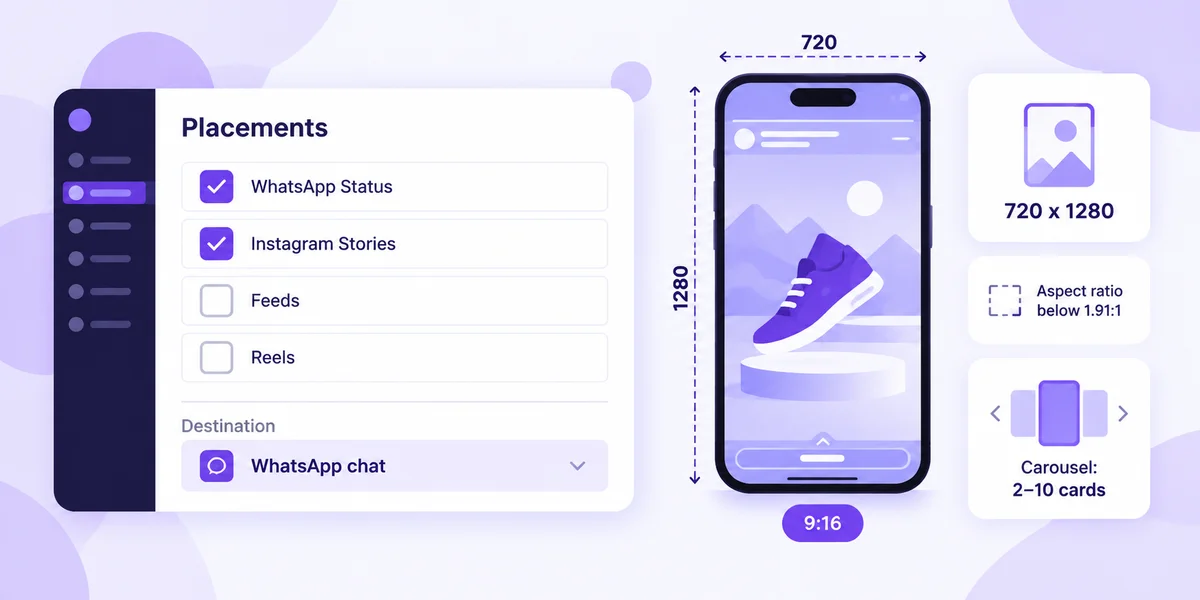
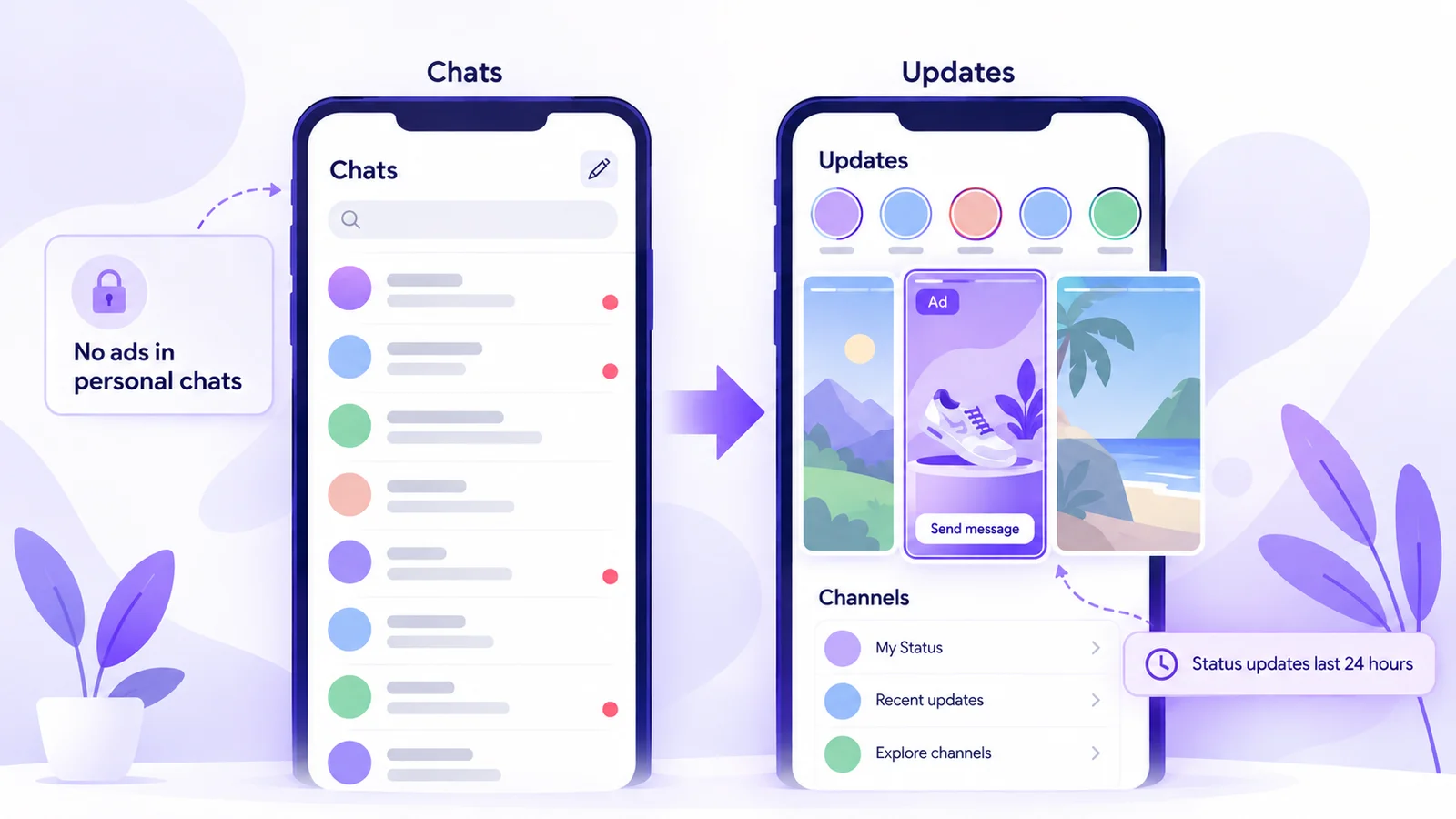
Direct answer: WhatsApp Status ads are Meta ads that appear between Status updates in WhatsApp's Updates tab, never inside personal chats. You create them in Meta Ads Manager by including the WhatsApp Status placement, which also needs Instagram Stories selected. A tap opens a WhatsApp chat with your business or your website. Cost is set by Meta's ad auction, usually per impression, with no fixed price.
Key takeaways
- WhatsApp Status ads appear between Status updates in WhatsApp's Updates tab, never inside personal chats or calls.
- They're a placement in Meta Ads Manager. Advantage+ placements include WhatsApp Status automatically; manual placement needs Instagram Stories selected too.
- Supported objectives are Awareness, Traffic, Engagement, Leads and Sales. A tap can open a WhatsApp chat with your business or your website.
- Meta recommends 720 x 1280 pixel vertical creative, and carousels take 2 to 10 image cards.
- There's no fixed price: Meta runs an auction and usually charges per impression. WhatsApp message charges are separate.
- Meta is rolling the placement out gradually, so it may not be available in your country or ad account yet.
Every rule and spec below was checked on Meta's own pages, mainly About ads in WhatsApp Status and Create ads in WhatsApp Status in the Meta Business Help Center, on 17 October 2026. Meta updates them often.
What are WhatsApp Status ads?
Status is WhatsApp's version of stories: photos, videos and text that disappear after 24 hours. In June 2025 Meta announced three new features for the Updates tab, the screen that holds Status and Channels: channel subscriptions, promoted channels and ads in Status. Meta says the Updates tab is used by 1.5 billion people a day.
A Status ad is a full-screen image, video or carousel that appears between the Status updates someone is tapping through. Its button opens a chat with your business on WhatsApp or sends people to your website (Meta says app destinations are coming soon).
Here's the part most guides miss. "Status ad" describes where the ad shows. "Click-to-WhatsApp" describes where the tap goes. Meta's help center calls a Status ad with a WhatsApp destination an ad that clicks to WhatsApp, so it's really a click-to-WhatsApp ad shown inside WhatsApp instead of on Facebook or Instagram.
Where Status ads appear (and where they don't)
According to the WhatsApp Help Center, people who only use WhatsApp for personal messaging won't see ads. Ads show only in Status and Channels, separate from chats and calls. Personal messages, calls and statuses stay end-to-end encrypted and aren't used to choose ads.
Instead, WhatsApp picks ads using a short list of signals: country code and age where available, device language, general location, and activity in Status and Channels, like channels followed and ads tapped. So targeting is broader than on Facebook or Instagram: locations, languages and age, with Meta recommending Advantage+ audience.
Who can run Status ads: the requirements
Meta's setup guide lists these requirements:
- A Facebook Page. Every Status ad needs one, including ads that send people to your website.
- A WhatsApp Business account linked to that Page if you want taps to open a chat. It can be created in the WhatsApp Business app or connected through the WhatsApp Business API.
- Instagram Stories selected. The WhatsApp Status placement can't run on its own. With manual placements, you must also include Instagram Stories.
- Access to the placement. Meta is introducing it gradually, and it may not be available in your country yet. If you've used brand safety and suitability controls on Facebook, Instagram or Threads in the past 12 months, you're opted out of WhatsApp Status automatically and need to opt back in through manual placements.
Some setups won't deliver to Status at all: Special Ad Category campaigns, Shops ads, the Collection format, creative testing, Meta Experiments, and Instant Experience or phone call destinations. Custom and lookalike audiences without Advantage+ can substantially reduce delivery.
Objectives and destinations Meta supports
Status ads work with five of Meta's campaign objectives. Here's what Meta lists for each, as of 17 October 2026:
| Objective | Where a tap can go | Performance goals you can pick |
|---|---|---|
| Awareness | WhatsApp chat or website | Daily unique reach, impressions, ThruPlay views |
| Traffic | Website, or Messaging apps with WhatsApp | Link clicks, daily unique reach, conversations, impressions (plus landing page views for website) |
| Engagement | Website, Messaging apps with WhatsApp, or On your ad | Link clicks, reach, conversations, impressions (website adds landing page views and conversions); On your ad: ThruPlay views |
| Leads | Website or WhatsApp | WhatsApp: maximise number of conversations. Website: link clicks, reach, impressions, landing page views, conversions |
| Sales | Website or Message destinations with WhatsApp | WhatsApp: link clicks, reach, conversations, impressions. Website: link clicks, reach, impressions, landing page views, conversions |
For conversations, use Leads or Engagement with WhatsApp as the destination and "maximise number of conversations". For product page visits, use Traffic or Sales with Website.
How to set up a WhatsApp Status ad in Ads Manager
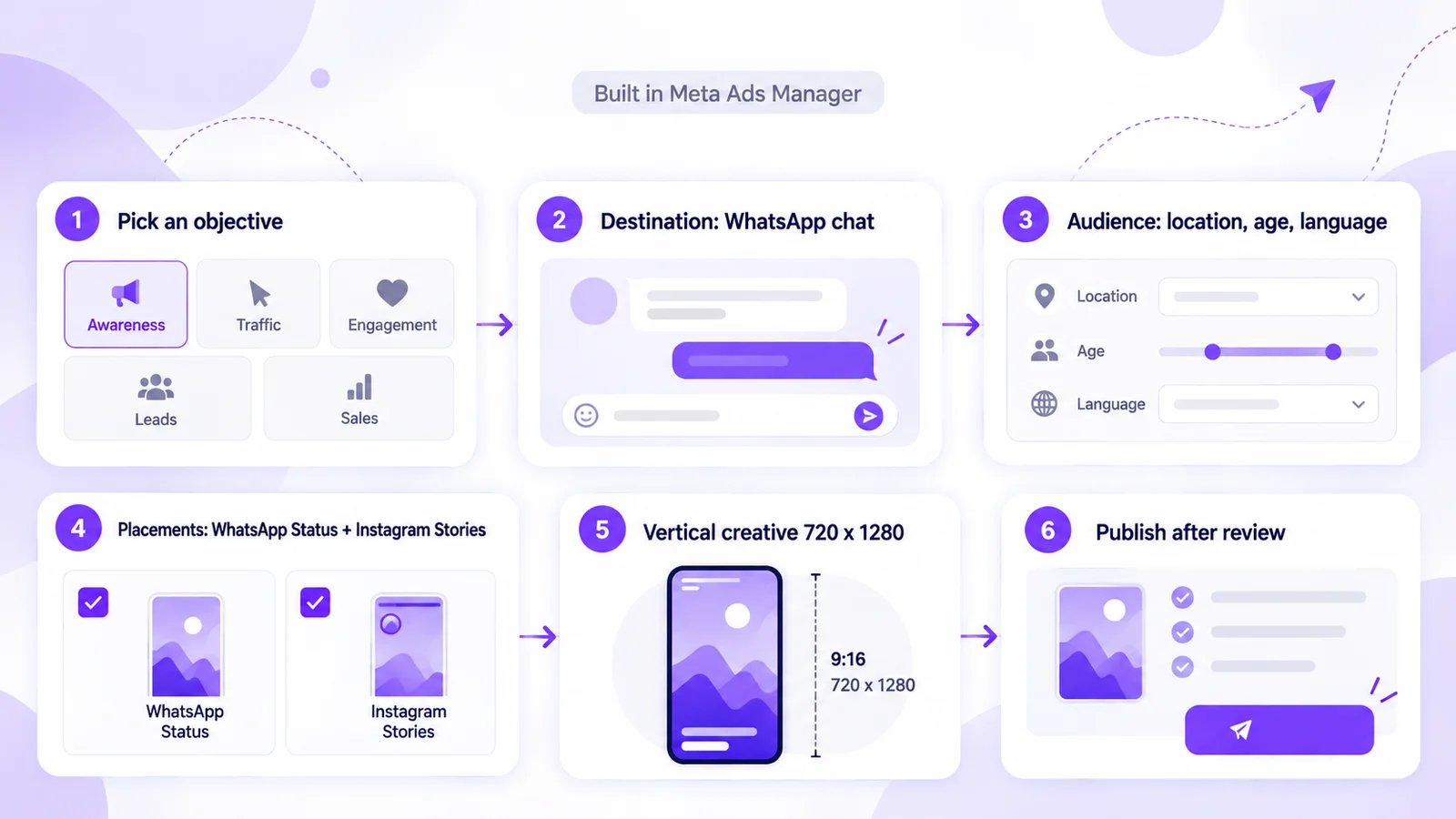
These steps follow Meta's guide for a Leads campaign that opens a WhatsApp chat:
- Create the campaign. In Meta Ads Manager, click + Create, choose Leads, then Continue. Name the campaign and click Next.
- Pick WhatsApp as the conversion location. Then choose "Maximize number of conversations" as the performance goal.
- Choose your Page and number. Select your Facebook Page, then your WhatsApp number. If none shows, click Connect account.
- Set the audience. Use locations, age and language. Status automatically includes people whose age is unknown, so the ad must suit all ages, or untick that option under age.
- Check placements. Advantage+ placements include WhatsApp Status by default. To choose manually, keep both WhatsApp Status and Instagram Stories ticked.
- Build the creative. Choose Create ad or Use existing post, then a single image or video, or a carousel of 2 to 10 cards. For Awareness campaigns, turn Dynamic Creative off or you can't select Status.
- Fill in the message template that people see when the chat opens.
- Publish. Once Meta approves the ad, it starts showing in WhatsApp Status. Ads Manager reports impressions, clicks and messaging conversations started.
Already running Click-to-WhatsApp campaigns with Advantage+ placements? Where the placement is available, some of those ads may already run in Status. Check each ad set's placements.
Creative specs for Status ads
Statuses are single vertical images or videos in a 9:16 ratio, so design for a full phone screen. Meta's creative guidance for the placement:
| Format | File type | Aspect ratio | Resolution |
|---|---|---|---|
| Image | JPG or PNG recommended | Any ratio below 1.91:1 | 720 x 1280 px recommended, minimum 500 x 320 px |
| Video | MP4, MOV or GIF | Any ratio below 1.91:1 | 720 x 1280 px recommended, minimum 120 x 120 px; video captions aren't supported |
| Carousel | JPG or PNG (video not yet supported) | 9:16 recommended, any ratio below 1.91:1 | 720 x 1280 px recommended, minimum 500 x 320 px; 2 to 10 cards |
Ads Manager accepts videos of up to 60 minutes, but people tap through Status quickly, so put the offer and call to action in the first frame. Captions aren't supported, so burn any text into the video.
What WhatsApp Status ads cost and how billing works
There's no rate card for Status ads. They're bought like any other Meta ad. Meta's page on how Meta charges for ads says ads compete in an auction based on bids and performance, and that you're usually charged for impressions unless you choose otherwise when you create the ad. You set a daily or lifetime budget, and Meta aims to spend it evenly.
With most cards, Meta charges you automatically when spend reaches your payment threshold and again on your monthly bill date. With prepaid funds, it deducts from your balance. Some regions also carry location fees.
Meta doesn't publish typical Status ad costs for India or anywhere else, so we won't guess. Start with a small daily budget, compare cost per conversation started with your other placements, and scale what works.
Then there's the chat. WhatsApp messages are priced separately under Meta's WhatsApp Business Platform pricing, which says that when someone messages you from an ad that clicks to WhatsApp on Android or iOS and you reply within 24 hours, a free entry point window opens and messages inside it aren't charged. Meta calls Status ads with a WhatsApp destination ads that click to WhatsApp, but confirm in your billing that these chats are counted this way. Our guide to what's actually free on the WhatsApp API explains the window. After it closes, Mark360 charges ₹0.94 per marketing message and ₹0.138 per utility message in India.
The funnel: Status ad to WhatsApp chat to an AI agent that qualifies leads
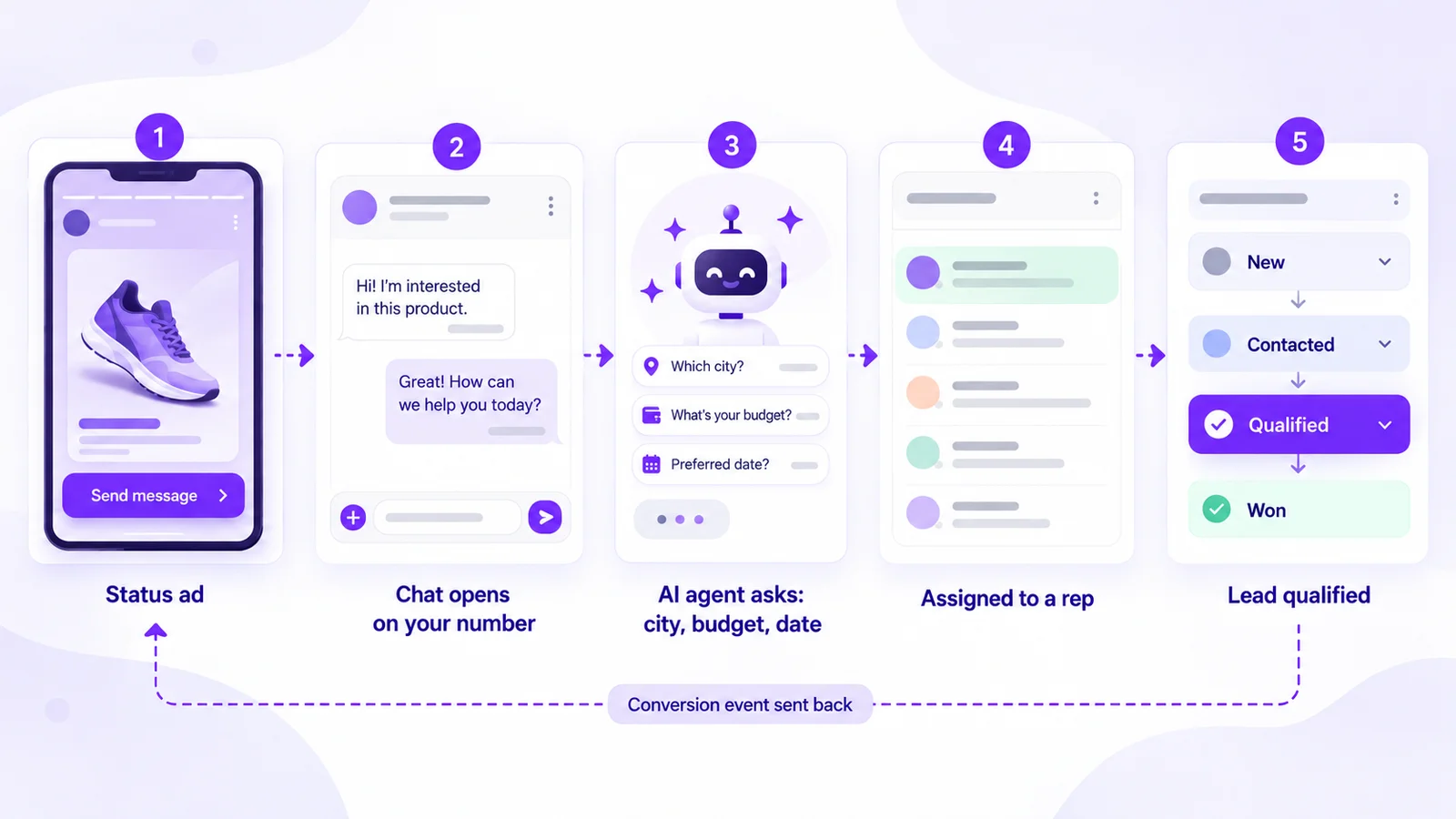
A Status ad only gets you the first message. The next minute decides whether you get a lead. Here's the path on Mark360's Click-to-WhatsApp setup:
- The ad opens a chat on your number. You build the ad in Meta Ads Manager, and Mark360 receives the chat on the same WhatsApp Business number.
- An AI agent replies right away. A WhatsApp trigger on incoming messages hands the chat to an AI agent, such as the Lead Qualification Agent from Mark360's agent templates, which asks two or three questions like city, budget or preferred date.
- A person takes over. Qualified chats go to a rep in the shared team inbox by round-robin or manual assignment, and move through lead stages from new to contacted, qualified and won.
- Follow-up uses an approved template. If the lead goes quiet after the free-form window closes, the next message has to be an approved template.
- Results go back to Meta. Mark360's Click-to-WhatsApp conversion tracking maps a contact tag, such as "qualified", to an event sent to Meta through the Conversions API with hashed data, once your dataset is connected.
To design the agent, see the WhatsApp AI agent guide.
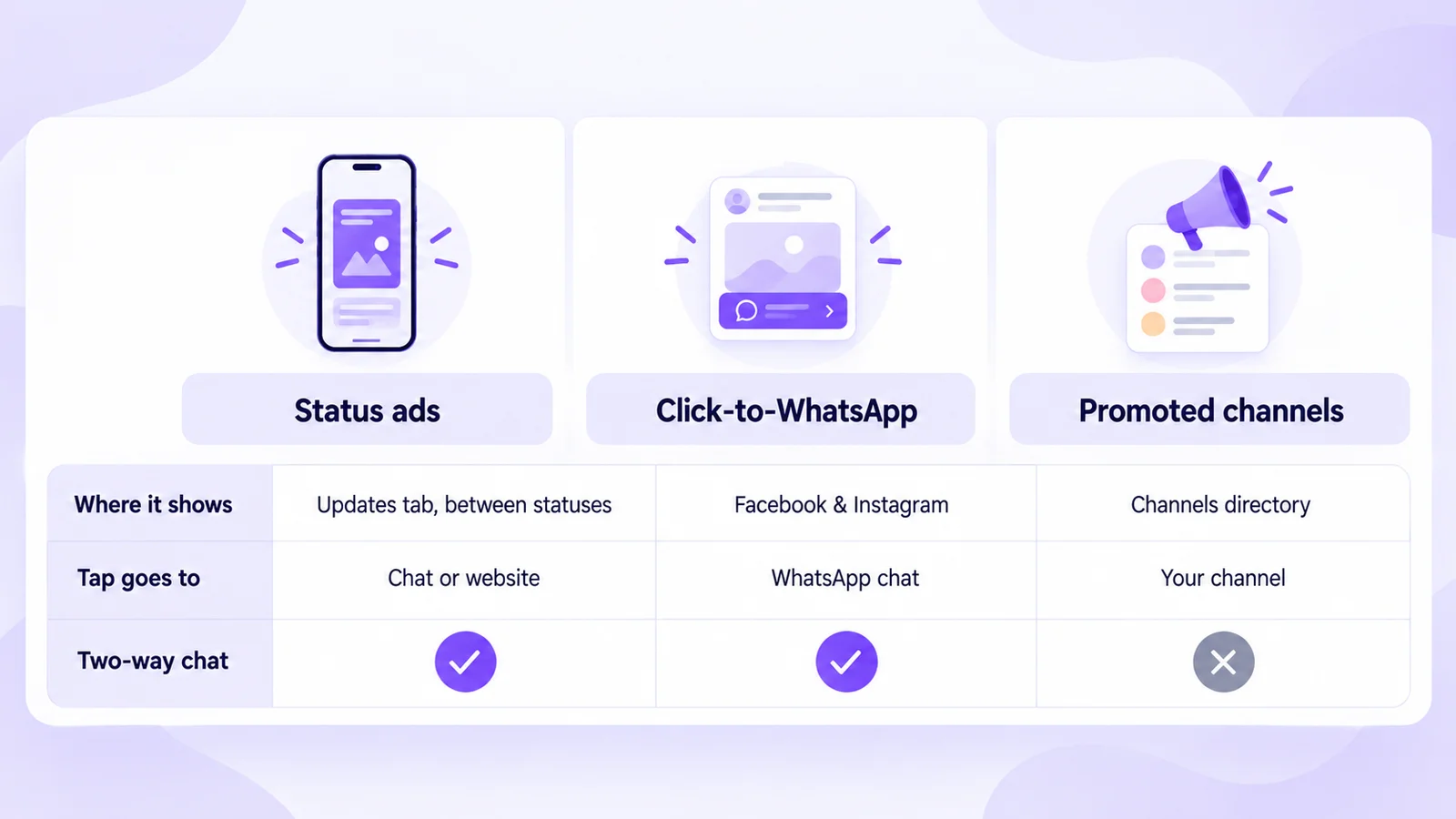
Status ads vs Click-to-WhatsApp ads vs promoted channels
All three are Meta ad products that touch WhatsApp, but they do different jobs:
| Status ads | Click-to-WhatsApp on Facebook and Instagram | Promoted channels | |
|---|---|---|---|
| Where people see it | Between Status updates in the WhatsApp Updates tab | Facebook and Instagram (Feed, Stories, Marketplace) | Higher up in the WhatsApp Channels directory |
| What a tap does | Opens a WhatsApp chat or your website | Opens a WhatsApp chat | Opens your channel to follow |
| Two-way conversation | Yes, when the destination is WhatsApp | Yes | No. Channels are one-way broadcasts |
| Targeting | Location, age and language; Advantage+ audience recommended | Meta targeting incl. location, age, gender, custom and lookalike audiences | Shown to people who may be interested in that type of channel |
| Availability | Rolling out gradually | Available in Ads Manager and the WhatsApp Business app | Only in some countries |
| Best for | Reaching people already in WhatsApp with a short visual offer | Lead generation from Facebook and Instagram audiences | Growing a one-way updates channel |
Use Status ads when your offer works as one vertical image or short video: a launch, a sale, an admission deadline or a booking slot. Since the placement needs Instagram Stories anyway, add it to a vertical-creative campaign you already run.
Use Click-to-WhatsApp ads on Facebook and Instagram when you need custom audiences, lookalikes, retargeting or feed formats. Our Click-to-WhatsApp ads guide for India and Click-to-WhatsApp + Instagram ads funnel cover the setup.
Use promoted channels when you want followers for a one-way channel, not conversations. The WhatsApp Help Center says this is only available in some countries. For two-way campaigns to opted-in customers, see WhatsApp marketing on Mark360.
Route your Status ad chats into Mark360
Mark360 is an Official Meta Business Partner based in Surat, India, trusted by 100+ businesses. Connect the number you use in your ads, and chats from Status and Click-to-WhatsApp ads land in one inbox, where an AI agent qualifies each lead before your team takes over.
The Scale plan, at $19 a month billed quarterly with a 7-day free trial, includes WhatsApp API setup, Click-to-WhatsApp ads, conversion tracking and the AI support agent. See plans and start free, or read how Click-to-WhatsApp works on Mark360.