
Shopify integration
Connect Shopify to WhatsApp
Install the Mark360.ai app, approve it with Shopify, and the store’s cart and order events can start a workflow. Abandoned cart, COD, order confirmation, and shipping are written up on the store page.
- Store name, then Shopify OAuth
- Listed on the Shopify App Store
- Same integrations screen as Razorpay, Sheets, and Zoho CRM
Trusted by 100+ businesses. Official Meta Business Partner.
Shopify App Store listinghttps://apps.shopify.com/m360-whatsapp-marketing-chat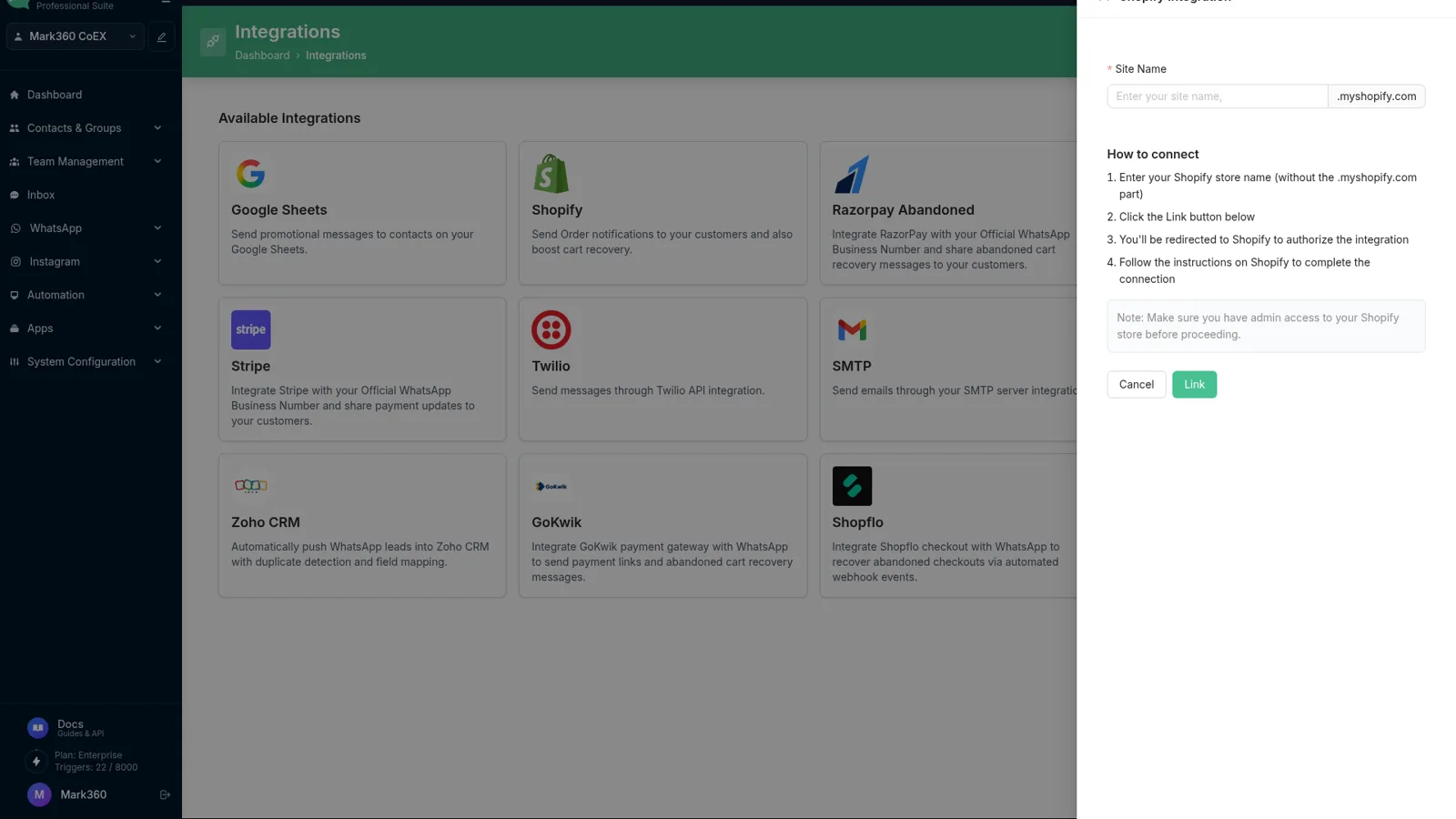
Set up the Shopify connection
Two doors, one approval. You do not paste a WhatsApp password into Shopify.
1
Open the listing or the catalog
Use the Shopify App Store listing, or in Mark360.ai go to Integrations and choose Shopify.
2
Enter the store name
The connect dialog asks for the store, then sends you to Shopify.
3
Approve the app
Shopify shows the OAuth screen. Mark360.ai does not ask for the store password.
4
Turn on workflows
Cart, order, delivery, and shipment presets stay off until you enable them.
What you can run after OAuth
The Shopify card is the source of cart, checkout, order, and fulfilment events. It is not a second inbox. Shiprocket, Razorpay, and Google Sheets are their own cards.
| After you connect | Available in Mark360.ai |
|---|---|
| Abandoned cart | Cart-abandonment preset, WhatsApp plus email, with a Shopify checkout link |
| Order placed | Order-confirmation preset |
| Cash on delivery | COD confirmation, and a Razorpay payment link if you offer prepaid |
| Shipment and delivery | Shipment-update and order-delivered presets |
| Other checkouts | GoKwik, Shopflo, and FlexyPe abandoned-cart events are separate cards |
What the first workflow sounds like
One example is enough here. Cart reminders are marketing messages. In India that Mark360.ai total is ₹0.94. Order and shipping updates are usually utility messages at ₹0.138.
Cart reminder
The message is a template you submit. The rest of the journeys, including COD and shipping, are on the store page.
Mark360
Cart reminder
Mark360.aiYou left a checkout open. Here is the link back to the cart.
CustomerThanks, opening it
It sits in the integrations catalog
The catalog lists Google Sheets, Shopify, Razorpay, FlexyPe, Stripe, Twilio, SMTP, Shiprocket, Zoho CRM, GoKwik, Shopflo, and Super Money.
Klaviyo, HubSpot, Zapier, and WooCommerce are not in that catalog. Those old URLs redirect to the integrations hub.
Developers who outgrow presets can create an API token with send-message and send-template permissions, and subscribe to webhooks.
Open Integrations, choose Shopify, enter the store name, and approve the app on Shopify. Or install the Shopify App Store listing first.
Abandoned cart, order confirmation, COD confirmation, and shipment or delivery updates. Message examples are on the WhatsApp for Shopify page.
Yes. The Shopify listing installs the Mark360.ai connection. You still use Mark360.ai for templates, the inbox, and workflows.
No for the OAuth connect and the presets. Only if you want your own API calls.
Campaigns and automated updates go through the WhatsApp Cloud API. The shared inbox is where the team replies.
Yes. The Free plan is $0/month and does not ask for a card. Scale is $19/month billed quarterly. Scale+ is $99/month. WhatsApp messages are billed per message on every plan.
Connect the store on the free plan
Approve Shopify, then enable one workflow. Upgrade when you need more triggers or seats.
Trusted by 100+ businesses. Free plan, no credit card.