

WhatsApp Automation for Ecommerce: A Practical Guide
You’ve probably already seen where ecommerce teams lose time on WhatsApp: checking order messages manually, calling COD customers, answering “Where is my order?”, and chasing abandoned carts.
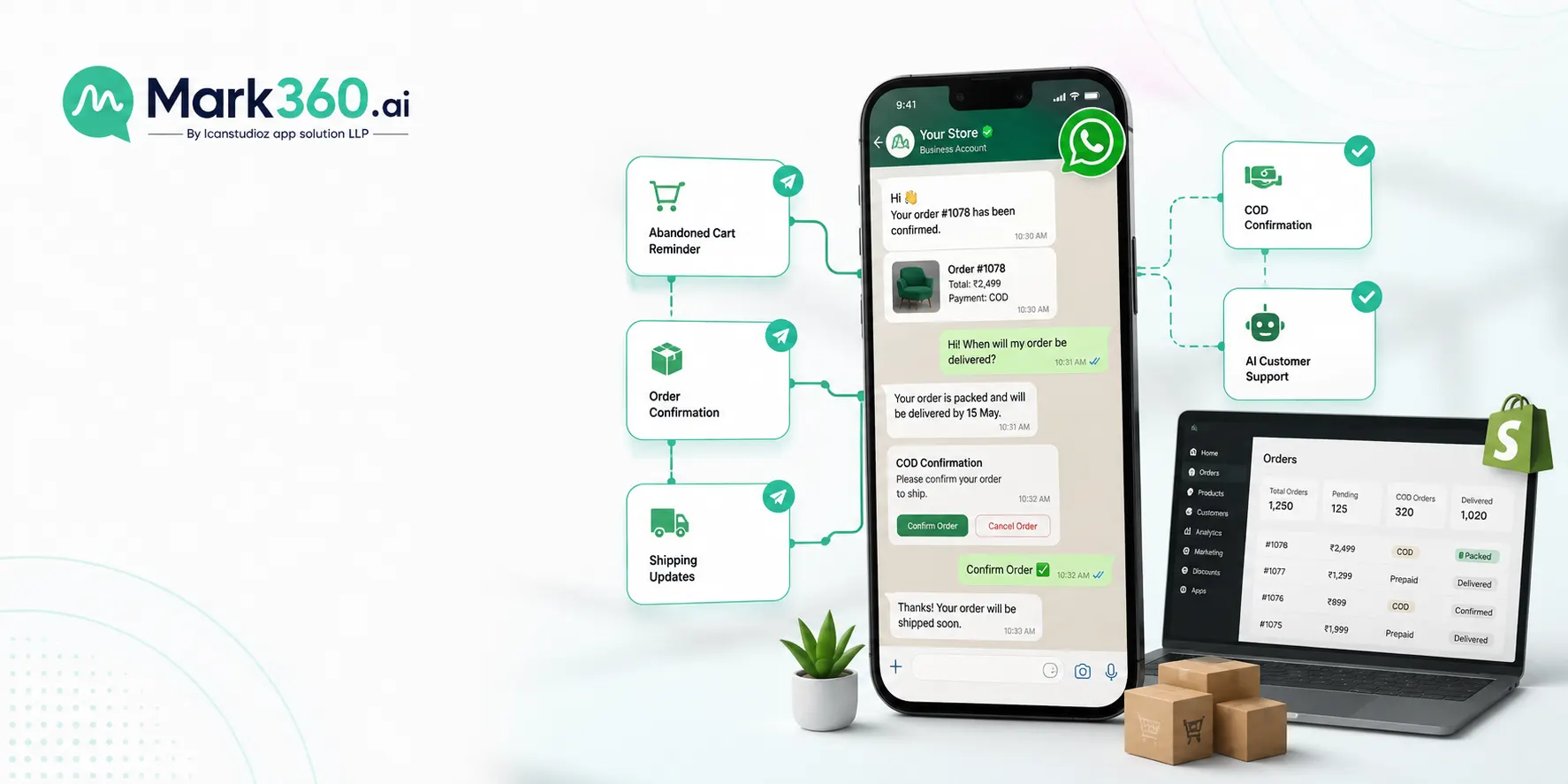
WhatsApp automation for ecommerce turns those repetitive conversations into automated workflows triggered by customer actions, Shopify events, and WhatsApp messages. With the right setup, you can automate sales follow-ups, order communication, COD verification, customer support, and parts of the buying journey without adding another person to your support team.
What is WhatsApp automation for ecommerce?
WhatsApp automation for ecommerce means using the WhatsApp Business Platform to automatically send messages or respond to customers based on events such as an order being placed, a cart being abandoned, or a customer asking for support.
For a Shopify store, the typical setup connects Shopify → automation platform → WhatsApp Business API, with webhooks and customer/order data triggering specific workflows.
For example:
A customer adds products to their Shopify cart.
The customer leaves without purchasing.
Your automation detects the abandoned cart.
An approved WhatsApp template is sent.
The customer clicks back to checkout.
If they reply, an AI agent or support workflow can continue the conversation.
The point isn't to automate every message. It's to remove repetitive work while keeping conversations available when customers need a human.
What can you automate on WhatsApp for an ecommerce store?
The highest-value workflows are usually abandoned-cart recovery, COD confirmation, order notifications, customer support, and post-purchase follow-ups.
1. Abandoned cart recovery
An abandoned cart workflow can automatically remind customers who added products but didn't complete checkout.
A basic sequence might look like:
Cart abandoned → WhatsApp reminder → product/checkout link → customer replies → AI or human follow-up
Don't send the same message to every customer. Your workflow can use information such as the products in the cart, cart value, customer history, or discount eligibility.
For example, a high-value cart may deserve a different follow-up from a customer who abandoned a low-value item.
Implementation detail: Shopify webhooks can be used to pass relevant events into your automation system. The WhatsApp message itself must follow Meta's messaging and template requirements when the conversation is outside the applicable customer-service window.
2. COD order confirmation
Cash-on-delivery orders create a different problem: you want to confirm that the customer actually intends to receive the package before shipping it.
Instead of calling every COD customer, send a WhatsApp confirmation:
Your order #1234 is ready to ship. Please confirm your order.
Buttons can give the customer simple choices:
Confirm Order | Cancel Order
The response can trigger your Shopify workflow.
For example:
Confirm → update order/tag → fulfilment workflow
Cancel → flag order → stop fulfilment
This is one of the clearest cases where automation can replace repetitive operational work.
3. Order and shipping updates
Customers shouldn't have to open your website to answer basic questions about an order.
You can automate messages for events such as:
Order confirmation
Payment confirmation
Order packed
Order shipped
Out for delivery
Delivered
Delivery exception
The exact events available depend on your Shopify setup, logistics provider, and integration.
A useful rule is simple: automate status communication, not complicated exceptions.
If a shipment is delayed or the customer has a specific problem, route the conversation to an AI agent or human support workflow instead of sending another generic notification.
4. Customer support
WhatsApp becomes much more useful when customers can reply to automated messages.
Instead of:
Message → support agent reads → searches Shopify → replies
you can build:
Message → AI agent identifies intent → retrieves relevant order/customer information → responds or escalates
Common ecommerce questions include:
Where is my order?
Can I change my delivery address?
What's your return policy?
Can I exchange this size?
Is this product available?
How do I cancel my order?
I received the wrong product.
An AI agent can handle repetitive questions while escalating cases that require human judgment.
The important part is the integration. An AI agent that only knows what's in its prompt can't reliably answer “Where is order #1234?” It needs access to the relevant order or customer data.
5. Post-purchase messages
The conversation shouldn't necessarily end when an order is delivered.
Depending on your product and customer journey, you can automate:
Delivery → usage guidance → feedback request → support → repeat purchase
For consumable products, replenishment reminders can be particularly useful.
For example, if a product typically lasts around 30 days, you could create a follow-up workflow around the expected reorder period.
Don't treat this as a license to send promotional messages indefinitely. WhatsApp opt-in, template, and messaging rules still apply.
How does WhatsApp automation work with Shopify?
A Shopify WhatsApp automation system usually has four parts: Shopify, an integration layer, WhatsApp Business Platform, and your automation or AI logic.
Shopify
Shopify contains the ecommerce events and customer/order information your workflows need.
Examples include:
New order
Order status change
Customer information
Product information
Cart activity
Integration layer
The integration connects Shopify events with your WhatsApp workflows.
Depending on the platform, this may use Shopify APIs, webhooks, native integrations, or middleware.
WhatsApp Business Platform
This is the messaging layer. It handles sending WhatsApp messages according to Meta's platform rules.
Templates are used for certain business-initiated messages, while customer-service conversations can operate within the applicable customer-service window.
Automation and AI layer
This is where you define what happens after an event.
For example:
Shopify order created → check payment method → if COD → send confirmation → wait for response → update order
Or:
Customer sends “Where's my order?” → identify order → retrieve shipping status → respond
That's the part that turns WhatsApp from a messaging channel into an ecommerce workflow.
WhatsApp automation vs WhatsApp chatbot: what's the difference?
A chatbot mainly focuses on conversations. WhatsApp automation focuses on actions triggered by customer or ecommerce events.
For example, a chatbot might answer:
“What are your return rules?”
An ecommerce automation can do much more:
Order delivered → wait 7 days → ask for feedback → if customer reports a problem → create support case
You can use both together.
In practice, the best setup is usually automation for predictable workflows + AI for conversations that need context.
What does an AI agent add to WhatsApp ecommerce automation?
AI agents are useful when the next response can't be determined by a simple button or rule.
A traditional workflow might say:
If customer clicks Confirm → update order.
An AI agent can interpret:
“Yes, send it, but please deliver it after Friday because I'm travelling.”
The agent can identify the intent, check what actions are allowed, retrieve relevant information, and either complete the action or hand it to a human.
But don't give an AI agent unrestricted control over your store.
For sensitive actions such as refunds, cancellations, address changes, or high-value orders, define explicit permissions and escalation rules.
My recommendation: automate deterministic actions with rules. Use AI where language and context make rules impractical.
What do you need to start?
You don't need a complicated setup to launch your first workflow.
At minimum, you'll need:
A WhatsApp Business Platform setup
An approved business identity/number configuration
Customer opt-in where required
Approved message templates for applicable outbound messages
Your Shopify store
A WhatsApp automation platform or integration
Clear workflow rules
A way to hand conversations to humans when automation can't resolve them
Start with one workflow.
For most ecommerce stores, I'd start with COD confirmation or abandoned-cart recovery, depending on where your biggest operational or revenue leak is.
Measure the result before adding five more automations.
How much can WhatsApp automation improve ecommerce operations?
The answer depends heavily on your store, traffic, category, customer mix, message quality, and existing process.
Don't use generic claims like “WhatsApp increases conversions by X%” unless the number comes from a source that matches your use case.
Instead, measure your own baseline:
| Workflow | Metric to track |
|---|---|
| Abandoned cart | Recovery rate and recovered revenue |
| COD confirmation | Confirmation rate and RTO rate |
| Order updates | Support contacts per order |
| AI support | Resolution rate and escalation rate |
| Post-purchase | Repeat purchase rate |
| Campaigns | Delivery, read, click and conversion metrics |
For a Shopify merchant, this makes the business case much easier to evaluate.
Common mistakes with WhatsApp ecommerce automation
Automating everything at once
Start with one painful workflow.
A complicated automation system is difficult to debug, especially when Shopify events, WhatsApp templates, customer responses, and AI actions all interact.
Sending too many messages
Automation makes sending messages easy. That's exactly why you need limits.
Every message should have a reason.
If a customer receives an order confirmation, shipping update, promotional message, review request, and three follow-ups in a short period, your automation is working technically but failing as a customer experience.
Building an AI agent without store access
An AI agent can't reliably answer order-specific questions without access to the underlying data.
Connect it to the information it needs, and restrict what it can change.
Ignoring the 24-hour customer-service window
WhatsApp messaging rules distinguish between customer-initiated conversations and business-initiated messages.
Your workflows need to account for the applicable customer-service window and template requirements.
Measuring messages instead of business outcomes
A 90% read rate sounds good.
It doesn't tell you whether the automation recovered carts, reduced support workload, reduced RTO, or generated repeat purchases.
Track the business metric attached to each workflow.
A practical WhatsApp automation stack for Shopify
A straightforward architecture looks like this:
Shopify
↓
Webhook / API event
↓
Mark360 automation
↓
WhatsApp Business Platform
↓
Customer
↓
AI agent or human support
For example:
COD order created
→ Shopify sends event
→ Mark360 checks payment method
→ WhatsApp confirmation template sent
→ Customer confirms
→ Shopify order updated
→ Fulfilment continues
If the customer replies with a question, the AI agent can take over instead of forcing the conversation back into a rigid menu.
That combination is where ecommerce WhatsApp automation becomes much more useful than a simple broadcast tool.
Where should you start?
Don't start by building 20 WhatsApp workflows.
Pick the one process that currently consumes the most repetitive work or loses the most money.
If COD is creating operational headaches, automate confirmation first.
If abandoned carts are the bigger issue, start there.
If your support team spends hours answering “Where is my order?”, connect WhatsApp to Shopify and your logistics data, then let an AI agent handle those repetitive queries.
Once the first workflow is producing measurable results, add the next one.
For Shopify merchants, WhatsApp automation works best when it's connected to the actual ecommerce system—not when WhatsApp is treated as another isolated marketing channel.